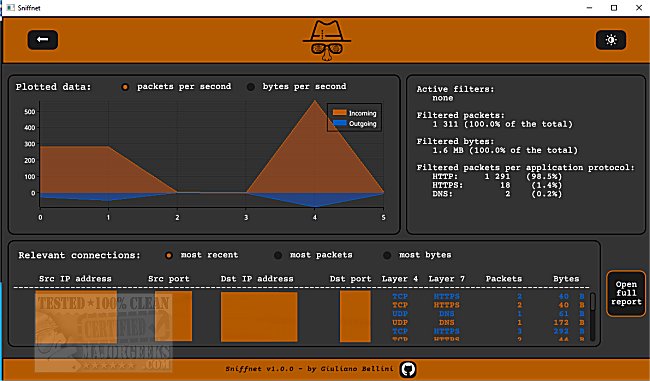
The newly released Sniffnet 1.5.0 is a user-friendly application designed for live network traffic monitoring across multiple platforms. It provides users with a clear and insightful interface that displays real-time network traffic, allowing for effective monitoring and management of data flow.
Key Features:
- Real-Time Traffic Monitoring: Sniffnet provides an overview of your network traffic as it happens, enabling users to respond quickly to any unusual activity.
- Detailed Reporting: Users can generate comprehensive reports in .txt format, which include vital information such as connection details, IP addresses, ports, protocols, and timestamps for data exchanges.
- Customizable Monitoring: The application allows users to select specific network adapters for monitoring, apply traffic filters, and view statistics on the most significant connections based on various metrics (recent activity, packet counts, and data volume).
- Visual Traffic Analysis: A real-time chart features incoming and outgoing traffic intensity (measured in bytes and packets per second), helping users to identify spikes in traffic and address potential issues effectively.
- User Interface Options: While Sniffnet defaults to a dark mode for a sleek appearance, users can switch to a light mode based on their preference.
Additional Information:
Sniffnet has certain dependencies, and users can find the necessary download links on the application’s repository page. It’s worth noting that Sniffnet complements various network management tasks, similar to tools for checking internet speeds, using command-line utilities like ping, and managing network settings in Windows.
Future Extensions:
As network demands continue to grow, future updates to Sniffnet could include advanced analytical features, deeper integration with security tools for threat detection, and enhanced user customization options. Additionally, community-driven enhancements could foster collaborative features, allowing users to share insights or configurations with others in real-time
Key Features:
- Real-Time Traffic Monitoring: Sniffnet provides an overview of your network traffic as it happens, enabling users to respond quickly to any unusual activity.
- Detailed Reporting: Users can generate comprehensive reports in .txt format, which include vital information such as connection details, IP addresses, ports, protocols, and timestamps for data exchanges.
- Customizable Monitoring: The application allows users to select specific network adapters for monitoring, apply traffic filters, and view statistics on the most significant connections based on various metrics (recent activity, packet counts, and data volume).
- Visual Traffic Analysis: A real-time chart features incoming and outgoing traffic intensity (measured in bytes and packets per second), helping users to identify spikes in traffic and address potential issues effectively.
- User Interface Options: While Sniffnet defaults to a dark mode for a sleek appearance, users can switch to a light mode based on their preference.
Additional Information:
Sniffnet has certain dependencies, and users can find the necessary download links on the application’s repository page. It’s worth noting that Sniffnet complements various network management tasks, similar to tools for checking internet speeds, using command-line utilities like ping, and managing network settings in Windows.
Future Extensions:
As network demands continue to grow, future updates to Sniffnet could include advanced analytical features, deeper integration with security tools for threat detection, and enhanced user customization options. Additionally, community-driven enhancements could foster collaborative features, allowing users to share insights or configurations with others in real-time
Sniffnet 1.5.0 released
Sniffnet allows live network traffic monitoring through an easy-to-navigate interface.