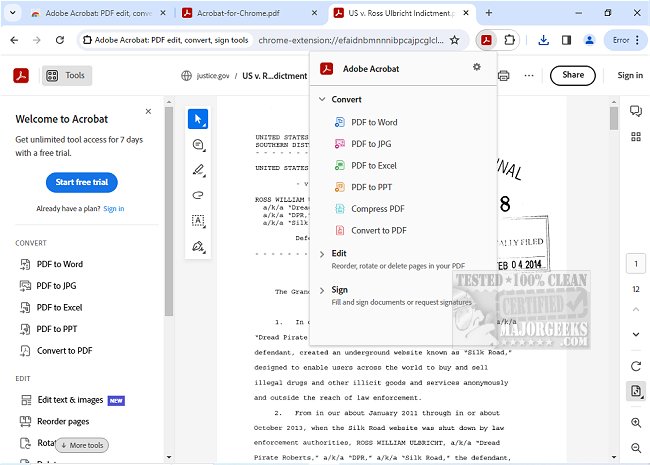
Adobe has released version 26.4.1.0 of Adobe Acrobat for Chrome, enhancing the PDF experience directly within the browser. This extension allows users to access a variety of PDF tools, including viewing, filling out forms, commenting, signing, converting, and compressing PDF documents.
Adobe Acrobat is renowned for its robust capabilities that facilitate efficient PDF management. With the new Chrome extension, users can seamlessly integrate these functionalities into their browsing experience, making it easier to annotate PDFs with comments, sticky notes, and highlights—all at no cost. For those requiring more advanced features, the extension provides tools for exporting, creating, merging, and organizing PDFs, as well as reducing file sizes.
To use Adobe Acrobat for Chrome, users simply need to install the extension and pin it for easy access. Once installed, any PDF opened in the browser can be enhanced using the various Acrobat tools available. The extension not only enhances the viewing experience but also allows for quick actions such as downloading, printing, and accessing files online for convenience from any location.
Adobe Acrobat for Chrome also includes features for adding notes, text, and comments directly onto PDF documents. Users can utilize the PDF editor to draw or write, fill out forms, and sign documents electronically with their signature or initials. This makes it easier than ever to work with PDFs in an online setting.
In summary, Adobe Acrobat for Chrome 26.4.1.0 offers a user-friendly solution that streamlines PDF-related tasks, enhances productivity, and provides quick access to advanced features, making it an essential tool for anyone who frequently works with PDF documents. As digital workflows continue to evolve, tools like Adobe Acrobat for Chrome will play a crucial role in facilitating efficient document management and collaboration.
For further exploration, users might also want to look into related topics such as creating PDFs in Windows or understanding Adobe's update services
Adobe Acrobat is renowned for its robust capabilities that facilitate efficient PDF management. With the new Chrome extension, users can seamlessly integrate these functionalities into their browsing experience, making it easier to annotate PDFs with comments, sticky notes, and highlights—all at no cost. For those requiring more advanced features, the extension provides tools for exporting, creating, merging, and organizing PDFs, as well as reducing file sizes.
To use Adobe Acrobat for Chrome, users simply need to install the extension and pin it for easy access. Once installed, any PDF opened in the browser can be enhanced using the various Acrobat tools available. The extension not only enhances the viewing experience but also allows for quick actions such as downloading, printing, and accessing files online for convenience from any location.
Adobe Acrobat for Chrome also includes features for adding notes, text, and comments directly onto PDF documents. Users can utilize the PDF editor to draw or write, fill out forms, and sign documents electronically with their signature or initials. This makes it easier than ever to work with PDFs in an online setting.
In summary, Adobe Acrobat for Chrome 26.4.1.0 offers a user-friendly solution that streamlines PDF-related tasks, enhances productivity, and provides quick access to advanced features, making it an essential tool for anyone who frequently works with PDF documents. As digital workflows continue to evolve, tools like Adobe Acrobat for Chrome will play a crucial role in facilitating efficient document management and collaboration.
For further exploration, users might also want to look into related topics such as creating PDFs in Windows or understanding Adobe's update services
Adobe Acrobat for Chrome 26.4.1.0 released
Access Adobe Acrobat PDF tools in Chrome; view, fill, comment, sign, convert, and compress tools available.