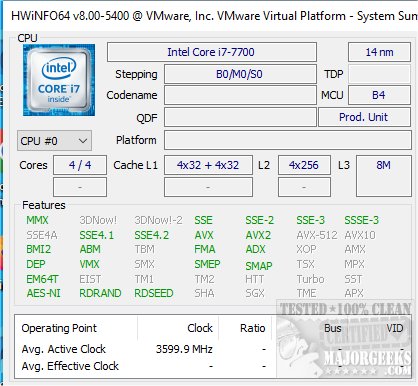
HWiNFO 8.46 has been released, offering a comprehensive suite of tools for detailed system information analysis, hardware monitoring, and reporting capabilities for both Windows and DOS environments. The software is also available as a portable application, making it convenient for users on the go. A video tutorial is provided to help users navigate its features.
Key features of HWiNFO include:
- In-depth Hardware Information: Users can access detailed insights into all hardware components, with the tool continually updated to support the latest technologies and standards.
- Real-Time System Monitoring: HWiNFO provides accurate monitoring of system components, allowing users to track current statuses and predict potential failures. The interface is customizable with various options to suit user preferences.
- Extensive Reporting: The software generates multiple types of reports and status logs, enabling integration with other tools or add-ons, enhancing the overall functionality.
Additionally, HWiNFO is a valuable resource for users looking to understand their computer's hardware better. It can assist with identifying hardware components, finding serial numbers, determining CPU specifications, and evaluating memory (RAM) capabilities.
For those interested in exploring HWiNFO further, the software's video tutorial is an excellent starting point, demonstrating its features and functionalities.
In conclusion, HWiNFO 8.46 serves as an essential tool for both casual users and professionals alike, ensuring they have the necessary information to maintain and optimize their computer systems effectively. Users are encouraged to explore the software’s extensive capabilities and utilize the tutorial for a more in-depth understanding
Key features of HWiNFO include:
- In-depth Hardware Information: Users can access detailed insights into all hardware components, with the tool continually updated to support the latest technologies and standards.
- Real-Time System Monitoring: HWiNFO provides accurate monitoring of system components, allowing users to track current statuses and predict potential failures. The interface is customizable with various options to suit user preferences.
- Extensive Reporting: The software generates multiple types of reports and status logs, enabling integration with other tools or add-ons, enhancing the overall functionality.
Additionally, HWiNFO is a valuable resource for users looking to understand their computer's hardware better. It can assist with identifying hardware components, finding serial numbers, determining CPU specifications, and evaluating memory (RAM) capabilities.
For those interested in exploring HWiNFO further, the software's video tutorial is an excellent starting point, demonstrating its features and functionalities.
In conclusion, HWiNFO 8.46 serves as an essential tool for both casual users and professionals alike, ensuring they have the necessary information to maintain and optimize their computer systems effectively. Users are encouraged to explore the software’s extensive capabilities and utilize the tutorial for a more in-depth understanding
HWiNFO 8.46 released
HWiNFO provides you with comprehensive system information details, including hardware analysis, monitoring, and Windows and DOS reporting. Also available as a portable app. Video tutorial available.