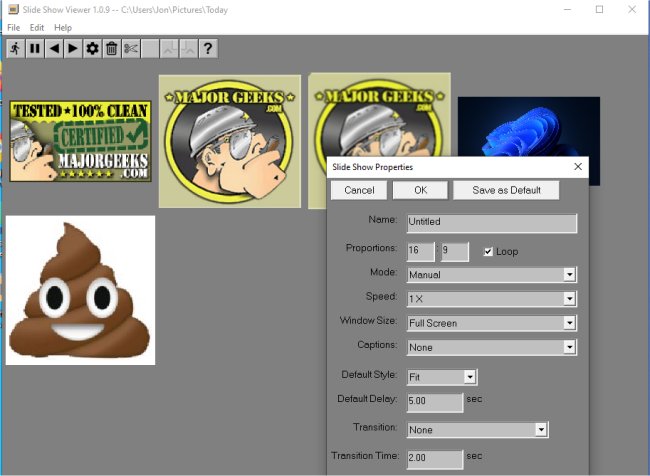
Slide Show Viewer version 1.0.23 has been released, offering users a customizable application for displaying TIFF and JPEG files in a slide show format. This app enables users to create slide shows from a designated folder containing their image files, which essentially consists of two components: a folder filled with the desired JPEG or TIFF images and a slide show index file (default name: index.ssi) that resides in the same directory. The index file holds critical information regarding the slide show settings, such as the sequence in which the images appear and display preferences.
Users can enjoy features such as panning and zooming to enhance their viewing experience, along with options to either set automated transitions between slides at specified intervals or manually navigate through the images. Furthermore, Slide Show Viewer supports the creation of multiple index files for the same folder, allowing users to present the same images in various arrangements or styles. The necessary slide show files are kept organized within a single folder, and the app is capable of managing color profiles extracted from the images and monitor settings.
The application comes equipped with an in-app Help File to assist users in getting started, making it a user-friendly alternative to standard image viewing methods.
In addition to its main features, Slide Show Viewer opens up possibilities for enhancing photography presentations, educational purposes, or even personal nostalgia by showcasing forgotten images in a visually appealing manner. With its flexibility and customization options, it stands out as a valuable tool for anyone looking to exhibit their image collections.
For those interested in similar software, there are also options available for viewing images as slideshows on Windows 10 and 11, restoring the Windows Photo Viewer, and managing folders within the Windows Photos app
Users can enjoy features such as panning and zooming to enhance their viewing experience, along with options to either set automated transitions between slides at specified intervals or manually navigate through the images. Furthermore, Slide Show Viewer supports the creation of multiple index files for the same folder, allowing users to present the same images in various arrangements or styles. The necessary slide show files are kept organized within a single folder, and the app is capable of managing color profiles extracted from the images and monitor settings.
The application comes equipped with an in-app Help File to assist users in getting started, making it a user-friendly alternative to standard image viewing methods.
In addition to its main features, Slide Show Viewer opens up possibilities for enhancing photography presentations, educational purposes, or even personal nostalgia by showcasing forgotten images in a visually appealing manner. With its flexibility and customization options, it stands out as a valuable tool for anyone looking to exhibit their image collections.
For those interested in similar software, there are also options available for viewing images as slideshows on Windows 10 and 11, restoring the Windows Photo Viewer, and managing folders within the Windows Photos app
Slide Show Viewer 1.0.23 released
Slide Show Viewer is a customizable app that can display TIFF or JPEG files as a slide show.