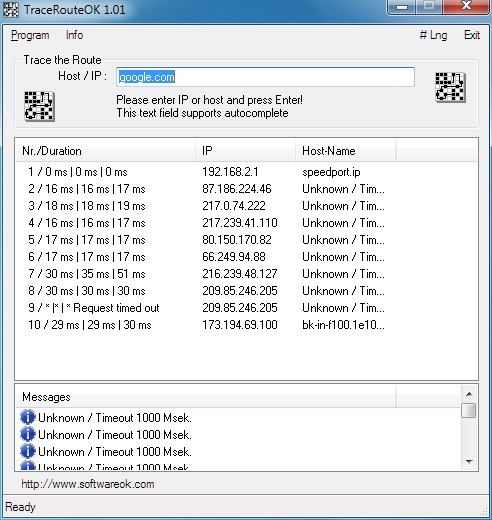
TraceRouteOK version 3.57 has been released as a freeware application designed to monitor the route that data takes over the World Wide Web, the internet, or a local network. This tool stands out among similar programs due to its optimization for quickly displaying a list of data paths and querying data routes. For users who wish to run the application in a portable format, it is recommended to create a TraceRouteOK.ini file in the application folder.
Key features of TraceRouteOK include:
- A lightweight design that ensures minimal resource usage
- Customizable host name query intervals
- Adjustable timeout settings for ping requests
- Rapid querying of data routes
- Portability for use on various devices
- Support for multiple languages
In addition to the main functionality, users may find value in related topics such as enhancing wireless network performance, resetting network settings on Windows 10 and 11, resetting TCP/IP or Internet Protocol settings, and flushing the Windows DNS cache.
Overall, TraceRouteOK provides a user-friendly and efficient way to assess data routing, making it a valuable tool for network troubleshooting and optimization. As technology continues to evolve, the application may also benefit from future updates that could introduce additional features, improved performance, and enhanced user interfaces, ensuring it remains relevant in the ever-changing landscape of network management tools
Key features of TraceRouteOK include:
- A lightweight design that ensures minimal resource usage
- Customizable host name query intervals
- Adjustable timeout settings for ping requests
- Rapid querying of data routes
- Portability for use on various devices
- Support for multiple languages
In addition to the main functionality, users may find value in related topics such as enhancing wireless network performance, resetting network settings on Windows 10 and 11, resetting TCP/IP or Internet Protocol settings, and flushing the Windows DNS cache.
Overall, TraceRouteOK provides a user-friendly and efficient way to assess data routing, making it a valuable tool for network troubleshooting and optimization. As technology continues to evolve, the application may also benefit from future updates that could introduce additional features, improved performance, and enhanced user interfaces, ensuring it remains relevant in the ever-changing landscape of network management tools
TraceRouteOK 3.57 released
TraceRouteOK is a freeware app that tracks the path your data travels over the WWW, internet, or the local network.