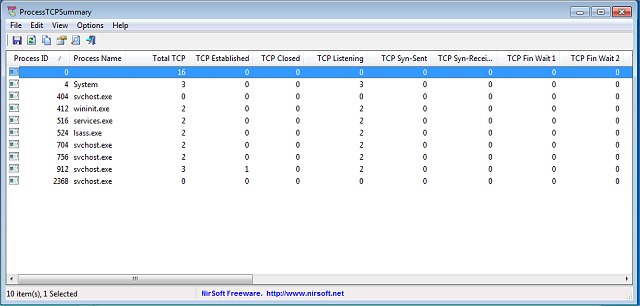
ProcessTCPSummary version 1.26 has been released, offering a straightforward and portable solution that efficiently collects and displays information about processes with active TCP connections or listening UDP ports. Upon launch, ProcessTCPSummary immediately starts gathering details for all processes, providing insights such as the total number of TCP connections, the status of each connection (including Established, Listening, Syn-Sent, and Syn-Received), and a breakdown of total IPv4 and IPv6 connections, as well as common port numbers.
An advanced feature allows users to run ProcessTCPSummary with Administrator privileges, enabling the monitoring of TCP/UDP byte transfers sent and received by each process, along with current transfer speeds. This tool is particularly valuable for security purposes, as it helps users identify and manage unwanted open ports that could be exploited by cybercriminals to introduce malware or ransomware into systems. By utilizing ProcessTCPSummary, users can maintain better oversight of their network activity and potential security vulnerabilities.
Additionally, users may find related resources helpful, such as guides on resetting TCP/IP or Internet Protocol settings, checking network adapter speeds, and resetting network settings in Windows 10 and 11. Extending the capabilities of ProcessTCPSummary, users can also consider integrating it with other network monitoring tools to build a more comprehensive network security strategy. Regularly updating software and conducting periodic network audits can further enhance protection against unauthorized access and cyber threats
An advanced feature allows users to run ProcessTCPSummary with Administrator privileges, enabling the monitoring of TCP/UDP byte transfers sent and received by each process, along with current transfer speeds. This tool is particularly valuable for security purposes, as it helps users identify and manage unwanted open ports that could be exploited by cybercriminals to introduce malware or ransomware into systems. By utilizing ProcessTCPSummary, users can maintain better oversight of their network activity and potential security vulnerabilities.
Additionally, users may find related resources helpful, such as guides on resetting TCP/IP or Internet Protocol settings, checking network adapter speeds, and resetting network settings in Windows 10 and 11. Extending the capabilities of ProcessTCPSummary, users can also consider integrating it with other network monitoring tools to build a more comprehensive network security strategy. Regularly updating software and conducting periodic network audits can further enhance protection against unauthorized access and cyber threats
ProcessTCPSummary 1.26 released
ProcessTCPSummary is a simple portable option that gathers and displays all processes that have TCP connections or listening UDP ports.