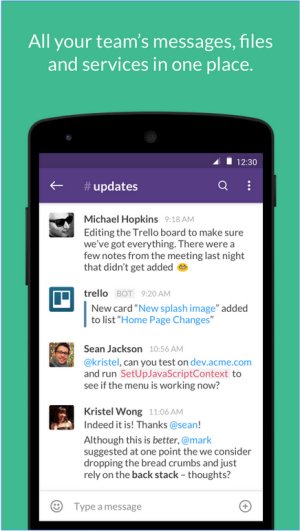
Slack has released updates with versions 4.49.81 and 4.49.89 Beta, further enhancing its capabilities as a comprehensive team communication platform. Designed to centralize team interactions, Slack offers real-time messaging, file sharing, and options for both one-on-one and group conversations.
Why Slack is a Leading Communication Tool
Slack has emerged as a powerful tool for communication and collaboration, significantly reducing the dependency on email by consolidating messaging within a single platform. Its user-friendly interface includes features such as real-time chat, video calls, and file sharing capabilities, alongside deep integrations with various productivity applications. This makes it indispensable for businesses and remote teams aiming for a cohesive workspace.
Key Features of Slack
At its core, Slack functions as a messaging application, enhanced by its unique Channels feature, which organizes discussions by project, department, or topic. This structured approach minimizes chaos and ensures easy access to pertinent information. Direct messaging is also available for quick, private conversations. Users can conveniently share files, links, and documents, reducing the need for cumbersome email attachments. A notable feature is Slack's robust search functionality, allowing users to effortlessly locate past messages and files.
One of Slack's standout benefits is its extensive integration capabilities. It can connect with tools like Google Drive, Trello, Zoom, and Asana, among many others, facilitating workflow automation and process streamlining. This transforms Slack from a mere messaging app into a comprehensive hub for collaboration, project management, and task automation.
Features Summary:
- Channels & Direct Messages: Organized discussions by projects or topics.
- File Sharing: Seamless document and link sharing in conversations.
- Integrations: Compatibility with hundreds of apps for enhanced productivity.
- Searchable History: Easy retrieval of past messages and documents.
- Automation & Bots: Utilize Slackbot for reminders and task automation.
- Voice & Video Calls: Direct communication without switching platforms.
Pricing Structure
Slack offers a free plan, which includes access to 90 days of message history, ten integrations, and one-on-one video calls. For teams needing more advanced features, the Pro plan offers unlimited message history, enhanced integrations, and group video calls with screen sharing. Larger organizations can benefit from Business+ and Enterprise Grid plans, which provide additional security and administrative features.
When compared to competitors like Microsoft Teams and Google Chat, Slack distinguishes itself through its user-friendly design and adaptability to various workflows. It is especially effective for remote teams that require clear and organized communication. However, the limitations of the free plan in terms of message history and integrations may pose challenges for growing teams, and subscription costs can accumulate for larger organizations.
Pros and Cons of Slack
*Pros:*
- Intuitive and clean interface.
- Extensive integrations with third-party applications.
- Organized channels for focused discussions.
- Cross-device functionality (desktop, mobile, web).
- Searchable message history available in paid plans.
*Cons:*
- Free plan restricts message history to 90 days.
- Potential distractions from excessive notifications.
- Costs of paid plans may escalate for larger teams.
Conclusion
In summary, Slack is an excellent choice for teams aiming to enhance communication and productivity. With its comprehensive feature set, strong integration capabilities, and user-friendly experience, Slack remains a top contender for modern workplaces. It serves as an exceptional collaboration tool for teams of all sizes, provided that budget considerations are taken into account. Users should also be prepared to manage notification settings to optimize their Slack experience.
Future Considerations
As Slack continues to evolve, it may introduce additional features to further enhance user experience and address the limitations of its free plan. Potential improvements could include advanced analytics for team communication efficiency, AI-driven insights for better workflow management, and enhanced customization options to tailor the platform to specific organizational needs. These developments could solidify Slack's position as a leading tool in the realm of team collaboration and productivity
Why Slack is a Leading Communication Tool
Slack has emerged as a powerful tool for communication and collaboration, significantly reducing the dependency on email by consolidating messaging within a single platform. Its user-friendly interface includes features such as real-time chat, video calls, and file sharing capabilities, alongside deep integrations with various productivity applications. This makes it indispensable for businesses and remote teams aiming for a cohesive workspace.
Key Features of Slack
At its core, Slack functions as a messaging application, enhanced by its unique Channels feature, which organizes discussions by project, department, or topic. This structured approach minimizes chaos and ensures easy access to pertinent information. Direct messaging is also available for quick, private conversations. Users can conveniently share files, links, and documents, reducing the need for cumbersome email attachments. A notable feature is Slack's robust search functionality, allowing users to effortlessly locate past messages and files.
One of Slack's standout benefits is its extensive integration capabilities. It can connect with tools like Google Drive, Trello, Zoom, and Asana, among many others, facilitating workflow automation and process streamlining. This transforms Slack from a mere messaging app into a comprehensive hub for collaboration, project management, and task automation.
Features Summary:
- Channels & Direct Messages: Organized discussions by projects or topics.
- File Sharing: Seamless document and link sharing in conversations.
- Integrations: Compatibility with hundreds of apps for enhanced productivity.
- Searchable History: Easy retrieval of past messages and documents.
- Automation & Bots: Utilize Slackbot for reminders and task automation.
- Voice & Video Calls: Direct communication without switching platforms.
Pricing Structure
Slack offers a free plan, which includes access to 90 days of message history, ten integrations, and one-on-one video calls. For teams needing more advanced features, the Pro plan offers unlimited message history, enhanced integrations, and group video calls with screen sharing. Larger organizations can benefit from Business+ and Enterprise Grid plans, which provide additional security and administrative features.
When compared to competitors like Microsoft Teams and Google Chat, Slack distinguishes itself through its user-friendly design and adaptability to various workflows. It is especially effective for remote teams that require clear and organized communication. However, the limitations of the free plan in terms of message history and integrations may pose challenges for growing teams, and subscription costs can accumulate for larger organizations.
Pros and Cons of Slack
*Pros:*
- Intuitive and clean interface.
- Extensive integrations with third-party applications.
- Organized channels for focused discussions.
- Cross-device functionality (desktop, mobile, web).
- Searchable message history available in paid plans.
*Cons:*
- Free plan restricts message history to 90 days.
- Potential distractions from excessive notifications.
- Costs of paid plans may escalate for larger teams.
Conclusion
In summary, Slack is an excellent choice for teams aiming to enhance communication and productivity. With its comprehensive feature set, strong integration capabilities, and user-friendly experience, Slack remains a top contender for modern workplaces. It serves as an exceptional collaboration tool for teams of all sizes, provided that budget considerations are taken into account. Users should also be prepared to manage notification settings to optimize their Slack experience.
Future Considerations
As Slack continues to evolve, it may introduce additional features to further enhance user experience and address the limitations of its free plan. Potential improvements could include advanced analytics for team communication efficiency, AI-driven insights for better workflow management, and enhanced customization options to tailor the platform to specific organizational needs. These developments could solidify Slack's position as a leading tool in the realm of team collaboration and productivity
Slack 4.49.81 / 4.49.89 Beta released
Slack puts all your team communications in one place wherever you go with real-time messaging, file sharing, and one-to-one and group conversations.