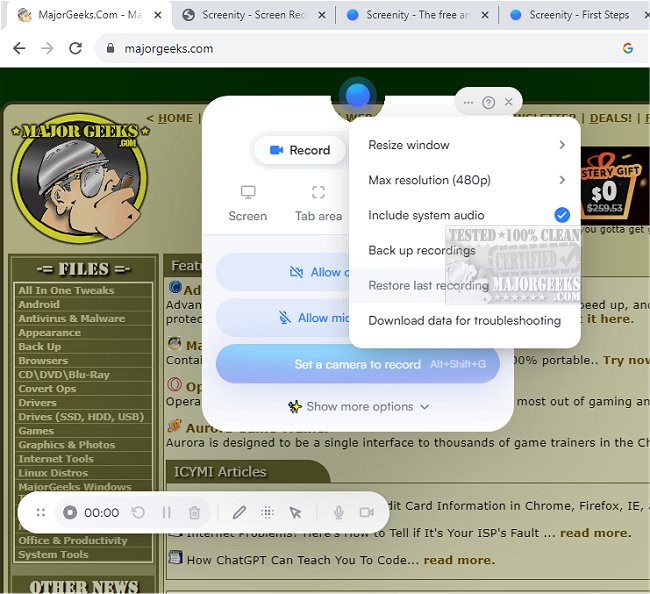
Screenity for Chrome has recently released version 4.3.6, enhancing its reputation as a user-friendly screen recording extension that offers an unlimited recording experience without the need for user sign-in. This tool enables users to capture high-quality video recordings of their screens, complete with audio, and incorporates features such as annotations and highlights to make the videos more engaging and informative.
With a straightforward interface and customizable settings, Screenity is ideal for various applications, including creating tutorials, demonstrations, and presentations, or providing feedback to teams. The extension supports recording a range of content: entire tabs, specific areas, desktop applications, and even camera feeds. Users have the option to record their microphone or internal audio, and utilize features like push-to-talk for seamless audio integration.
One of the standout features of Screenity is its annotation capabilities, which allow users to draw on the screen, and add text, arrows, and shapes, enhancing the instructional value of their recordings. Furthermore, the tool includes AI-powered options for camera backgrounds and blur effects, allowing for a more polished presentation. Users can also zoom in smoothly on specific areas of their recordings and blur out sensitive information to maintain privacy.
Screenity provides a comprehensive editing suite, enabling users to trim, cut, and crop their videos, as well as manage audio tracks by removing or adding sound. The extension also highlights user clicks and cursor movements and includes a spotlight mode for focused attention on specific content.
Additional features include the ability to set recording alarms, export videos in multiple formats (MP4, GIF, and WebM), and save recordings directly to Google Drive for easy sharing. Users can customize their recording experience further by setting countdowns, hiding UI elements, or repositioning them as needed.
In summary, Screenity for Chrome 4.3.6 is a versatile and powerful tool for anyone looking to create unlimited screen recordings, making it an invaluable resource for educators, content creators, and professionals alike. Its privacy-centric approach and extensive features make it an attractive choice for users who prioritize both functionality and security in their screen recording endeavors
With a straightforward interface and customizable settings, Screenity is ideal for various applications, including creating tutorials, demonstrations, and presentations, or providing feedback to teams. The extension supports recording a range of content: entire tabs, specific areas, desktop applications, and even camera feeds. Users have the option to record their microphone or internal audio, and utilize features like push-to-talk for seamless audio integration.
One of the standout features of Screenity is its annotation capabilities, which allow users to draw on the screen, and add text, arrows, and shapes, enhancing the instructional value of their recordings. Furthermore, the tool includes AI-powered options for camera backgrounds and blur effects, allowing for a more polished presentation. Users can also zoom in smoothly on specific areas of their recordings and blur out sensitive information to maintain privacy.
Screenity provides a comprehensive editing suite, enabling users to trim, cut, and crop their videos, as well as manage audio tracks by removing or adding sound. The extension also highlights user clicks and cursor movements and includes a spotlight mode for focused attention on specific content.
Additional features include the ability to set recording alarms, export videos in multiple formats (MP4, GIF, and WebM), and save recordings directly to Google Drive for easy sharing. Users can customize their recording experience further by setting countdowns, hiding UI elements, or repositioning them as needed.
In summary, Screenity for Chrome 4.3.6 is a versatile and powerful tool for anyone looking to create unlimited screen recordings, making it an invaluable resource for educators, content creators, and professionals alike. Its privacy-centric approach and extensive features make it an attractive choice for users who prioritize both functionality and security in their screen recording endeavors
Screenity for Chrome 4.3.6 released
Screenity for Chrome is a user-friendly screen recording extension designed to provide a seamless and unlimited recording experience.