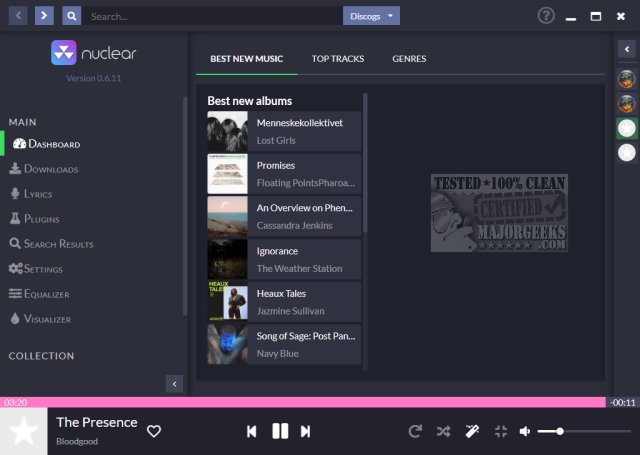
Nuclear Music Player is an open-source, free music streaming application available for Windows and Linux, designed to help users find, download, and play their favorite songs without the nuisances of ads or subscription fees commonly found in mainstream platforms like Spotify or iTunes. With its minimalist interface, Nuclear offers a refreshing alternative for those seeking a more straightforward music experience.
Key Features and Functionality
Nuclear Music Player connects to publicly accessible online sources such as YouTube, SoundCloud, and Jamendo, allowing users to enjoy a seamless music experience without the clutter. Users can explore curated playlists and browse by genre, with a central search bar that simplifies finding songs, albums, or artists. One notable feature is its ability to automatically add similar tracks to the queue, enhancing music discovery, reminiscent of the old Napster experience. However, this functionality can be a double-edged sword, as users cannot manage individual similar tracks in their queue, which might not suit everyone’s listening preferences.
Downloading Music Legally
Users can download tracks by right-clicking them, saving them as WEBM files, which are compatible with most media players like VLC. While downloads allow for offline listening, users should be aware of copyright laws that may apply to downloaded content. To avoid legal issues, it's recommended to use Nuclear for streaming or to download only royalty-free music.
Pros and Cons
*Pros:*
- Completely free and open-source with no ads or tracking.
- Facilitates music discovery through auto-suggestions.
- Supports offline downloads in WEBM format.
- Available across multiple platforms: Windows, macOS, and Linux.
- User-friendly, clean interface.
*Cons:*
- Limited to WEBM format for downloads; requires conversion for MP3 use.
- Cannot manage similar tracks individually in the queue.
- Dependent on third-party sources, which may affect availability.
- Downloading copyrighted content could lead to legal implications.
Conclusion
Nuclear Music Player stands out as an excellent option for users who prioritize privacy and simplicity in their music streaming experience. Its fast, straightforward design allows users to focus on what matters most: enjoying music and discovering new tracks. While it has certain limitations, such as download format and track management, its strengths make it a valuable addition to any music lover's toolkit. As always, users should remain mindful of legal considerations when downloading music. Overall, Nuclear is a recommended choice for those looking for a blend of functionality and ease without the complications of mainstream services
Key Features and Functionality
Nuclear Music Player connects to publicly accessible online sources such as YouTube, SoundCloud, and Jamendo, allowing users to enjoy a seamless music experience without the clutter. Users can explore curated playlists and browse by genre, with a central search bar that simplifies finding songs, albums, or artists. One notable feature is its ability to automatically add similar tracks to the queue, enhancing music discovery, reminiscent of the old Napster experience. However, this functionality can be a double-edged sword, as users cannot manage individual similar tracks in their queue, which might not suit everyone’s listening preferences.
Downloading Music Legally
Users can download tracks by right-clicking them, saving them as WEBM files, which are compatible with most media players like VLC. While downloads allow for offline listening, users should be aware of copyright laws that may apply to downloaded content. To avoid legal issues, it's recommended to use Nuclear for streaming or to download only royalty-free music.
Pros and Cons
*Pros:*
- Completely free and open-source with no ads or tracking.
- Facilitates music discovery through auto-suggestions.
- Supports offline downloads in WEBM format.
- Available across multiple platforms: Windows, macOS, and Linux.
- User-friendly, clean interface.
*Cons:*
- Limited to WEBM format for downloads; requires conversion for MP3 use.
- Cannot manage similar tracks individually in the queue.
- Dependent on third-party sources, which may affect availability.
- Downloading copyrighted content could lead to legal implications.
Conclusion
Nuclear Music Player stands out as an excellent option for users who prioritize privacy and simplicity in their music streaming experience. Its fast, straightforward design allows users to focus on what matters most: enjoying music and discovering new tracks. While it has certain limitations, such as download format and track management, its strengths make it a valuable addition to any music lover's toolkit. As always, users should remain mindful of legal considerations when downloading music. Overall, Nuclear is a recommended choice for those looking for a blend of functionality and ease without the complications of mainstream services
Nuclear Music Player 1.34.1 released
Nuclear Music Player can find, download, and play your favorite music from one intuitive app in Windows or Linux.