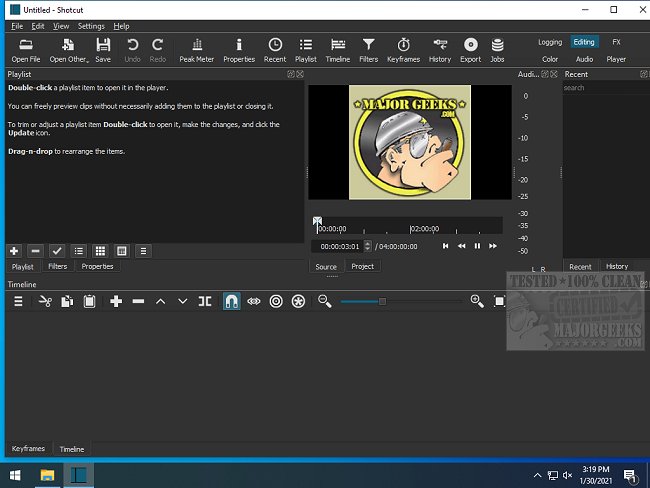
Shotcut, the open-source video editing software, has recently launched version 26.7.30. This cross-platform application is designed for users who want to edit and convert video files without the burden of paywalls or watermarks. With its robust feature set, Shotcut is an appealing alternative to paid video editing software, providing a powerful editing experience for free.
Key Features of Shotcut
Shotcut distinguishes itself by focusing on core editing functionalities rather than flashy templates or effects. The integration of FFmpeg allows for extensive format compatibility, supporting everything from standard MP4 files to high-resolution 4K footage. The user-friendly drag-and-drop timeline simplifies the editing process, enabling users to efficiently cut, edit, and refine their videos.
The software is equipped with essential tools, including various filters, transitions, keyframe animations, and chroma key capabilities, suitable for green screen use. Audio features are equally impressive, featuring EQ settings, compression options, and real-time audio scopes. GPU acceleration enhances the editing experience by providing smoother previews and speedier exports, especially beneficial when working with large video files.
Why Use Shotcut?
Shotcut is particularly useful for individuals looking to compile and enhance their personal video footage—be it for family gatherings, vlogs, or gaming highlights. Users can easily add transitions, captions, and background music, as well as apply slow-motion effects to create memorable montages. The software is also versatile enough to cater to various video formats, ensuring that projects for platforms like TikTok and YouTube maintain high quality.
Highlighted Features:
- Multi-Format Timeline: Mix various resolutions and frame rates within a single project.
- Capture Options: Screen, webcam, and audio recording, available on Linux.
- Network Stream Playback: Supports multiple streaming protocols including HTTP and RTSP.
- Audio and Video Sync: JACK Transport Sync and deinterlacing features for improved quality.
- Customizable Interface: Offers flexible, dockable panels for a personalized workspace.
- Encoding and Transcoding: Supports a wide array of formats through FFmpeg/libav.
Pros and Cons
*Pros:*
- Completely free and open-source with no hidden costs or watermarks.
- Wide support for video and audio formats.
- Advanced features like keyframes, GPU acceleration, and chroma keying.
- Available on multiple platforms (Windows, Mac, Linux).
*Cons:*
- User interface may appear outdated compared to premium alternatives.
- Steeper learning curve for beginners.
- Interface can become unresponsive if items are moved excessively.
- Lacks a built-in asset library, requiring users to source their music and effects externally.
Conclusion
Shotcut is an excellent choice for users who seek a cost-effective video editing solution without compromising on functionality. While it may require some time to master, its capabilities make it a valuable tool for both casual users looking to edit personal videos and aspiring creators wanting to produce professional-quality content. With its recent update, Shotcut continues to establish itself as a formidable player in the realm of free video editing software, appealing to those ready to explore its potential.
Whether you're capturing family memories or embarking on a YouTube career, Shotcut empowers its users to unleash their creativity without limitations
Key Features of Shotcut
Shotcut distinguishes itself by focusing on core editing functionalities rather than flashy templates or effects. The integration of FFmpeg allows for extensive format compatibility, supporting everything from standard MP4 files to high-resolution 4K footage. The user-friendly drag-and-drop timeline simplifies the editing process, enabling users to efficiently cut, edit, and refine their videos.
The software is equipped with essential tools, including various filters, transitions, keyframe animations, and chroma key capabilities, suitable for green screen use. Audio features are equally impressive, featuring EQ settings, compression options, and real-time audio scopes. GPU acceleration enhances the editing experience by providing smoother previews and speedier exports, especially beneficial when working with large video files.
Why Use Shotcut?
Shotcut is particularly useful for individuals looking to compile and enhance their personal video footage—be it for family gatherings, vlogs, or gaming highlights. Users can easily add transitions, captions, and background music, as well as apply slow-motion effects to create memorable montages. The software is also versatile enough to cater to various video formats, ensuring that projects for platforms like TikTok and YouTube maintain high quality.
Highlighted Features:
- Multi-Format Timeline: Mix various resolutions and frame rates within a single project.
- Capture Options: Screen, webcam, and audio recording, available on Linux.
- Network Stream Playback: Supports multiple streaming protocols including HTTP and RTSP.
- Audio and Video Sync: JACK Transport Sync and deinterlacing features for improved quality.
- Customizable Interface: Offers flexible, dockable panels for a personalized workspace.
- Encoding and Transcoding: Supports a wide array of formats through FFmpeg/libav.
Pros and Cons
*Pros:*
- Completely free and open-source with no hidden costs or watermarks.
- Wide support for video and audio formats.
- Advanced features like keyframes, GPU acceleration, and chroma keying.
- Available on multiple platforms (Windows, Mac, Linux).
*Cons:*
- User interface may appear outdated compared to premium alternatives.
- Steeper learning curve for beginners.
- Interface can become unresponsive if items are moved excessively.
- Lacks a built-in asset library, requiring users to source their music and effects externally.
Conclusion
Shotcut is an excellent choice for users who seek a cost-effective video editing solution without compromising on functionality. While it may require some time to master, its capabilities make it a valuable tool for both casual users looking to edit personal videos and aspiring creators wanting to produce professional-quality content. With its recent update, Shotcut continues to establish itself as a formidable player in the realm of free video editing software, appealing to those ready to explore its potential.
Whether you're capturing family memories or embarking on a YouTube career, Shotcut empowers its users to unleash their creativity without limitations
Shotcut 26.7.30 released
Shotcut is an Open Source, cross-platform video editor capable of converting and editing video files in various formats.