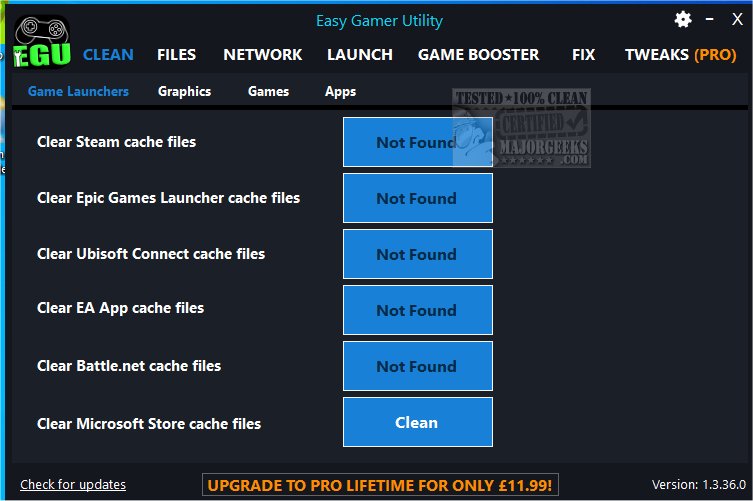
Easy Gamer Utility 2.0.5.0 has been released, providing gamers with a practical solution for enhancing their gaming performance by clearing cache files associated with various game launchers and graphics cards. If you’ve noticed any lag or performance dips while gaming, utilizing this utility to clear cache files could significantly help improve your gaming experience.
As gamers know, optimizing system performance is crucial for smooth gameplay, and Easy Gamer Utility is designed to streamline this process. This tool is not only user-friendly but also lightweight, making it suitable for both gaming and standard PCs. With just one click, users can clear caches from game launchers and drivers, find game save data and configuration files, and easily access the locations of cache folders and files.
A notable feature of Easy Gamer Utility is its launch tab, which allows users to adjust the priority settings for their games. However, the options for High Priority and Force High Priority are exclusive to the Pro version. The utility simplifies browsing through game configuration files and saved data with its intuitive interface, and developers are consistently adding new features to enhance user experience.
The software supports cache cleanup for a variety of platforms including Steam, Epic Games Launcher, Ubisoft Connect, EA App, Battle.Net, and graphics APIs like NVIDIA DirectX, OpenGL, AMD Shader, and Intel Shader on Windows 10/11 systems.
It’s important to remember that Easy Gamer Utility permanently deletes cache files, which typically should not cause any issues. However, to safeguard against unforeseen problems, it is advisable to create a restore point before proceeding with any deletions. This precaution ensures that you can revert to a previous state if necessary.
In summary, Easy Gamer Utility 2.0.5.0 is a powerful tool that simplifies the process of cache management for gamers, helping to elevate their gaming experience. Its ongoing updates and user-centric design make it a valuable addition to any PC gamer’s toolkit, fostering a smoother and more enjoyable gaming environment
As gamers know, optimizing system performance is crucial for smooth gameplay, and Easy Gamer Utility is designed to streamline this process. This tool is not only user-friendly but also lightweight, making it suitable for both gaming and standard PCs. With just one click, users can clear caches from game launchers and drivers, find game save data and configuration files, and easily access the locations of cache folders and files.
A notable feature of Easy Gamer Utility is its launch tab, which allows users to adjust the priority settings for their games. However, the options for High Priority and Force High Priority are exclusive to the Pro version. The utility simplifies browsing through game configuration files and saved data with its intuitive interface, and developers are consistently adding new features to enhance user experience.
The software supports cache cleanup for a variety of platforms including Steam, Epic Games Launcher, Ubisoft Connect, EA App, Battle.Net, and graphics APIs like NVIDIA DirectX, OpenGL, AMD Shader, and Intel Shader on Windows 10/11 systems.
It’s important to remember that Easy Gamer Utility permanently deletes cache files, which typically should not cause any issues. However, to safeguard against unforeseen problems, it is advisable to create a restore point before proceeding with any deletions. This precaution ensures that you can revert to a previous state if necessary.
In summary, Easy Gamer Utility 2.0.5.0 is a powerful tool that simplifies the process of cache management for gamers, helping to elevate their gaming experience. Its ongoing updates and user-centric design make it a valuable addition to any PC gamer’s toolkit, fostering a smoother and more enjoyable gaming environment
Easy Gamer Utility 2.0.5.0 released
Easy Gamer Utility assists in clearing cache files for your game launchers and graphics cards to help improve overall performance.