Easy System Utility 1.1.72.0 has been released, offering users a user-friendly interface designed to streamline various maintenance tasks on their computers. This tool facilitates the removal of unnecessary files, unlocking of folders, image compression, watermarking, and launching files and folders directly from the system tray.
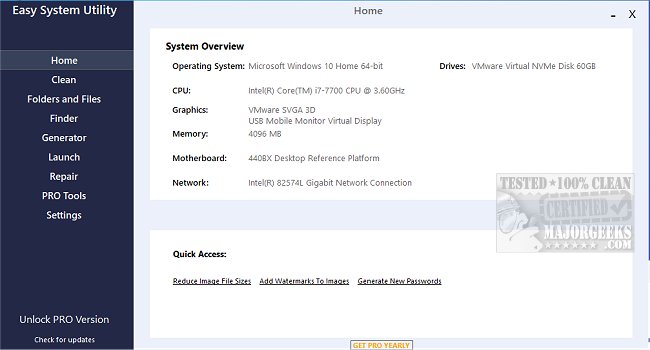
One of the key features of Easy System Utility is its system overview capability, which provides users with detailed information about their computer's hardware specifications. Users can easily access data regarding their operating system, CPU, GPU, memory, motherboard, network, and drivers, all consolidated in one organized location. This feature saves users time by eliminating the need to navigate through multiple system settings.
The interface is structured with a tab menu that categorizes features for ease of use. The Clean tab allows users to clear out unwanted Windows software and junk files, such as DirectX Shader Cache, Prefetch Files, and Temporary files, ultimately optimizing disk space on their machines. The Folders/Files tab offers tools for managing files and folders, including the ability to unlock restricted items, compress image sizes, apply watermarks, rename folders, and delete large folders that consume significant storage.
Additionally, Easy System Utility includes a Password Generator tab, enabling users to create secure, random passwords with customizable options for length and character types. The Launch tab provides a convenient way to access frequently used programs or files directly from the ESU system tray icon, enhancing user efficiency.
To utilize all features effectively, it is crucial to run Easy System Utility with administrator rights.
Key features of Easy System Utility include:
- Viewing System Specs
- Analyzing and Cleaning Windows Junk Files
- Unlocking Files/Folders
- Reducing Image File Sizes
- Adding Image Watermarks
- Renaming Files/Folders
- Deleting Large Folders
- Finding Windows and WiFi Passwords
- Generating Random Passwords
- Quick Launching Files/Programs
In comparison to similar tools like CCleaner, Wise Disk Cleaner, and PrivaZer, Easy System Utility stands out with its comprehensive functionality and user-centric design. Additionally, users may find resources on managing storage, backing up the Windows registry, and optimizing startup apps helpful for further system maintenance.
As technology continues to evolve, tools like Easy System Utility will be increasingly vital for managing system efficiency and security, providing users with a consolidated platform to maintain their digital environments effortlessly
One of the key features of Easy System Utility is its system overview capability, which provides users with detailed information about their computer's hardware specifications. Users can easily access data regarding their operating system, CPU, GPU, memory, motherboard, network, and drivers, all consolidated in one organized location. This feature saves users time by eliminating the need to navigate through multiple system settings.
The interface is structured with a tab menu that categorizes features for ease of use. The Clean tab allows users to clear out unwanted Windows software and junk files, such as DirectX Shader Cache, Prefetch Files, and Temporary files, ultimately optimizing disk space on their machines. The Folders/Files tab offers tools for managing files and folders, including the ability to unlock restricted items, compress image sizes, apply watermarks, rename folders, and delete large folders that consume significant storage.
Additionally, Easy System Utility includes a Password Generator tab, enabling users to create secure, random passwords with customizable options for length and character types. The Launch tab provides a convenient way to access frequently used programs or files directly from the ESU system tray icon, enhancing user efficiency.
To utilize all features effectively, it is crucial to run Easy System Utility with administrator rights.
Key features of Easy System Utility include:
- Viewing System Specs
- Analyzing and Cleaning Windows Junk Files
- Unlocking Files/Folders
- Reducing Image File Sizes
- Adding Image Watermarks
- Renaming Files/Folders
- Deleting Large Folders
- Finding Windows and WiFi Passwords
- Generating Random Passwords
- Quick Launching Files/Programs
In comparison to similar tools like CCleaner, Wise Disk Cleaner, and PrivaZer, Easy System Utility stands out with its comprehensive functionality and user-centric design. Additionally, users may find resources on managing storage, backing up the Windows registry, and optimizing startup apps helpful for further system maintenance.
As technology continues to evolve, tools like Easy System Utility will be increasingly vital for managing system efficiency and security, providing users with a consolidated platform to maintain their digital environments effortlessly
Easy System Utility 1.1.72.0 released
Easy System Utility provides an intuitive interface for removing unnecessary files, unlocking folders, compressing images, adding watermarks, launching files and folders from the system tray, and more.