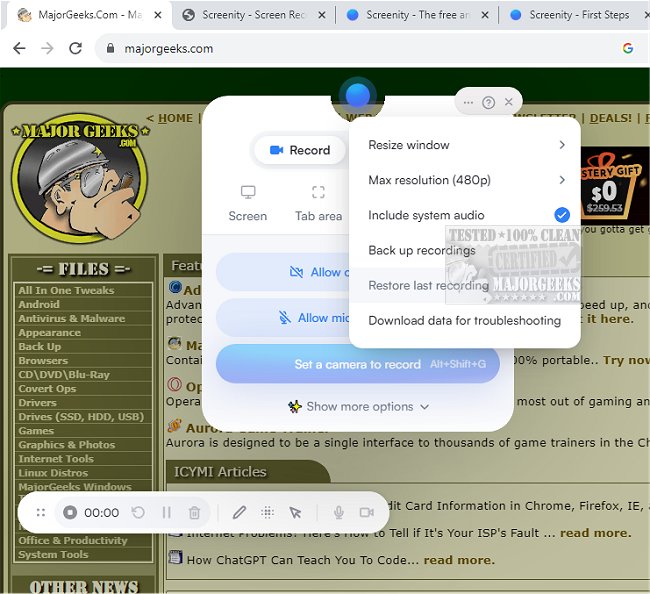
Screenity for Chrome has recently released version 4.6.7, offering a user-friendly screen recording extension that ensures an effortless and unlimited recording experience. This tool allows users to capture high-quality screen videos complete with audio, while also providing options for annotations and highlights, making it ideal for creating tutorials, presentations, demos, or any video content. Notably, users do not need to sign in to access its features.
As a privacy-focused screen recorder and annotation tool, Screenity is particularly useful for producing high-quality product demos and sharing feedback with teams, all at no cost. The extension enables unlimited recordings from your tab, specific areas, desktop, applications, or even the camera. It captures microphone or internal audio and includes a push-to-talk feature.
Screenity enhances your recordings with AI-powered camera backgrounds or blurring options, allowing for smooth zooming on specific areas and blurring sensitive content for privacy. Users can edit their recordings to remove or add audio, cut, trim, or crop, and also utilize features to highlight clicks and cursor movements, or enter a spotlight mode.
Additional functionalities include setting alarms for automatic recording stoppage, exporting videos in formats such as MP4, GIF, and WebM, or saving directly to Google Drive for easy sharing. Users can set countdowns, hide UI elements, or reposition them as needed.
With Screenity for Chrome, there are no restrictions on the number or length of videos you can create, although permission is required for microphone and camera access. Overall, Screenity offers a comprehensive and flexible solution for anyone looking to produce high-quality screen recordings.
In addition to its core functionality, the extension could benefit from potential enhancements such as more advanced editing tools, integration with other productivity software, or community features for sharing and collaborating on video content. Overall, Screenity stands out as an invaluable resource for educators, marketers, and professionals aiming to create engaging video content easily and effectively
As a privacy-focused screen recorder and annotation tool, Screenity is particularly useful for producing high-quality product demos and sharing feedback with teams, all at no cost. The extension enables unlimited recordings from your tab, specific areas, desktop, applications, or even the camera. It captures microphone or internal audio and includes a push-to-talk feature.
Screenity enhances your recordings with AI-powered camera backgrounds or blurring options, allowing for smooth zooming on specific areas and blurring sensitive content for privacy. Users can edit their recordings to remove or add audio, cut, trim, or crop, and also utilize features to highlight clicks and cursor movements, or enter a spotlight mode.
Additional functionalities include setting alarms for automatic recording stoppage, exporting videos in formats such as MP4, GIF, and WebM, or saving directly to Google Drive for easy sharing. Users can set countdowns, hide UI elements, or reposition them as needed.
With Screenity for Chrome, there are no restrictions on the number or length of videos you can create, although permission is required for microphone and camera access. Overall, Screenity offers a comprehensive and flexible solution for anyone looking to produce high-quality screen recordings.
In addition to its core functionality, the extension could benefit from potential enhancements such as more advanced editing tools, integration with other productivity software, or community features for sharing and collaborating on video content. Overall, Screenity stands out as an invaluable resource for educators, marketers, and professionals aiming to create engaging video content easily and effectively
Screenity for Chrome 4.6.7 released
Screenity for Chrome is a user-friendly screen recording extension designed to provide a seamless and unlimited recording experience.