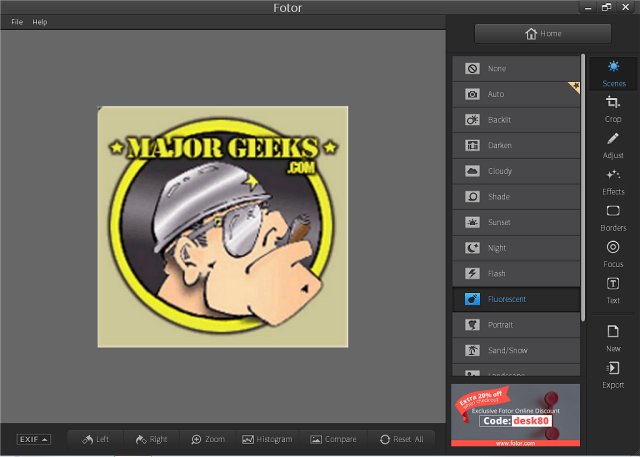
Fotor 5.1.3 / 3.8.5 has been released, enhancing its reputation as a user-friendly desktop photo editor. Designed for individuals who may not possess extensive photo editing skills, Fotor allows users to transform their images without the complexity often associated with software like Photoshop. Its advanced photo processing engine simplifies the editing process, enabling users to easily adjust key elements such as exposure, brightness, contrast, white balance, and saturation through intuitive sliders.
One of Fotor's standout features is its impressive array of customizable effects, which can elevate any photograph to the next level. Additionally, the software offers a seamless collage feature, making it easy to create multi-layout images by simply dragging and dropping photos into pre-designed templates. Users can manipulate the size and orientation of each image to achieve their desired aesthetic.
Once editing is complete, sharing creations on social media platforms like Facebook, Twitter, or Flickr is a hassle-free process, requiring only a click of the mouse. Fotor’s features include basic editing adjustments, various photo effects, portrait touch-up options, access to classic content like collages and templates, the ability to edit and save in standard formats, and basic HDR technology. Moreover, users can sync their photos and projects through Fotor Cloud for added convenience.
In summary, Fotor 5.1.3 / 3.8.5 is an excellent choice for both novice and experienced users looking for a straightforward yet powerful photo editing solution. Its blend of essential editing tools and creative effects makes it a versatile option for anyone interested in enhancing their photography skills. As the software continues to evolve, it is likely to incorporate additional features that further simplify the editing process and expand creative possibilities for users
One of Fotor's standout features is its impressive array of customizable effects, which can elevate any photograph to the next level. Additionally, the software offers a seamless collage feature, making it easy to create multi-layout images by simply dragging and dropping photos into pre-designed templates. Users can manipulate the size and orientation of each image to achieve their desired aesthetic.
Once editing is complete, sharing creations on social media platforms like Facebook, Twitter, or Flickr is a hassle-free process, requiring only a click of the mouse. Fotor’s features include basic editing adjustments, various photo effects, portrait touch-up options, access to classic content like collages and templates, the ability to edit and save in standard formats, and basic HDR technology. Moreover, users can sync their photos and projects through Fotor Cloud for added convenience.
In summary, Fotor 5.1.3 / 3.8.5 is an excellent choice for both novice and experienced users looking for a straightforward yet powerful photo editing solution. Its blend of essential editing tools and creative effects makes it a versatile option for anyone interested in enhancing their photography skills. As the software continues to evolve, it is likely to incorporate additional features that further simplify the editing process and expand creative possibilities for users
Fotor 5.1.3 / 3.8.5 released
Fotor is a simple but easy-to-use desktop photo editor that enables you to edit photos without being an expert in Photoshop.