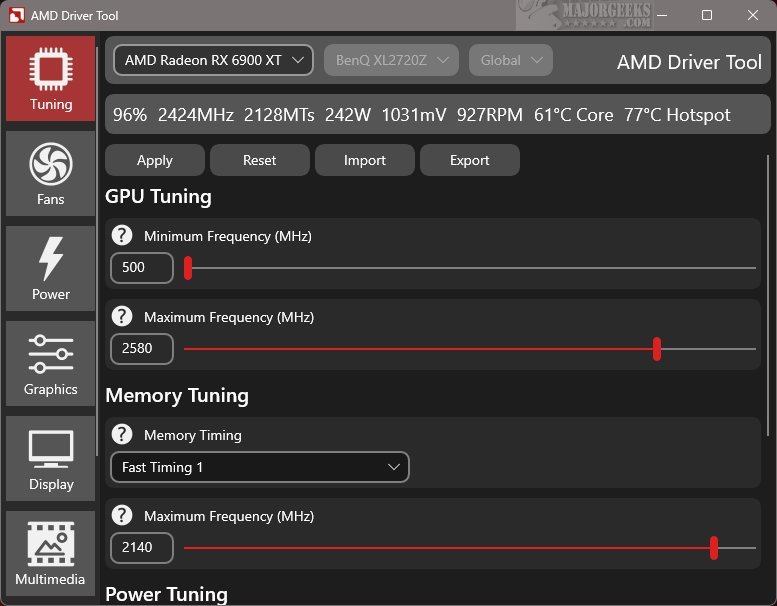
RadeonTuner 0.40.0.0 has been released as a simplified and user-friendly alternative to the comprehensive AMD Radeon Adrenalin Edition suite. Its main goal is to equip users with essential tools for easily adjusting display settings, optimizing GPU and fan performance, and managing various gaming graphics options.
Key Features of RadeonTuner:
1. Intuitive Interface: RadeonTuner boasts an intuitive layout, with main functions clearly displayed on the left side, allowing for easy navigation. The top section of the interface indicates the selected AMD GPU model, which is especially useful for users with multiple graphics cards, ensuring adjustments are made to the correct device.
2. Customizable Adjustments: Users can modify critical settings such as clock speeds, fan curves, and power limits, along with graphics settings for games and display preferences. A standout feature is the ability to import and export settings, enabling users to quickly restore their configurations after updates or driver installations, reducing the likelihood of reverting to default settings.
3. Driver Management: RadeonTuner is particularly advantageous for users who prefer to download and install their GPU drivers independently of the full Adrenalin suite. By obtaining the latest driver from the official AMD website, users can then leverage RadeonTuner to personalize their settings effectively.
User Experience: RadeonTuner is praised for its ability to provide a straightforward tool for users wanting to manage their AMD GPU without the complexities often associated with official software. The lightweight application avoids unnecessary background processes and extraneous features, resulting in a seamless experience ideal for those seeking simplicity in graphics management.
Conclusion: RadeonTuner is an invaluable tool for gamers and graphics enthusiasts looking for a straightforward solution to customize their AMD GPU settings. By embracing RadeonTuner, users can enhance their gaming and graphics experience efficiently, free from the clutter of larger software suites.
Additional Resources:
- How to Download the Latest Drivers for Windows
- How to Backup and Restore Your Drivers
- How to Stop Windows Updates from Downloading Drivers on Windows 10 & 11
- How to View Recently Updated Windows Drivers
Future Considerations: As RadeonTuner continues to evolve, potential future updates could include enhanced compatibility with new graphics cards, additional customization options, and improved performance metrics to further empower users in managing their GPU settings
Key Features of RadeonTuner:
1. Intuitive Interface: RadeonTuner boasts an intuitive layout, with main functions clearly displayed on the left side, allowing for easy navigation. The top section of the interface indicates the selected AMD GPU model, which is especially useful for users with multiple graphics cards, ensuring adjustments are made to the correct device.
2. Customizable Adjustments: Users can modify critical settings such as clock speeds, fan curves, and power limits, along with graphics settings for games and display preferences. A standout feature is the ability to import and export settings, enabling users to quickly restore their configurations after updates or driver installations, reducing the likelihood of reverting to default settings.
3. Driver Management: RadeonTuner is particularly advantageous for users who prefer to download and install their GPU drivers independently of the full Adrenalin suite. By obtaining the latest driver from the official AMD website, users can then leverage RadeonTuner to personalize their settings effectively.
User Experience: RadeonTuner is praised for its ability to provide a straightforward tool for users wanting to manage their AMD GPU without the complexities often associated with official software. The lightweight application avoids unnecessary background processes and extraneous features, resulting in a seamless experience ideal for those seeking simplicity in graphics management.
Conclusion: RadeonTuner is an invaluable tool for gamers and graphics enthusiasts looking for a straightforward solution to customize their AMD GPU settings. By embracing RadeonTuner, users can enhance their gaming and graphics experience efficiently, free from the clutter of larger software suites.
Additional Resources:
- How to Download the Latest Drivers for Windows
- How to Backup and Restore Your Drivers
- How to Stop Windows Updates from Downloading Drivers on Windows 10 & 11
- How to View Recently Updated Windows Drivers
Future Considerations: As RadeonTuner continues to evolve, potential future updates could include enhanced compatibility with new graphics cards, additional customization options, and improved performance metrics to further empower users in managing their GPU settings
RadeonTuner 0.40.0.0 released
RadeonTuner serves as a streamlined and user-friendly alternative to the comprehensive AMD Radeon Adrenalin Edition suite. Its primary purpose is to provide essential tools that let users easily adjust display settings, fine-tune GPU and fan performance, and manage various gaming graphics options.