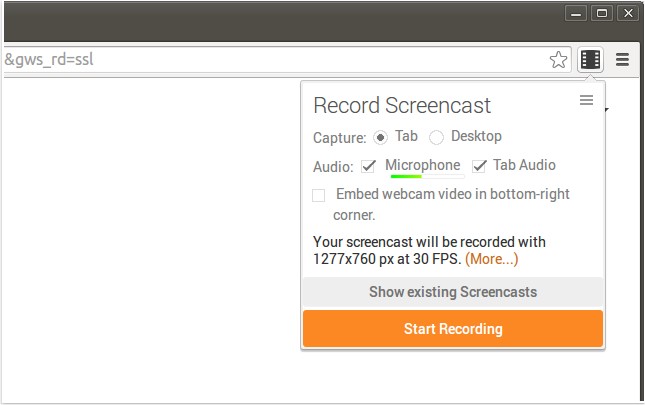
Screencastify for Chrome has released version 4.24.2, enhancing its functionality for recording screen activity along with audio, ideal for creating YouTube tutorials, presentations, and other instructional content. The application captures videos in WebM/vp8 format with Ogg Vorbis audio, ensuring high-quality recordings. Users can easily save their recordings to local storage, upload them to YouTube, or save them directly to Google Drive with a single click. This seamless integration with Google Drive is particularly beneficial for Chromebooks and Chromeboxes, as it conserves local storage space.
Key features of Screencastify include:
- Google Drive Integration: Automatically stores recordings in the cloud, providing easy access from any device.
- Simple Sharing Options: Uploading recordings to YouTube or Google Drive is straightforward, allowing for quick sharing through generated links.
- Webcam Feed: Users can personalize their recordings by including a webcam feed, adding a more engaging element to their videos.
- Keyboard Shortcuts: Customizable shortcuts enable users to start recordings effortlessly.
In addition to these features, Screencastify is designed to be user-friendly and does not require additional software like Java or Flash, making it accessible for a wide range of users.
Overall, Screencastify for Chrome is a powerful tool for anyone needing to create screen recordings, whether for educational purposes, professional presentations, or personal projects. With its continuous updates and feature enhancements, users can expect an increasingly robust experience for their recording needs.
Future updates could include enhanced editing tools, support for additional file formats, or improved integration with other platforms to further streamline the recording and sharing process
Key features of Screencastify include:
- Google Drive Integration: Automatically stores recordings in the cloud, providing easy access from any device.
- Simple Sharing Options: Uploading recordings to YouTube or Google Drive is straightforward, allowing for quick sharing through generated links.
- Webcam Feed: Users can personalize their recordings by including a webcam feed, adding a more engaging element to their videos.
- Keyboard Shortcuts: Customizable shortcuts enable users to start recordings effortlessly.
In addition to these features, Screencastify is designed to be user-friendly and does not require additional software like Java or Flash, making it accessible for a wide range of users.
Overall, Screencastify for Chrome is a powerful tool for anyone needing to create screen recordings, whether for educational purposes, professional presentations, or personal projects. With its continuous updates and feature enhancements, users can expect an increasingly robust experience for their recording needs.
Future updates could include enhanced editing tools, support for additional file formats, or improved integration with other platforms to further streamline the recording and sharing process
Screencastify for Chrome 4.24.2 released
Screencastify for Chrome will record all your screen activity including audio making it perfect for YouTube tutorials, presentations and more.