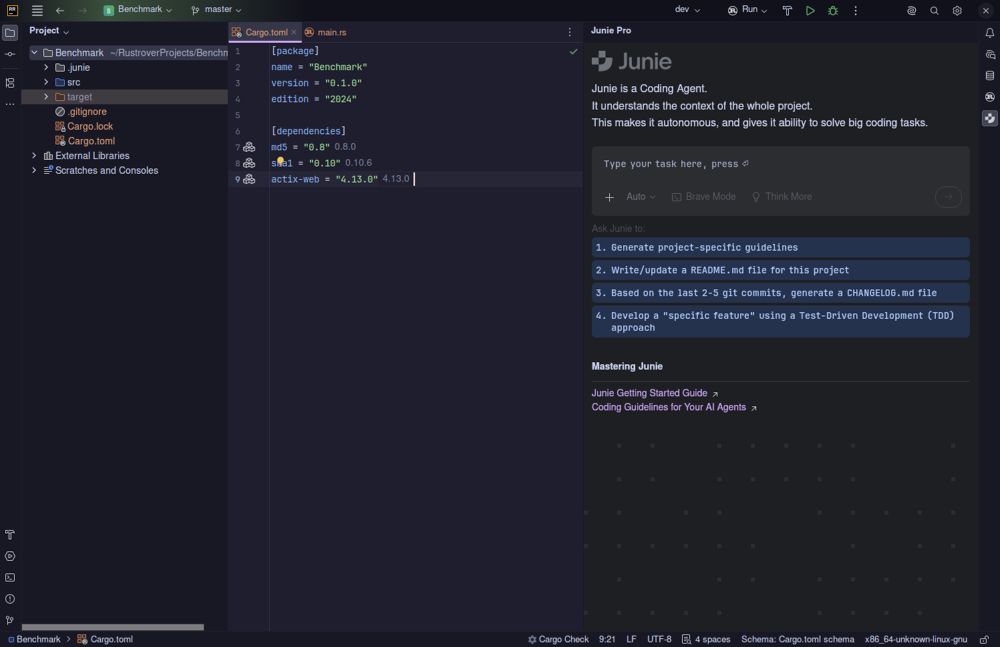
The latest version of RustRover, JetBrains' integrated development environment (IDE) for Rust, aims to simplify the development process by including all necessary tools for writing, testing, and debugging Rust code straight out of the box. This approach eliminates common frustrations associated with plugin hunting and configuration that many developers face.
Key Features of RustRover
RustRover sets itself apart from traditional setups where developers often start with minimal editors and spend significant time installing various plugins for tasks like linting, formatting, and Git integration. Instead, RustRover comes fully equipped with features like Cargo support, TOML editing, remote development capabilities, and Docker management from the start. Users simply need to point the IDE to their Cargo.toml file, and it is ready to use, significantly reducing setup time.
However, while its robust feature set enhances functionality, it does come with a trade-off in terms of memory usage. JetBrains products are known for being resource-intensive, which could lead to performance slowdowns on machines with limited RAM, particularly when handling large projects. On modern computers, though, RustRover operates smoothly and maintains a responsive user interface during demanding tasks.
AI Integration and Tools
One of the standout features of RustRover is its built-in AI capabilities, allowing integration with various AI models such as Claude, GPT-4, and more, without forcing users into subscription models. The AI facilitates intelligent code completion and context-aware suggestions, which can significantly enhance productivity. Additionally, the IDE includes real-time collaboration tools and Git integration to streamline teamwork, allowing developers to share configurations and manage code changes seamlessly.
The database tools, derived from JetBrains' DataGrip, provide powerful schema exploration and query editing capabilities directly within the IDE, enabling developers to work efficiently without switching between different applications.
License and Accessibility
JetBrains offers RustRover for free for non-commercial use, making it accessible for hobbyists, students, and open-source contributors. However, if users intend to monetize their projects or engage in commercial development, they will need to acquire a paid license.
Pros and Cons of RustRover
*Pros:*
- Zero configuration required for Cargo, TOML, and debugging.
- Integrated AI features that understand Rust's specific context.
- Built-in database management and Docker tools reduce the need for external applications.
- Free access for non-commercial projects lowers the barrier to entry.
*Cons:*
- High memory consumption during indexing may hinder performance on older systems.
- A paid license is required for commercial use, which could be costly for small teams.
- The UI may feel cluttered for users who only need basic functionalities.
- Limited plugin ecosystem compared to alternatives like VS Code.
Conclusion
RustRover is a polished IDE that simplifies the Rust development experience by minimizing setup time and integrating essential tools. Its AI capabilities are genuinely beneficial, and the free license caters to many developers' needs. While it may not be the best fit for those with older hardware or those seeking minimalistic setups, it provides a comprehensive solution for everyday Rust development, allowing developers to focus more on coding than on configuration. For further assistance, users can engage with the community on platforms like MajorGeeks forums.
Future Considerations
As Rust continues to grow in popularity, future iterations of RustRover may further enhance performance and expand its plugin ecosystem. JetBrains may also explore optimizations to reduce memory usage and improve the user interface for an even better developer experience
Key Features of RustRover
RustRover sets itself apart from traditional setups where developers often start with minimal editors and spend significant time installing various plugins for tasks like linting, formatting, and Git integration. Instead, RustRover comes fully equipped with features like Cargo support, TOML editing, remote development capabilities, and Docker management from the start. Users simply need to point the IDE to their Cargo.toml file, and it is ready to use, significantly reducing setup time.
However, while its robust feature set enhances functionality, it does come with a trade-off in terms of memory usage. JetBrains products are known for being resource-intensive, which could lead to performance slowdowns on machines with limited RAM, particularly when handling large projects. On modern computers, though, RustRover operates smoothly and maintains a responsive user interface during demanding tasks.
AI Integration and Tools
One of the standout features of RustRover is its built-in AI capabilities, allowing integration with various AI models such as Claude, GPT-4, and more, without forcing users into subscription models. The AI facilitates intelligent code completion and context-aware suggestions, which can significantly enhance productivity. Additionally, the IDE includes real-time collaboration tools and Git integration to streamline teamwork, allowing developers to share configurations and manage code changes seamlessly.
The database tools, derived from JetBrains' DataGrip, provide powerful schema exploration and query editing capabilities directly within the IDE, enabling developers to work efficiently without switching between different applications.
License and Accessibility
JetBrains offers RustRover for free for non-commercial use, making it accessible for hobbyists, students, and open-source contributors. However, if users intend to monetize their projects or engage in commercial development, they will need to acquire a paid license.
Pros and Cons of RustRover
*Pros:*
- Zero configuration required for Cargo, TOML, and debugging.
- Integrated AI features that understand Rust's specific context.
- Built-in database management and Docker tools reduce the need for external applications.
- Free access for non-commercial projects lowers the barrier to entry.
*Cons:*
- High memory consumption during indexing may hinder performance on older systems.
- A paid license is required for commercial use, which could be costly for small teams.
- The UI may feel cluttered for users who only need basic functionalities.
- Limited plugin ecosystem compared to alternatives like VS Code.
Conclusion
RustRover is a polished IDE that simplifies the Rust development experience by minimizing setup time and integrating essential tools. Its AI capabilities are genuinely beneficial, and the free license caters to many developers' needs. While it may not be the best fit for those with older hardware or those seeking minimalistic setups, it provides a comprehensive solution for everyday Rust development, allowing developers to focus more on coding than on configuration. For further assistance, users can engage with the community on platforms like MajorGeeks forums.
Future Considerations
As Rust continues to grow in popularity, future iterations of RustRover may further enhance performance and expand its plugin ecosystem. JetBrains may also explore optimizations to reduce memory usage and improve the user interface for an even better developer experience
RustRover 2026.3.1 released
RustRover drops the plugin hunting and config headaches by shipping with everything needed to write, test, and debug Rust code right out of the box.