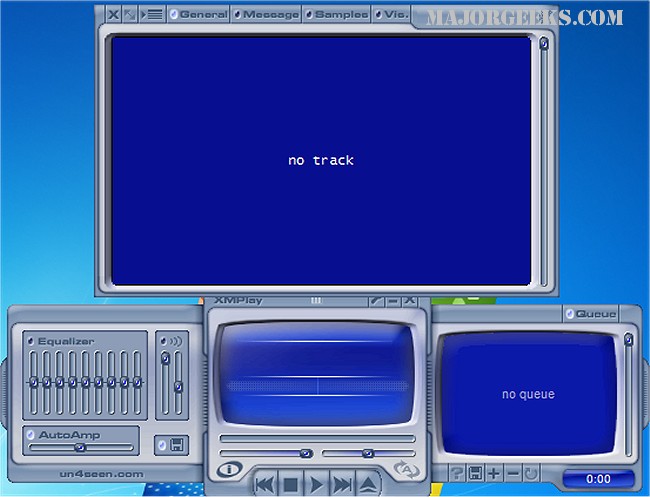
XMPlay has recently released version 4.1.0.19 Beta and 4.1, which is a versatile audio player that supports a wide array of audio formats including OGG, MP3, WMA, WAV, and more, as well as various playlist formats such as PLS and M3U. The player was initially launched in 1998 with support for only the XM format, which is reflected in its name. Over the years, XMPlay has expanded its capabilities, now allowing for additional formats through Winamp plugins.
One of XMPlay's standout features is its user-friendly interface, which is compact and organized, allowing users to visualize their audio experience through multiple visualizations. The software is portable, requiring no installation—just unzip and start using it.
In terms of audio quality, XMPlay boasts 32/24-bit and multi-channel output, ensuring a rich listening experience. It supports gapless playback across all formats and includes advanced features like crossfading, automatic gain control, a nine-band equalizer, and various DSP effects such as reverb. Streaming capabilities are also included, enabling users to stream audio files from FTP and HTTP servers, including popular services like Shoutcast and Icecast.
Additional features of XMPlay include customizable track title formatting, a comprehensive library for easy access to stored tracks, and the ability to save preset settings for specific audio files. Users can write audio files to disk in various bit-depths, utilize external encoders, and have complete control over keyboard shortcuts.
The software also offers integration with Windows Explorer, allowing for drag-and-drop functionality and clipboard monitoring for playable URLs. It supports loading files from compressed archives and offers Unicode support for various languages. Lastly, XMPlay is compatible with Sonique plugins for visualizations, enhancing the overall user experience.
In summary, XMPlay is a robust audio player that combines high-quality output with extensive format support and a range of user-friendly features, making it an excellent choice for audiophiles and casual listeners alike. With continuous updates, it remains a relevant option in the evolving landscape of audio playback software
One of XMPlay's standout features is its user-friendly interface, which is compact and organized, allowing users to visualize their audio experience through multiple visualizations. The software is portable, requiring no installation—just unzip and start using it.
In terms of audio quality, XMPlay boasts 32/24-bit and multi-channel output, ensuring a rich listening experience. It supports gapless playback across all formats and includes advanced features like crossfading, automatic gain control, a nine-band equalizer, and various DSP effects such as reverb. Streaming capabilities are also included, enabling users to stream audio files from FTP and HTTP servers, including popular services like Shoutcast and Icecast.
Additional features of XMPlay include customizable track title formatting, a comprehensive library for easy access to stored tracks, and the ability to save preset settings for specific audio files. Users can write audio files to disk in various bit-depths, utilize external encoders, and have complete control over keyboard shortcuts.
The software also offers integration with Windows Explorer, allowing for drag-and-drop functionality and clipboard monitoring for playable URLs. It supports loading files from compressed archives and offers Unicode support for various languages. Lastly, XMPlay is compatible with Sonique plugins for visualizations, enhancing the overall user experience.
In summary, XMPlay is a robust audio player that combines high-quality output with extensive format support and a range of user-friendly features, making it an excellent choice for audiophiles and casual listeners alike. With continuous updates, it remains a relevant option in the evolving landscape of audio playback software
XMPlay 4.1.0.19 Beta / 4.1 released
XMPlay is an audio player that supports OGG / MP3 / MP2 / MP1 / WMA / WAV / AIFF / CDA / MO3 / IT / XM / S3M / MTM / MOD / UMX audio formats, PLS / M3U / ASX / WAX / CUE playlists, and ZIP archives.