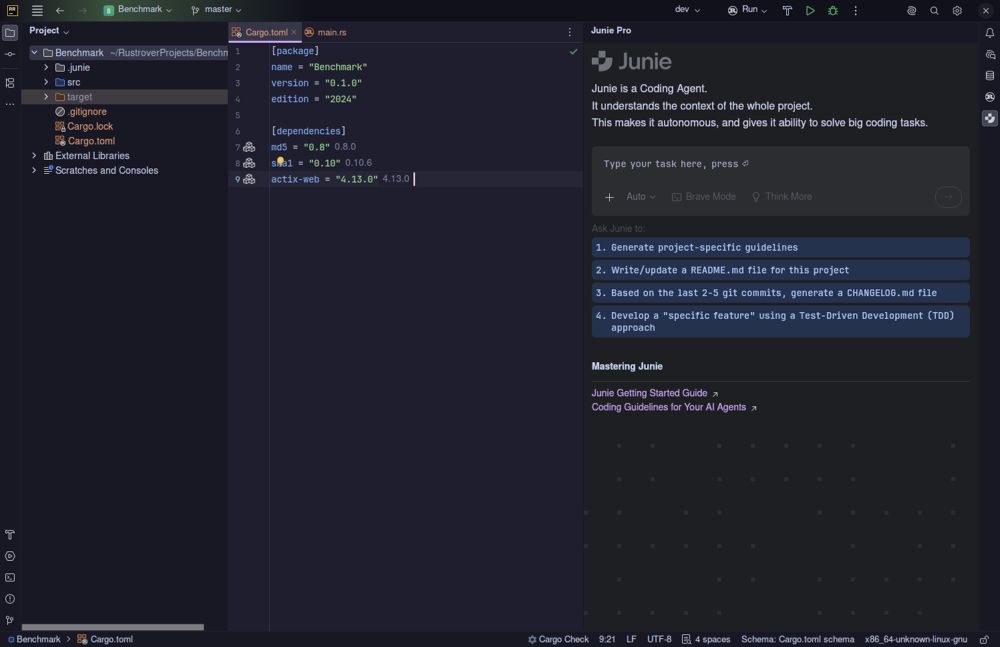
The latest release of RustRover by JetBrains, version 2026.1.3, aims to streamline the Rust development experience by eliminating the need for extensive plugin hunting and configuration. This integrated development environment (IDE) comes equipped with all essential tools needed for writing, testing, and debugging Rust code right from the start, including built-in AI capabilities, database tools, and real-time collaboration features.
Key Features of RustRover IDE
1. Out-of-the-Box Functionality: RustRover bypasses the typical setup process by including Cargo support, TOML file editing, remote development, and Docker management in its base install. Users simply need to point the IDE at their Cargo.toml file to get started, which significantly reduces setup time compared to traditional IDEs that require manual plugin installations.
2. Performance Considerations: While RustRover is feature-rich, it is known to consume substantial system memory, which could lead to slowdowns on machines with lower RAM. Users with modern hardware should experience smooth performance, but those on older systems may need to manage background processes to maintain responsiveness.
3. AI Integration: RustRover incorporates advanced AI features that enhance code completion and context understanding. Users can connect to various AI models like Claude, GPT-4, and others, facilitating a more intuitive coding experience. The IDE’s AI can accurately suggest edits and infer error handling patterns, which is beneficial for complex Rust coding tasks.
4. Collaboration and Git Integration: The IDE supports real-time collaboration and detailed Git integration, allowing developers to work together seamlessly across different locations. It also includes database tools derived from JetBrains' DataGrip, which provide an efficient way to manage database connections and queries within the same environment.
5. Free License Availability: JetBrains offers a free non-commercial license, which is particularly advantageous for hobbyists, learners, and open-source contributors. However, any work that is part of paid employment or commercial development requires a paid license.
Pros and Cons of RustRover IDE
- Pros:
- Zero-config setup with comprehensive support for Cargo, TOML, and debugging.
- Intelligent AI integration tailored to Rust development.
- Built-in database and Docker management reduces the need for multiple applications.
- Free usage for non-commercial projects and educational purposes.
- Cons:
- High RAM usage can hinder performance on older systems.
- Commercial usage necessitates a paid license, which might be a barrier for small teams.
- The UI may appear cluttered for users who only require basic functionality.
- Limited plugin ecosystem compared to more established editors like VS Code.
Conclusion
RustRover presents a polished and efficient IDE that caters specifically to Rust developers. It reduces the friction typically associated with project setup, allowing developers to focus more on coding rather than configuration. While the IDE’s resource demands might be challenging for some users, its robust features and free licensing for non-commercial use make it a compelling choice for many Rust enthusiasts. For users seeking a seamless coding experience, RustRover is worth considering, especially for those who prefer a comprehensive tool that minimizes the need for additional plugins and configurations.
As Rust continues to grow in popularity, tools like RustRover will likely evolve further, potentially incorporating even more features and enhancements to support the developer community
Key Features of RustRover IDE
1. Out-of-the-Box Functionality: RustRover bypasses the typical setup process by including Cargo support, TOML file editing, remote development, and Docker management in its base install. Users simply need to point the IDE at their Cargo.toml file to get started, which significantly reduces setup time compared to traditional IDEs that require manual plugin installations.
2. Performance Considerations: While RustRover is feature-rich, it is known to consume substantial system memory, which could lead to slowdowns on machines with lower RAM. Users with modern hardware should experience smooth performance, but those on older systems may need to manage background processes to maintain responsiveness.
3. AI Integration: RustRover incorporates advanced AI features that enhance code completion and context understanding. Users can connect to various AI models like Claude, GPT-4, and others, facilitating a more intuitive coding experience. The IDE’s AI can accurately suggest edits and infer error handling patterns, which is beneficial for complex Rust coding tasks.
4. Collaboration and Git Integration: The IDE supports real-time collaboration and detailed Git integration, allowing developers to work together seamlessly across different locations. It also includes database tools derived from JetBrains' DataGrip, which provide an efficient way to manage database connections and queries within the same environment.
5. Free License Availability: JetBrains offers a free non-commercial license, which is particularly advantageous for hobbyists, learners, and open-source contributors. However, any work that is part of paid employment or commercial development requires a paid license.
Pros and Cons of RustRover IDE
- Pros:
- Zero-config setup with comprehensive support for Cargo, TOML, and debugging.
- Intelligent AI integration tailored to Rust development.
- Built-in database and Docker management reduces the need for multiple applications.
- Free usage for non-commercial projects and educational purposes.
- Cons:
- High RAM usage can hinder performance on older systems.
- Commercial usage necessitates a paid license, which might be a barrier for small teams.
- The UI may appear cluttered for users who only require basic functionality.
- Limited plugin ecosystem compared to more established editors like VS Code.
Conclusion
RustRover presents a polished and efficient IDE that caters specifically to Rust developers. It reduces the friction typically associated with project setup, allowing developers to focus more on coding rather than configuration. While the IDE’s resource demands might be challenging for some users, its robust features and free licensing for non-commercial use make it a compelling choice for many Rust enthusiasts. For users seeking a seamless coding experience, RustRover is worth considering, especially for those who prefer a comprehensive tool that minimizes the need for additional plugins and configurations.
As Rust continues to grow in popularity, tools like RustRover will likely evolve further, potentially incorporating even more features and enhancements to support the developer community
RustRover 2026.1.3 released
RustRover drops the plugin hunting and config headaches by shipping with everything needed to write, test, and debug Rust code right out of the box.