Joplin 3.6.15 has been released, enhancing the functionality of this Open Source note-taking application that efficiently manages a vast number of notes organized into notebooks. This application stores notes in markdown format, allowing for easy searching, editing, and tagging, either directly within Joplin or through any text editor. A notable feature is its ability to import notes from Evernote, making it accessible for users transitioning from that platform.
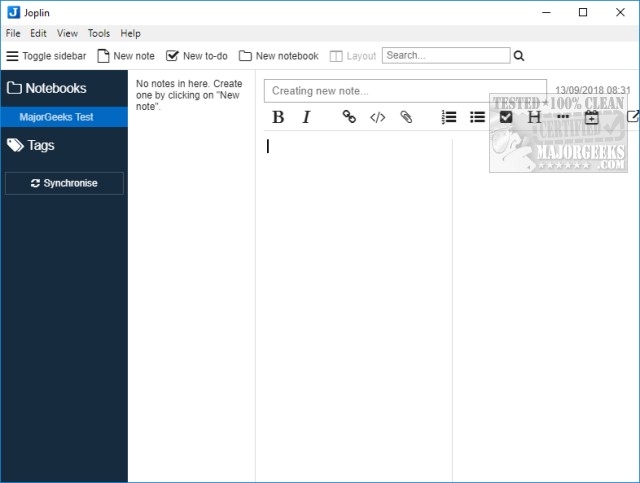
Joplin is designed with user-friendliness in mind; its intuitive layout ensures a smooth experience without a learning curve. Users can effortlessly create new notes, to-do lists, or notebooks from the top navigation bar. The interface offers flexibility with options to toggle the sidebar and adjust layout preferences. It also includes various formatting options typical of text editors, such as bold, italic, copy, and paste.
A key advantage of Joplin is its portability. Users can download a portable version for on-the-go access and can sync their notes with popular cloud services like Dropbox and OneDrive, ensuring that their notes are secure and easily retrievable from anywhere.
The application is highly regarded for its thoughtful design and functionality, making it a strong choice for individuals who frequently take notes and require effective organization and backup solutions. The developer accepts donations to support the ongoing development of the application, which can be done through the program's interface or the author's website.
In addition to its primary features, Joplin could benefit from future updates that enhance collaboration tools, such as shared notebooks or real-time editing capabilities, making it even more versatile for teams and group projects. Integrating additional organizational tools, like tags or categories, may also improve user experience, catering to varied note-taking styles. Overall, Joplin stands out as a comprehensive note-taking solution for both personal and professional use
Joplin is designed with user-friendliness in mind; its intuitive layout ensures a smooth experience without a learning curve. Users can effortlessly create new notes, to-do lists, or notebooks from the top navigation bar. The interface offers flexibility with options to toggle the sidebar and adjust layout preferences. It also includes various formatting options typical of text editors, such as bold, italic, copy, and paste.
A key advantage of Joplin is its portability. Users can download a portable version for on-the-go access and can sync their notes with popular cloud services like Dropbox and OneDrive, ensuring that their notes are secure and easily retrievable from anywhere.
The application is highly regarded for its thoughtful design and functionality, making it a strong choice for individuals who frequently take notes and require effective organization and backup solutions. The developer accepts donations to support the ongoing development of the application, which can be done through the program's interface or the author's website.
In addition to its primary features, Joplin could benefit from future updates that enhance collaboration tools, such as shared notebooks or real-time editing capabilities, making it even more versatile for teams and group projects. Integrating additional organizational tools, like tags or categories, may also improve user experience, catering to varied note-taking styles. Overall, Joplin stands out as a comprehensive note-taking solution for both personal and professional use
Joplin 3.6.15 released
Joplin is an Open Source note-taking application that can handle a large number of notes organized into notebooks.