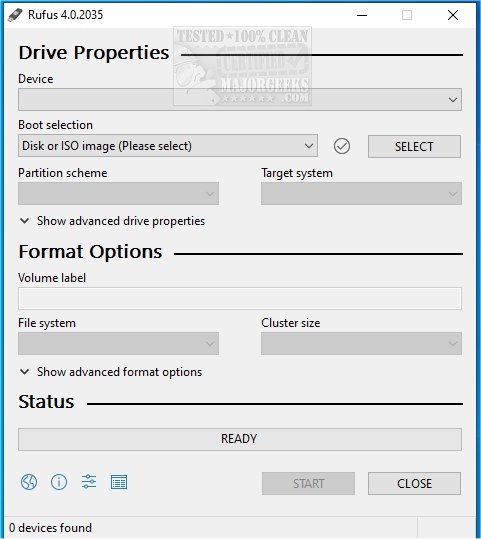
Rufus 4.16 Beta and 4.15 have been released, enhancing its functionality as a small Open Source utility designed for quickly formatting and creating bootable USB flash drives. This tool is especially useful for tasks such as installing operating systems, running diagnostics, or flashing firmware, making the process fast, simple, and reliable.
One of the key new features in Rufus is its integration with Fido, enabling users to download Windows 10 and 8.1 ISO files directly from Microsoft servers. This feature is accompanied by a video guide to help users navigate the process. Rufus stands out among similar utilities due to its speed, support for various file formats, and compatibility with both BIOS and UEFI systems.
There are numerous scenarios where Rufus proves invaluable. It allows for the quick creation of bootable installation drives for Windows or Linux, and can also assist in creating rescue disks for system repair. Moreover, Rufus is frequently used for firmware flashing and BIOS updates, ensuring systems remain current. It provides the ability to run live operating systems, which allows users to boot into Linux without the need for installation on their hard drives. For IT professionals, Rufus is essential for troubleshooting and maintaining multiple machines. However, it is worth noting that Rufus is best suited for creating a bootable USB drive for a single OS; users seeking to store multiple operating systems on one drive might consider alternatives like Ventoy.
Rufus boasts a range of powerful features, including support for various ISO files, persistent storage for Linux users, advanced partition options, and features that bypass Secure Boot and TPM, allowing Windows 11 installation on unsupported hardware. The tool also includes automatic bad block detection and low-level formatting capabilities, which are beneficial for power users and IT professionals who utilize command-line support for scripting and automation.
For safe USB creation, users should keep in mind that all data on the USB will be erased, and Mac users will need to find alternative tools like BalenaEtcher, as Rufus is Windows-only. Additionally, some ISOs may require special configurations, and selecting the appropriate partition scheme is crucial for compatibility with the system.
In conclusion, Rufus is an outstanding tool for creating bootable USB drives, earning a place in the "Ultimate 25 for 2025" list due to its lightweight design, speed, and comprehensive features. Users are encouraged to download Rufus to streamline their bootable USB creation process.
Extended Summary:
As Rufus continues to evolve, it remains a go-to solution for both casual users and IT professionals alike. The integration with Fido is particularly significant, as it simplifies the process of obtaining Windows ISOs directly from Microsoft, ensuring users have access to the latest versions. The tool's versatility means it can cater to a wide range of needs, from personal use to enterprise-level solutions, further solidifying its reputation in the tech community.
As technology advances and the need for efficient OS installations persists, Rufus is likely to introduce even more features that enhance usability and functionality. Future updates could potentially include support for more file systems, improved user interfaces, and expanded compatibility with different operating systems. As such, Rufus is not just a tool for today but is positioned to adapt and grow with the changing landscape of technology and user requirements. For anyone looking to create bootable USB drives efficiently, Rufus remains an essential application
One of the key new features in Rufus is its integration with Fido, enabling users to download Windows 10 and 8.1 ISO files directly from Microsoft servers. This feature is accompanied by a video guide to help users navigate the process. Rufus stands out among similar utilities due to its speed, support for various file formats, and compatibility with both BIOS and UEFI systems.
There are numerous scenarios where Rufus proves invaluable. It allows for the quick creation of bootable installation drives for Windows or Linux, and can also assist in creating rescue disks for system repair. Moreover, Rufus is frequently used for firmware flashing and BIOS updates, ensuring systems remain current. It provides the ability to run live operating systems, which allows users to boot into Linux without the need for installation on their hard drives. For IT professionals, Rufus is essential for troubleshooting and maintaining multiple machines. However, it is worth noting that Rufus is best suited for creating a bootable USB drive for a single OS; users seeking to store multiple operating systems on one drive might consider alternatives like Ventoy.
Rufus boasts a range of powerful features, including support for various ISO files, persistent storage for Linux users, advanced partition options, and features that bypass Secure Boot and TPM, allowing Windows 11 installation on unsupported hardware. The tool also includes automatic bad block detection and low-level formatting capabilities, which are beneficial for power users and IT professionals who utilize command-line support for scripting and automation.
For safe USB creation, users should keep in mind that all data on the USB will be erased, and Mac users will need to find alternative tools like BalenaEtcher, as Rufus is Windows-only. Additionally, some ISOs may require special configurations, and selecting the appropriate partition scheme is crucial for compatibility with the system.
In conclusion, Rufus is an outstanding tool for creating bootable USB drives, earning a place in the "Ultimate 25 for 2025" list due to its lightweight design, speed, and comprehensive features. Users are encouraged to download Rufus to streamline their bootable USB creation process.
Extended Summary:
As Rufus continues to evolve, it remains a go-to solution for both casual users and IT professionals alike. The integration with Fido is particularly significant, as it simplifies the process of obtaining Windows ISOs directly from Microsoft, ensuring users have access to the latest versions. The tool's versatility means it can cater to a wide range of needs, from personal use to enterprise-level solutions, further solidifying its reputation in the tech community.
As technology advances and the need for efficient OS installations persists, Rufus is likely to introduce even more features that enhance usability and functionality. Future updates could potentially include support for more file systems, improved user interfaces, and expanded compatibility with different operating systems. As such, Rufus is not just a tool for today but is positioned to adapt and grow with the changing landscape of technology and user requirements. For anyone looking to create bootable USB drives efficiently, Rufus remains an essential application
Rufus 4.16 Beta / 4.15 released
Rufus is a small Open Source utility that helps quickly format and creates bootable USB flash drives, such as USB keys/pen drives, memory sticks, etc. Rufus is now integrated with Fido to download Windows 10 and 8.1 ISOs from Microsoft servers. Video guide available.