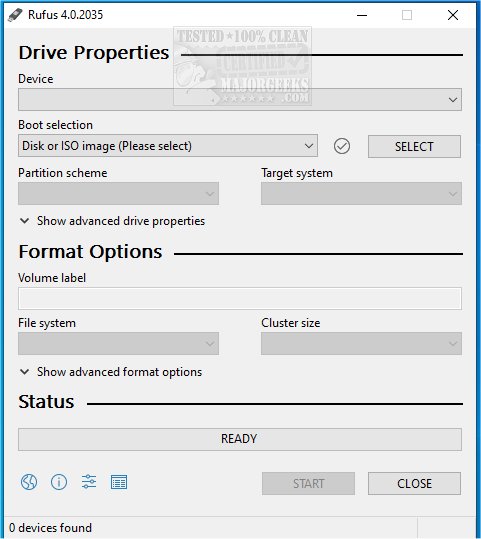
Rufus is a lightweight and open-source utility designed for quickly formatting and creating bootable USB flash drives, such as USB keys and memory sticks. The latest version integrates with Fido, allowing users to download Windows 10 and 8.1 ISOs directly from Microsoft servers, enhancing its utility for OS installations. A video guide is available for those who prefer visual instructions.
Why Choose Rufus?
Rufus stands out as a go-to tool for anyone working with ISO files or needing to set up bootable USB drives. Some of its key features include:
- Fast Bootable USB Creation: Ideal for installing Windows, Linux, or other operating systems.
- Portability: No installation is required, allowing for instant use.
- Compatibility: Works with both UEFI and Legacy BIOS systems.
- Open Source: Free to use without ads or unnecessary bloat.
Perfect Scenarios for Using Rufus
Rufus is particularly useful in various situations, such as:
- Creating bootable installation drives for operating systems.
- Recovering and repairing systems that fail to boot by generating rescue disks.
- Flashing firmware and updating BIOS to keep systems current.
- Running live operating systems, which allows users to test Linux without installation.
For IT professionals and tech support teams, Rufus is an invaluable tool for troubleshooting and maintaining multiple machines.
However, it's worth noting that Rufus specializes in creating a single OS bootable drive. If users require multiple operating systems on one USB drive, alternatives like Ventoy may be more suitable.
Additional Features & Benefits
Rufus is equipped with numerous features that enhance its functionality:
- Support for Various ISO Files: Compatible with Windows, Linux distros, and rescue disks.
- Persistent Storage: Allows Linux users to save files and settings across reboots.
- Advanced Partition Options: Choose between MBR and GPT for better compatibility.
- Secure Boot and TPM Bypass: Facilitates installing Windows 11 on unsupported hardware.
- Automatic Bad Block Detection: Ensures reliability by checking USB drives before data writing.
- Low-Level Formatting: Enables complete erasure and restoration of USB drives.
- Command-Line Support: Simplifies scripting and automation for advanced users.
Tips for Safe USB Creation
- Backup Data: Always back up important files before using Rufus, as it will erase existing data on the USB.
- Windows-Only: Rufus does not support Mac, requiring users to seek alternatives like BalenaEtcher.
- ISO Configurations: Some Linux distros and Windows versions may need specific configurations.
- Partition Scheme: Select GPT for UEFI systems and MBR for BIOS to ensure proper compatibility.
Geek Verdict
Rufus is regarded as one of the best tools for creating bootable USB drives, earning its place in the "Ultimate 25 for 2025" list. Its combination of speed, lightweight design, and robust features makes it an essential tool for OS installations and system recovery. Users are encouraged to download Rufus for a seamless bootable USB creation experience.
Similar Resources:
- Explore the 11 Best Linux Distributions for Windows Users.
- Learn How to Optimize USB Drives for Better Performance.
- Understand What an SS USB Port Is.
In conclusion, Rufus continues to be a top choice for anyone needing reliable USB drive functionality, with frequent updates enhancing its capabilities and user experience
Why Choose Rufus?
Rufus stands out as a go-to tool for anyone working with ISO files or needing to set up bootable USB drives. Some of its key features include:
- Fast Bootable USB Creation: Ideal for installing Windows, Linux, or other operating systems.
- Portability: No installation is required, allowing for instant use.
- Compatibility: Works with both UEFI and Legacy BIOS systems.
- Open Source: Free to use without ads or unnecessary bloat.
Perfect Scenarios for Using Rufus
Rufus is particularly useful in various situations, such as:
- Creating bootable installation drives for operating systems.
- Recovering and repairing systems that fail to boot by generating rescue disks.
- Flashing firmware and updating BIOS to keep systems current.
- Running live operating systems, which allows users to test Linux without installation.
For IT professionals and tech support teams, Rufus is an invaluable tool for troubleshooting and maintaining multiple machines.
However, it's worth noting that Rufus specializes in creating a single OS bootable drive. If users require multiple operating systems on one USB drive, alternatives like Ventoy may be more suitable.
Additional Features & Benefits
Rufus is equipped with numerous features that enhance its functionality:
- Support for Various ISO Files: Compatible with Windows, Linux distros, and rescue disks.
- Persistent Storage: Allows Linux users to save files and settings across reboots.
- Advanced Partition Options: Choose between MBR and GPT for better compatibility.
- Secure Boot and TPM Bypass: Facilitates installing Windows 11 on unsupported hardware.
- Automatic Bad Block Detection: Ensures reliability by checking USB drives before data writing.
- Low-Level Formatting: Enables complete erasure and restoration of USB drives.
- Command-Line Support: Simplifies scripting and automation for advanced users.
Tips for Safe USB Creation
- Backup Data: Always back up important files before using Rufus, as it will erase existing data on the USB.
- Windows-Only: Rufus does not support Mac, requiring users to seek alternatives like BalenaEtcher.
- ISO Configurations: Some Linux distros and Windows versions may need specific configurations.
- Partition Scheme: Select GPT for UEFI systems and MBR for BIOS to ensure proper compatibility.
Geek Verdict
Rufus is regarded as one of the best tools for creating bootable USB drives, earning its place in the "Ultimate 25 for 2025" list. Its combination of speed, lightweight design, and robust features makes it an essential tool for OS installations and system recovery. Users are encouraged to download Rufus for a seamless bootable USB creation experience.
Similar Resources:
- Explore the 11 Best Linux Distributions for Windows Users.
- Learn How to Optimize USB Drives for Better Performance.
- Understand What an SS USB Port Is.
In conclusion, Rufus continues to be a top choice for anyone needing reliable USB drive functionality, with frequent updates enhancing its capabilities and user experience
Rufus 4.15 Beta / 4.14 released
Rufus is a small Open Source utility that helps quickly format and creates bootable USB flash drives, such as USB keys/pen drives, memory sticks, etc. Rufus is now integrated with Fido to download Windows 10 and 8.1 ISOs from Microsoft servers. Video guide available.