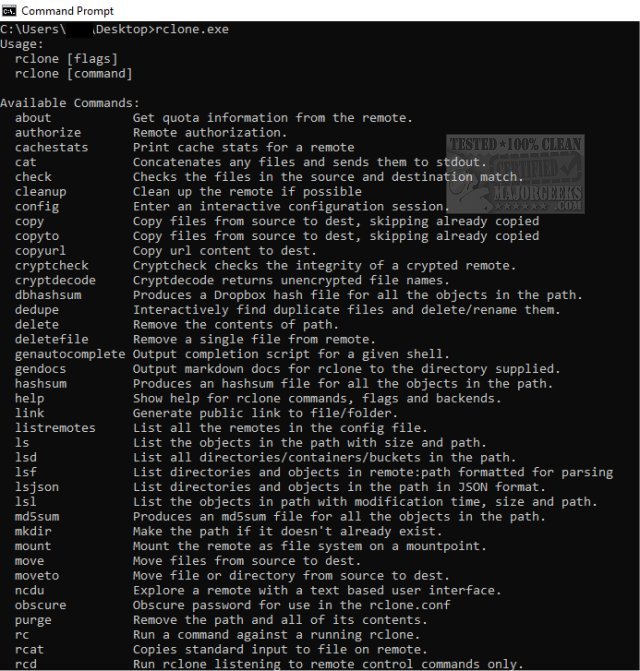
Rclone, a robust command-line tool, has been updated to version 1.74.3. This versatile program is designed for seamless synchronization of files and directories between various cloud storage services and local file systems. Rclone serves as a powerful alternative to the web-based interfaces provided by cloud vendors, allowing users to efficiently transfer, sync, and back up files across popular platforms such as Google Drive, Dropbox, and Amazon S3.
Key Features and Functionality
Rclone stands out for its extensive range of features, including:
- File Management Capabilities: Rclone mirrors functionalities of common Unix commands, such as `rsync` for synchronization, `cp` for copying, `mv` for moving files, and `mount` for remote file systems. It can also perform operations akin to `ls`, `ncdu`, `tree`, `rm`, and `cat`.
- User-Friendly Syntax: The tool supports shell pipelines, allowing users to efficiently process and manipulate files in a familiar manner. It also includes a dry-run option for safe file operations, enabling users to preview changes prior to execution.
- Versatility in Usage: Rclone can be run directly from the command line, integrated into automated scripts, or accessed via its API, making it suitable for both casual users and developers.
Supported Cloud Storage Services
Rclone is compatible with over 70 cloud storage products, offering a wide array of options for users. Supported services include:
- 1Fichier
- Alibaba Cloud OSS
- Amazon Drive and S3
- Backblaze B2
- Dropbox
- Google Drive and Google Cloud Storage
- Microsoft OneDrive and Azure Blob Storage
- And many more, including FTP, WebDAV, and SFTP.
Advanced Features
Rclone also provides advanced features that enhance its capabilities, such as:
- Continuous checks for file integrity using MD5/SHA1 hashes.
- Preservation of file timestamps.
- Support for partial and one-way syncs.
- Options for encryption, caching, and chunking.
- Multi-threaded downloads for improved efficiency.
- Experimental web-based GUI for easier management.
Conclusion
Rclone is an invaluable tool for anyone looking to optimize their cloud storage experience, whether for personal use or professional file management tasks. With its extensive feature set and compatibility with numerous cloud services, Rclone simplifies the complexities of managing files across diverse storage solutions. Its latest version, 1.74.3, continues to enhance the user experience, further solidifying its position as a leading tool in the realm of cloud storage management
Key Features and Functionality
Rclone stands out for its extensive range of features, including:
- File Management Capabilities: Rclone mirrors functionalities of common Unix commands, such as `rsync` for synchronization, `cp` for copying, `mv` for moving files, and `mount` for remote file systems. It can also perform operations akin to `ls`, `ncdu`, `tree`, `rm`, and `cat`.
- User-Friendly Syntax: The tool supports shell pipelines, allowing users to efficiently process and manipulate files in a familiar manner. It also includes a dry-run option for safe file operations, enabling users to preview changes prior to execution.
- Versatility in Usage: Rclone can be run directly from the command line, integrated into automated scripts, or accessed via its API, making it suitable for both casual users and developers.
Supported Cloud Storage Services
Rclone is compatible with over 70 cloud storage products, offering a wide array of options for users. Supported services include:
- 1Fichier
- Alibaba Cloud OSS
- Amazon Drive and S3
- Backblaze B2
- Dropbox
- Google Drive and Google Cloud Storage
- Microsoft OneDrive and Azure Blob Storage
- And many more, including FTP, WebDAV, and SFTP.
Advanced Features
Rclone also provides advanced features that enhance its capabilities, such as:
- Continuous checks for file integrity using MD5/SHA1 hashes.
- Preservation of file timestamps.
- Support for partial and one-way syncs.
- Options for encryption, caching, and chunking.
- Multi-threaded downloads for improved efficiency.
- Experimental web-based GUI for easier management.
Conclusion
Rclone is an invaluable tool for anyone looking to optimize their cloud storage experience, whether for personal use or professional file management tasks. With its extensive feature set and compatibility with numerous cloud services, Rclone simplifies the complexities of managing files across diverse storage solutions. Its latest version, 1.74.3, continues to enhance the user experience, further solidifying its position as a leading tool in the realm of cloud storage management
Rclone 1.74.3 released
Rclone is a powerful Command Line tool designed for synchronizing files and directories between a wide range of cloud storage services and local file systems.