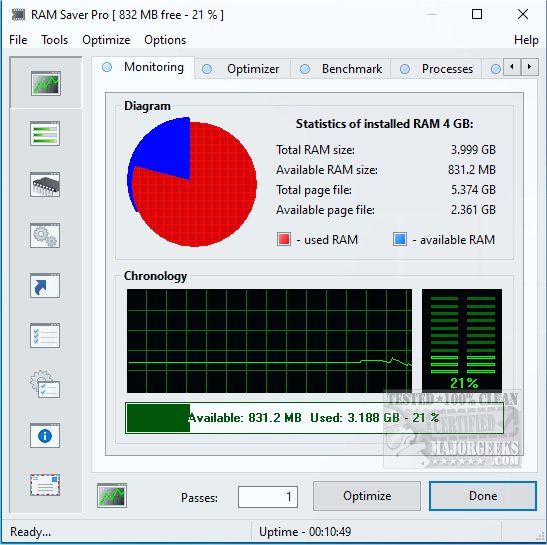
Ram Saver Pro is a specialized RAM optimizer specifically designed for Windows operating systems, aimed at enhancing system performance by managing memory more effectively. This tool is particularly beneficial for users experiencing slowdowns after opening multiple browser tabs or running several applications simultaneously. By optimizing RAM usage, Ram Saver Pro can significantly speed up older computers or heavily utilized systems without the need for hardware upgrades.
Key Functionality of Ram Saver Pro
Understanding that Windows may struggle with efficient memory management—especially when background applications accumulate—Ram Saver Pro actively monitors RAM usage in real time. It works by clearing unused memory and optimizing active processes, thereby restoring system performance. Users can view detailed statistics regarding memory usage, including how much is free and what processes are consuming the most resources. The application can be set to automatically optimize memory on a schedule, or users can manually trigger optimization whenever the system feels sluggish.
Notable Features Include:
- Real-Time RAM Monitoring: Provides live tracking of memory performance through a user-friendly interface.
- One-Click RAM Optimization: Instantly frees up unused memory, enhancing performance during resource-intensive tasks like gaming or video editing.
- System Tray Integration: Offers quick access to controls without needing to open the full application.
- Memory Benchmarking Tool: Allows users to assess their system’s performance with built-in tests.
- Startup Manager: Enables users to delay or disable background applications that hinder boot times.
Target Audience
Ram Saver Pro is especially useful for users operating older Windows desktops or budget laptops with limited RAM (typically between 4-8 GB). It also benefits those who manage many browser tabs or use memory-intensive software such as Photoshop or integrated development environments (IDEs). Even casual users will find value in minimizing slowdowns during routine tasks like streaming, emailing, or document editing.
Pros and Cons
Pros:
- Effective real-time RAM optimization.
- Lightweight and minimal impact on system resources.
- Customizable features, including scheduling and automatic adjustments.
- Bundled with useful system tools.
Cons:
- The interface may feel outdated compared to modern Windows applications.
- Some features are only available in the paid version.
- No portable version available for use on different devices.
Geek Verdict
Ram Saver Pro stands out as a minor utility with significant capabilities. While Windows includes basic memory management, this tool offers enhanced control and insights that can greatly benefit systems with limited RAM. Though not visually impressive, it is functional and straightforward, making it a practical option for those experiencing sluggish performance. Whether engaged in gaming, video editing, or multitasking with various applications, Ram Saver Pro can help maintain smooth operations with minimal effort.
Conclusion and Future Considerations
As technology continues to evolve, it remains essential for software tools like Ram Saver Pro to adapt and improve. Future iterations could enhance the user interface for a more modern feel, expand free features, or introduce a portable version for users on the go. Overall, Ram Saver Pro is a valuable asset for Windows users seeking to optimize their system's performance efficiently
Key Functionality of Ram Saver Pro
Understanding that Windows may struggle with efficient memory management—especially when background applications accumulate—Ram Saver Pro actively monitors RAM usage in real time. It works by clearing unused memory and optimizing active processes, thereby restoring system performance. Users can view detailed statistics regarding memory usage, including how much is free and what processes are consuming the most resources. The application can be set to automatically optimize memory on a schedule, or users can manually trigger optimization whenever the system feels sluggish.
Notable Features Include:
- Real-Time RAM Monitoring: Provides live tracking of memory performance through a user-friendly interface.
- One-Click RAM Optimization: Instantly frees up unused memory, enhancing performance during resource-intensive tasks like gaming or video editing.
- System Tray Integration: Offers quick access to controls without needing to open the full application.
- Memory Benchmarking Tool: Allows users to assess their system’s performance with built-in tests.
- Startup Manager: Enables users to delay or disable background applications that hinder boot times.
Target Audience
Ram Saver Pro is especially useful for users operating older Windows desktops or budget laptops with limited RAM (typically between 4-8 GB). It also benefits those who manage many browser tabs or use memory-intensive software such as Photoshop or integrated development environments (IDEs). Even casual users will find value in minimizing slowdowns during routine tasks like streaming, emailing, or document editing.
Pros and Cons
Pros:
- Effective real-time RAM optimization.
- Lightweight and minimal impact on system resources.
- Customizable features, including scheduling and automatic adjustments.
- Bundled with useful system tools.
Cons:
- The interface may feel outdated compared to modern Windows applications.
- Some features are only available in the paid version.
- No portable version available for use on different devices.
Geek Verdict
Ram Saver Pro stands out as a minor utility with significant capabilities. While Windows includes basic memory management, this tool offers enhanced control and insights that can greatly benefit systems with limited RAM. Though not visually impressive, it is functional and straightforward, making it a practical option for those experiencing sluggish performance. Whether engaged in gaming, video editing, or multitasking with various applications, Ram Saver Pro can help maintain smooth operations with minimal effort.
Conclusion and Future Considerations
As technology continues to evolve, it remains essential for software tools like Ram Saver Pro to adapt and improve. Future iterations could enhance the user interface for a more modern feel, expand free features, or introduce a portable version for users on the go. Overall, Ram Saver Pro is a valuable asset for Windows users seeking to optimize their system's performance efficiently
Ram Saver Pro 26.4.1 released
Ram Saver Pro is a RAM optimizer for Windows that gives you direct control over your system's memory management.