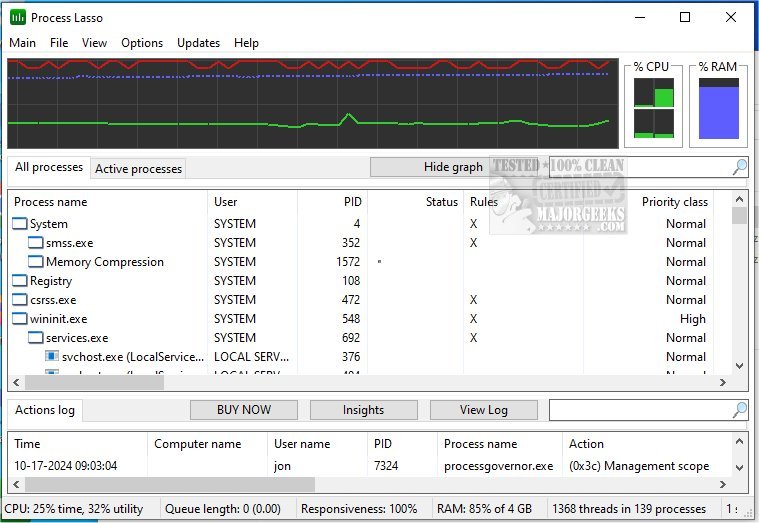
Process Lasso has announced the release of version 18.0.1.24, a free tool that enhances the management and editing of processes and services on your computer. This software provides users with a comprehensive array of features that optimize system performance and resource allocation.
Key features of Process Lasso include:
- ProBalance: A dynamic priority optimization tool that helps maintain system responsiveness during high CPU loads.
- Persistent Priorities and CPU Affinities: Allows users to set default priorities and CPU affinities for processes to ensure optimal performance.
- Instance Count Limits: Users can impose limits on how many instances of a process can run simultaneously.
- Disallowed Processes: The tool can terminate processes that are deemed undesirable or unnecessary.
- Keep Processes Running: Ensures that important processes are kept alive by automatically restarting them if they crash.
- Unique System Responsiveness Graph: Provides real-time visual feedback on system performance and responsiveness.
- Prevent PC Sleep for Designated Processes: Ensures that certain processes continue running without interruption.
- Differentiation of svchost.exe Instances: Offers insights into different instances of this common Windows process.
- Low Resource Use: The application is designed to be lightweight, requiring as little as 1MB of RAM.
- Event Logging: Keeps a record of process activities for user review.
In addition to its primary functionalities, Process Lasso can be particularly useful for users looking to optimize their system's performance and manage resource-intensive applications effectively.
Furthermore, users looking to enhance their knowledge of process management can explore related topics, such as identifying processes and services on their computers, saving text files of running processes, customizing process information in Task Manager, and managing startup applications in Windows 10 and 11.
As technology continues to evolve, tools like Process Lasso remain essential for users seeking to maximize their system's efficiency and stability. The latest version promises even greater enhancements, making it a valuable resource for both casual users and professionals alike
Key features of Process Lasso include:
- ProBalance: A dynamic priority optimization tool that helps maintain system responsiveness during high CPU loads.
- Persistent Priorities and CPU Affinities: Allows users to set default priorities and CPU affinities for processes to ensure optimal performance.
- Instance Count Limits: Users can impose limits on how many instances of a process can run simultaneously.
- Disallowed Processes: The tool can terminate processes that are deemed undesirable or unnecessary.
- Keep Processes Running: Ensures that important processes are kept alive by automatically restarting them if they crash.
- Unique System Responsiveness Graph: Provides real-time visual feedback on system performance and responsiveness.
- Prevent PC Sleep for Designated Processes: Ensures that certain processes continue running without interruption.
- Differentiation of svchost.exe Instances: Offers insights into different instances of this common Windows process.
- Low Resource Use: The application is designed to be lightweight, requiring as little as 1MB of RAM.
- Event Logging: Keeps a record of process activities for user review.
In addition to its primary functionalities, Process Lasso can be particularly useful for users looking to optimize their system's performance and manage resource-intensive applications effectively.
Furthermore, users looking to enhance their knowledge of process management can explore related topics, such as identifying processes and services on their computers, saving text files of running processes, customizing process information in Task Manager, and managing startup applications in Windows 10 and 11.
As technology continues to evolve, tools like Process Lasso remain essential for users seeking to maximize their system's efficiency and stability. The latest version promises even greater enhancements, making it a valuable resource for both casual users and professionals alike
Process Lasso 18.0.1.24 released
Process Lasso is a free tool designed to manage and edit how your processes and services run.