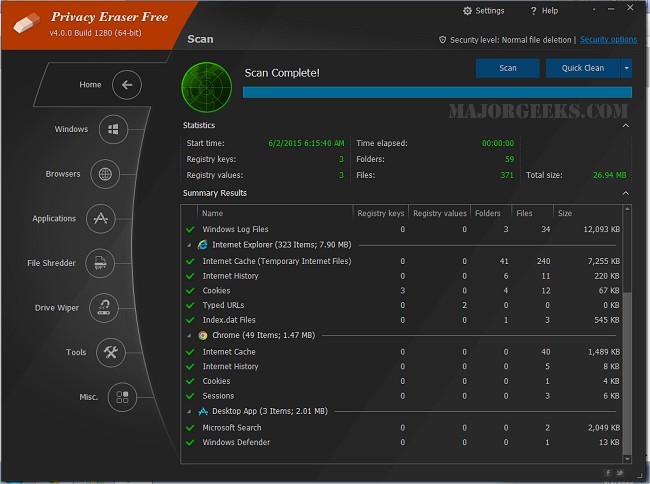
Privacy Eraser is a comprehensive software tool designed to enhance user privacy and optimize computer performance. It not only cleans your hard drive but also functions as a privacy suite that safeguards your personal information against potential threats from trackers and advertisers. A video tutorial is available for those seeking guidance on how to utilize its features effectively.
Key Features and Benefits
Privacy Eraser effectively removes traces of both online and offline activities, contributing to a faster and more efficient system. It targets unwanted data, freeing up disk space and improving security. The software's user-friendly interface allows for easy one-click cleaning, making it accessible for beginners, while advanced users can take advantage of customizable cleaning options.
- Comprehensive Cleaning: Privacy Eraser covers a wide range of cleaning tasks, including:
- Browser Cleaning: Erases history, cookies, cache, and more from various web browsers.
- Windows Cleanup: Removes temporary files and recent document histories.
- Third-Party Application Support: Cleans residual data from popular software applications.
- Drive & File Wiping: Uses advanced methods to securely delete files beyond recovery.
- Registry Cleaning: Identifies and removes obsolete registry entries.
- Automation & Scheduling: Allows users to set automatic cleaning schedules.
Version Options
Privacy Eraser is available in both Free and Pro versions. The Free version offers essential cleaning features, while the Pro version includes additional functionalities like real-time monitoring and automated updates. The Pro version is particularly beneficial for users seeking continuous protection without manual efforts.
Considerations Before Use
While Privacy Eraser is a powerful tool for maintaining privacy and system performance, users are advised to exercise caution. Actions like file shredding and registry cleaning are irreversible, so it's crucial to double-check and maintain backups before proceeding. Drive wiping can also be time-consuming, especially when utilizing advanced deletion methods.
Pros and Cons
Pros:
- Supports various browsers and applications.
- Secure file deletion using military-grade methods.
- Automation of cleaning tasks for user convenience.
- The Free version provides core functionalities.
Cons:
- Some advanced features are only available in the Pro version.
- Registry cleaning should be approached with caution to avoid system stability issues.
Conclusion
Privacy Eraser stands out as an excellent choice for users focused on system cleanliness, enhanced security, and efficient disk space management. Its Free version delivers substantial tools, while the Pro version offers additional benefits for those needing more robust features. If maintaining privacy and optimizing performance are priorities for you, Privacy Eraser is certainly worth exploring.
Further Resources: For those interested in drive cleaning software, comparisons with other tools like CCleaner, Wise Disk Cleaner, and PrivaZer are available. Additionally, tips on using Windows storage management tools can help streamline junk file deletion and drive space analysis
Key Features and Benefits
Privacy Eraser effectively removes traces of both online and offline activities, contributing to a faster and more efficient system. It targets unwanted data, freeing up disk space and improving security. The software's user-friendly interface allows for easy one-click cleaning, making it accessible for beginners, while advanced users can take advantage of customizable cleaning options.
- Comprehensive Cleaning: Privacy Eraser covers a wide range of cleaning tasks, including:
- Browser Cleaning: Erases history, cookies, cache, and more from various web browsers.
- Windows Cleanup: Removes temporary files and recent document histories.
- Third-Party Application Support: Cleans residual data from popular software applications.
- Drive & File Wiping: Uses advanced methods to securely delete files beyond recovery.
- Registry Cleaning: Identifies and removes obsolete registry entries.
- Automation & Scheduling: Allows users to set automatic cleaning schedules.
Version Options
Privacy Eraser is available in both Free and Pro versions. The Free version offers essential cleaning features, while the Pro version includes additional functionalities like real-time monitoring and automated updates. The Pro version is particularly beneficial for users seeking continuous protection without manual efforts.
Considerations Before Use
While Privacy Eraser is a powerful tool for maintaining privacy and system performance, users are advised to exercise caution. Actions like file shredding and registry cleaning are irreversible, so it's crucial to double-check and maintain backups before proceeding. Drive wiping can also be time-consuming, especially when utilizing advanced deletion methods.
Pros and Cons
Pros:
- Supports various browsers and applications.
- Secure file deletion using military-grade methods.
- Automation of cleaning tasks for user convenience.
- The Free version provides core functionalities.
Cons:
- Some advanced features are only available in the Pro version.
- Registry cleaning should be approached with caution to avoid system stability issues.
Conclusion
Privacy Eraser stands out as an excellent choice for users focused on system cleanliness, enhanced security, and efficient disk space management. Its Free version delivers substantial tools, while the Pro version offers additional benefits for those needing more robust features. If maintaining privacy and optimizing performance are priorities for you, Privacy Eraser is certainly worth exploring.
Further Resources: For those interested in drive cleaning software, comparisons with other tools like CCleaner, Wise Disk Cleaner, and PrivaZer are available. Additionally, tips on using Windows storage management tools can help streamline junk file deletion and drive space analysis
Privacy Eraser 6.29.5 Build 5555 released
Privacy Eraser is not just a drive cleaner but also an all-in-one privacy suite that protects your privacy and optimizes your computer so it runs faster. Video tutorial available.