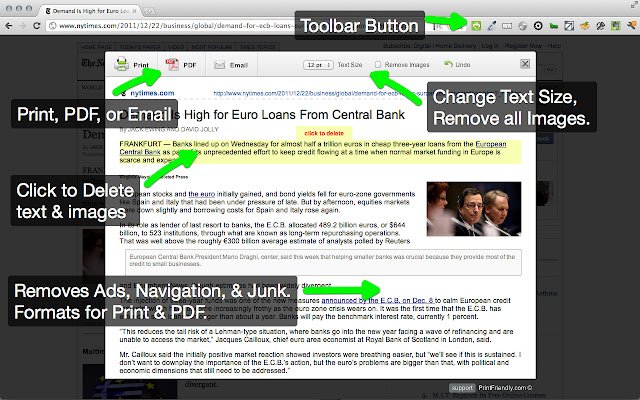
The latest release of Print Friendly & PDF, version 6.16.2, is now available for major browsers including Chrome, Firefox, Edge, and Safari. This browser extension enhances the printing experience by cleaning and formatting web pages, effectively removing ads, navigation elements, and other unnecessary content, which helps in conserving paper and ink.
Key features of Print Friendly & PDF include a Print Preview option that optimizes content for printing, and an Edit Before Printing feature that allows users to customize their printouts by removing images or text. Users can choose to print immediately or save their documents as PDFs for later use.
For new users, the process is simple: just copy and paste the desired URL at PrintFriendly.com. Regular users can enhance their browsing experience by adding the extension to their browser for one-click access to print-friendly pages. Additionally, developers and bloggers can integrate a print-friendly button onto their websites or blogs to offer the same convenience to their visitors.
In summary, Print Friendly & PDF is a valuable tool for anyone looking to improve their printing process, whether for personal use, professional documentation, or web content management.
Furthermore, keeping this tool updated is essential to ensure compatibility with the latest browser updates and improvements. Users may also explore related resources, such as enabling two-page view for PDFs in Google Chrome or managing PDF settings in Microsoft Edge, to further enhance their document handling capabilities
Key features of Print Friendly & PDF include a Print Preview option that optimizes content for printing, and an Edit Before Printing feature that allows users to customize their printouts by removing images or text. Users can choose to print immediately or save their documents as PDFs for later use.
For new users, the process is simple: just copy and paste the desired URL at PrintFriendly.com. Regular users can enhance their browsing experience by adding the extension to their browser for one-click access to print-friendly pages. Additionally, developers and bloggers can integrate a print-friendly button onto their websites or blogs to offer the same convenience to their visitors.
In summary, Print Friendly & PDF is a valuable tool for anyone looking to improve their printing process, whether for personal use, professional documentation, or web content management.
Furthermore, keeping this tool updated is essential to ensure compatibility with the latest browser updates and improvements. Users may also explore related resources, such as enabling two-page view for PDFs in Google Chrome or managing PDF settings in Microsoft Edge, to further enhance their document handling capabilities
Print Friendly and PDF for Chrome, Firefox, Edge, and Safari 6.16.2 released
Print Friendly & PDF for Chrome, Firefox, Edge, and Safari cleans and formats web pages for the perfect print experience.
Print Friendly and PDF for Chrome, Firefox, Edge, and Safari 6.16.2 released @ MajorGeeks