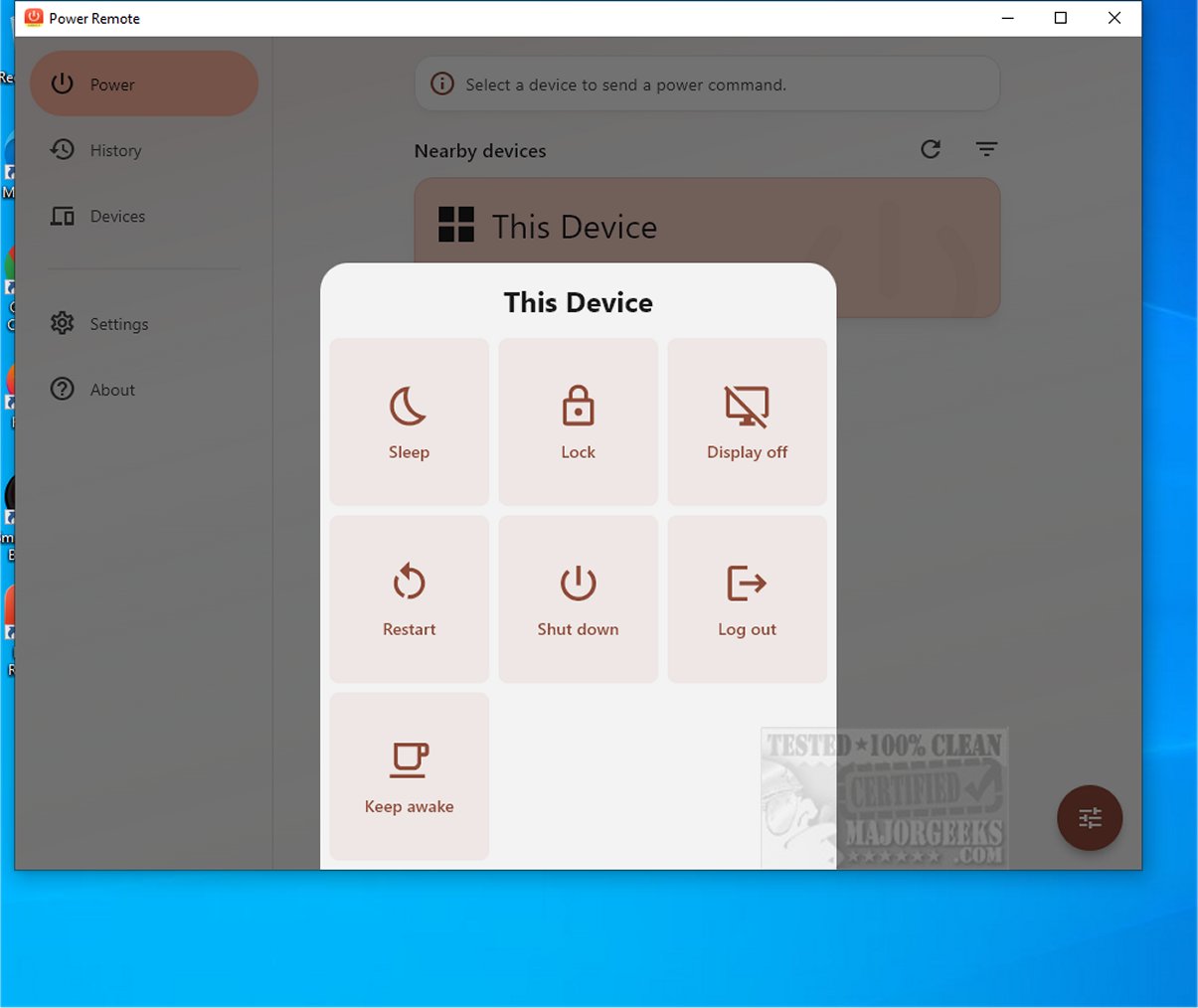
Power Remote is an advanced application that transforms your smartphone, tablet, or other devices into secure remote controls for Windows PCs and Macs. This innovative tool allows users to manage their devices from a distance, significantly enhancing convenience and efficiency in both personal and professional contexts.
- Wake-on-LAN Support: Wake a sleeping computer with the Wake-on-LAN magic packet, provided the computer, network adapter, and router support it. The app remembers the paired computer's MAC address for easy access.
- Timed Keep Awake: Keep a computer awake for a specified duration, perfect for downloads, backups, and video calls.
- Secure Local Pairing: Ensure that only trusted devices can send commands by pairing devices and setting permissions for actions.
- No Cloud Account Needed: Power Remote operates locally, with discovery and commands functioning over LAN or Wi-Fi, eliminating the need for internet accounts or cloud services.
- Encrypted Requests: Commands are securely transferred between paired devices, maintaining privacy within your trusted network.
- Nearby Device Discovery: Automatically discover supported devices on your network, or manually add devices using their IP addresses.
- Command History: Review recent commands to see their status and quickly repeat useful actions.
- Cross-Platform Compatibility: Use Android, iPhone, iPad, Mac, or Windows as the remote, targeting compatible devices on the same local network.
- User-Friendly Interface: Customize your experience with themes, accent colors, device filters, and background behavior options.
- Changing Power Plan Settings in Windows 10 & 11
- Restoring Missing Power Plans or Adding High Performance and Ultimate Performance Plans on Windows 10 & 11
- Deleting or Restoring Windows Power Plans
- Creating a Power Plan in Windows
By leveraging these features and capabilities, Power Remote 1.0.1 positions itself as an indispensable application for modern users, enhancing productivity and convenience in an increasingly digital world
Easy Setup and Usage
The setup process for Power Remote is user-friendly. Users only need to pair their trusted devices once to send power commands over a local network or Wi-Fi connection. This functionality enables control over various power functions such as putting the computer to sleep, waking it up, locking it for security, restarting, shutting down, logging out, turning off the display, or keeping it awake with a customizable timer.Key Features of Power Remote:
- One-Tap Power Actions: Easily send commands like Sleep, Wake, Lock, Restart, Shut Down, Log Out, Display Off, Display On, and Keep Awake from a trusted device on your network.- Wake-on-LAN Support: Wake a sleeping computer with the Wake-on-LAN magic packet, provided the computer, network adapter, and router support it. The app remembers the paired computer's MAC address for easy access.
- Timed Keep Awake: Keep a computer awake for a specified duration, perfect for downloads, backups, and video calls.
- Secure Local Pairing: Ensure that only trusted devices can send commands by pairing devices and setting permissions for actions.
- No Cloud Account Needed: Power Remote operates locally, with discovery and commands functioning over LAN or Wi-Fi, eliminating the need for internet accounts or cloud services.
- Encrypted Requests: Commands are securely transferred between paired devices, maintaining privacy within your trusted network.
- Nearby Device Discovery: Automatically discover supported devices on your network, or manually add devices using their IP addresses.
- Command History: Review recent commands to see their status and quickly repeat useful actions.
- Cross-Platform Compatibility: Use Android, iPhone, iPad, Mac, or Windows as the remote, targeting compatible devices on the same local network.
- User-Friendly Interface: Customize your experience with themes, accent colors, device filters, and background behavior options.
Boosting Productivity from Anywhere
Power Remote is especially valuable when your computer is out of reach. Users can complete tasks from the comfort of their couch, wake their desktop when ready to work, lock shared workstations for security, or shut down media PCs after enjoying a show. This flexibility is essential for ongoing tasks like downloads and backups, ensuring they remain uninterrupted.Conclusion: Your Power Management Solution
Power Remote is an essential tool for effective power management without relying on cloud services. It's ideal for home use, small offices, or media setups, providing practical control at your fingertips. Whether managing multiple devices or optimizing power usage, Power Remote empowers users to maintain command over their devices and network with ease and confidence. Experience the freedom of efficient power management today!Related Resources
- How to Turn on the Windows 10/11 Ultimate Performance Power Plan- Changing Power Plan Settings in Windows 10 & 11
- Restoring Missing Power Plans or Adding High Performance and Ultimate Performance Plans on Windows 10 & 11
- Deleting or Restoring Windows Power Plans
- Creating a Power Plan in Windows
By leveraging these features and capabilities, Power Remote 1.0.1 positions itself as an indispensable application for modern users, enhancing productivity and convenience in an increasingly digital world
Power Remote 1.0.1 released
Power Remote is a cutting-edge application that turns your smartphone, tablet, or other device into a secure remote control for Windows PCs and Macs. This innovative tool allows users to manage their devices seamlessly from a distance, enhancing convenience and efficiency in both personal and professional settings.