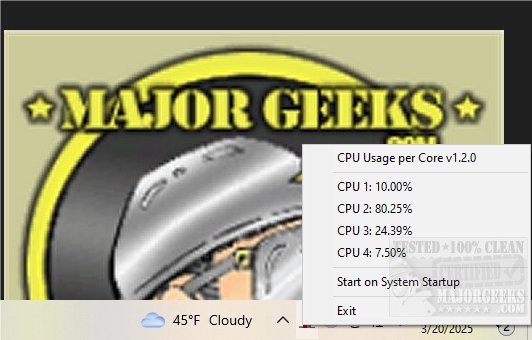
Resource Monitor is a suite of two open-source applications designed to provide users with real-time monitoring of CPU and memory usage directly from the system tray. This latest version, 2.4.0, continues to enhance the user experience by offering a comprehensive and user-friendly interface.
Key Features of Resource Monitor:
- CPU Monitoring: The CPU Monitor provides real-time insights into the usage of each core, displaying performance metrics through a dynamic bar chart icon in the systray. This allows users to easily track how effectively their CPU resources are being utilized.
- Memory Monitoring: Accompanying the CPU Monitor is the Memory Monitor, which presents detailed statistics on memory usage. It visualizes this information with an interactive pie chart icon, enabling users to understand their system's memory consumption at a glance.
- Real-Time Data: Both monitors update dynamically, reflecting the current usage levels of CPU and memory to ensure users have access to the most up-to-date information without having to dig through complex menus.
- Convenient Exit Option: The application includes an easy exit feature, allowing users to close it quickly when they no longer need to monitor their system's performance.
Single Executable Availability: In this release, both applications have been combined into a single executable file, streamlining the installation and usage process.
Geek Verdict: Resource Monitor 2.4.0 stands out as a powerful and intuitive monitoring solution for those looking to keep an eye on their system's performance. It is particularly useful for users who wish to manage their resources effectively and ensure their systems are running optimally.
For additional resources, users are encouraged to visit the developer's repository, which provides information on building and running the application on Linux and Mac systems.
Extended Use Cases:
- System Optimization: Users can utilize Resource Monitor to identify bottlenecks in CPU and memory usage, allowing for targeted optimization of applications and processes.
- Gaming Performance: Gamers can benefit from real-time monitoring to ensure their systems are performing at peak levels during gameplay.
- Software Development: Developers can use the tool to track resource usage while testing applications, aiding in performance tuning and debugging.
In conclusion, Resource Monitor 2.4.0 is an essential tool for anyone looking to enhance their understanding and management of system performance, making it a valuable addition to any tech-savvy user's toolkit
Key Features of Resource Monitor:
- CPU Monitoring: The CPU Monitor provides real-time insights into the usage of each core, displaying performance metrics through a dynamic bar chart icon in the systray. This allows users to easily track how effectively their CPU resources are being utilized.
- Memory Monitoring: Accompanying the CPU Monitor is the Memory Monitor, which presents detailed statistics on memory usage. It visualizes this information with an interactive pie chart icon, enabling users to understand their system's memory consumption at a glance.
- Real-Time Data: Both monitors update dynamically, reflecting the current usage levels of CPU and memory to ensure users have access to the most up-to-date information without having to dig through complex menus.
- Convenient Exit Option: The application includes an easy exit feature, allowing users to close it quickly when they no longer need to monitor their system's performance.
Single Executable Availability: In this release, both applications have been combined into a single executable file, streamlining the installation and usage process.
Geek Verdict: Resource Monitor 2.4.0 stands out as a powerful and intuitive monitoring solution for those looking to keep an eye on their system's performance. It is particularly useful for users who wish to manage their resources effectively and ensure their systems are running optimally.
For additional resources, users are encouraged to visit the developer's repository, which provides information on building and running the application on Linux and Mac systems.
Extended Use Cases:
- System Optimization: Users can utilize Resource Monitor to identify bottlenecks in CPU and memory usage, allowing for targeted optimization of applications and processes.
- Gaming Performance: Gamers can benefit from real-time monitoring to ensure their systems are performing at peak levels during gameplay.
- Software Development: Developers can use the tool to track resource usage while testing applications, aiding in performance tuning and debugging.
In conclusion, Resource Monitor 2.4.0 is an essential tool for anyone looking to enhance their understanding and management of system performance, making it a valuable addition to any tech-savvy user's toolkit
Resource Monitor 2.4.0 released
Resource Monitor is comprised of two Open Source applications designed to monitor memory and CPU from the systray.