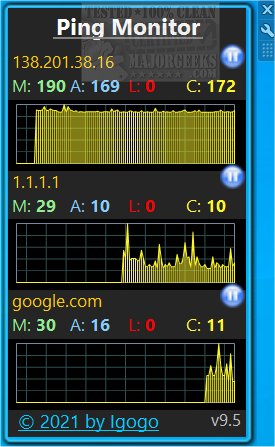
Ping Monitor has released version 10.6, which allows users to monitor up to fifteen servers, either locally or remotely. This tool pings the selected servers at user-defined intervals, providing response data in both graphical and numerical formats. Users can access detailed information, including maximum, average, and current ping times, along with the number of errors encountered while pinging each server or IP address.
Each server monitored can have its results logged for future reference, and users can refresh server data or graphs easily by double-clicking on the respective alias or graph. The application also allows users to pause or resume the monitoring state for each server with minimal effort. Supporting both IPv4 and IPv6 addresses, Ping Monitor offers a user-friendly interface that is accessible even for beginners.
For users running Windows 8.1 or 10 who experience installation issues, it may be necessary to use Desktop Gadgets Revived or similar software to enable full functionality of Ping Monitor.
In addition to the monitoring features, Ping Monitor also provides useful resources for users interested in enhancing their network management skills, such as guides on using the Ping command in Windows, flushing the Windows DNS cache, and understanding Windows Auto-Tuning.
With the latest enhancements, Ping Monitor 10.6 continues to be a valuable tool for network administrators and individuals needing reliable server monitoring solutions. Future updates could potentially include features like real-time alerts for downtime, enhanced reporting capabilities, and integration with other network management tools for a more comprehensive monitoring experience
Ping Monitor 10.6 released
Ping Monitor permits you to monitor up to fifteen servers locally, and/or remotely.