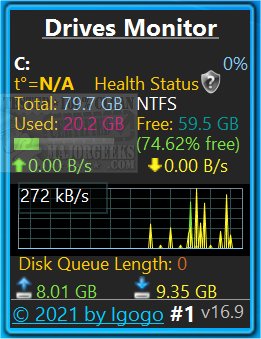
Drives Monitor version 19.3 has been released, offering enhanced capabilities for visualizing disk activity by utilizing performance monitor data. This application is compatible with Windows 8.1 and 10, although users may need to install Desktop Gadgets Revived or a similar tool to ensure proper functionality.
The application displays metrics for both physical and logical disks, including active time percentage and the rate of bytes read and written per second. A real-time graph facilitates interaction, allowing users to click on a drive letter to access a fly-out window that presents detailed information about the drive, such as its model, capacity, type, partitions, cylinders, and sectors. An Eject button is also included for safely disconnecting USB devices.
Drives Monitor is capable of monitoring hidden and mounted drives. A color-coded disk space usage bar alerts users about storage status, turning red when space is critically low and yellow when it is merely low. Users can customize the critical and warning thresholds in the settings. Additionally, the settings allow for toggling between physical and logical drives, excluding specific drives from monitoring, and selecting the information displayed.
In summary, Drives Monitor 19.3 is a versatile tool for monitoring disk performance and health, with user-friendly features designed to provide important insights and alerts regarding disk usage.
Future enhancements could include integrating predictive analytics for disk failure, improved user interfaces for better accessibility, and compatibility with additional operating systems, which would widen the user base and enhance its utility. Furthermore, incorporating cloud-based monitoring options could allow users to track disk performance remotely, ensuring they are always informed about their storage health
Drives Monitor 19.3 released
Drives Monitor utilizes performance monitor data to visualize physical or logical disk activity.