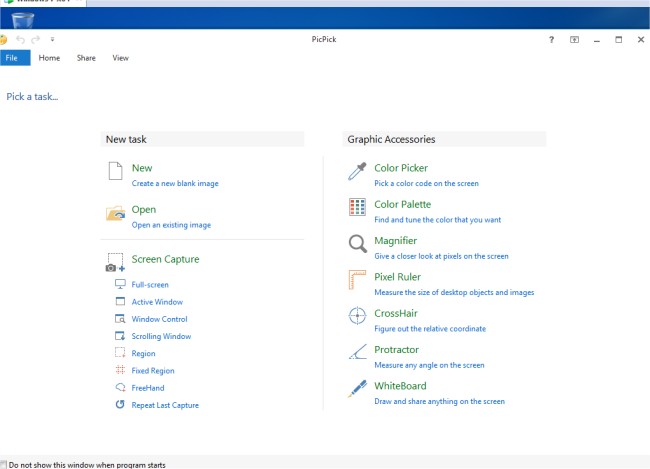
PicPick has released version 7.6.2 of its versatile screen capture tool, which combines a variety of useful features for both casual users and professionals. This comprehensive application is not only capable of capturing screenshots of an entire screen, active window, scrolling windows, or specific desktop regions, but it also includes an easy-to-use image editor. Users can enhance their captured images with annotations, highlights, and various editing tools such as text, arrows, and shapes.
The editor boasts a modern Ribbon-style menu, making navigation intuitive. Additionally, PicPick offers a selection of special effects like drop shadows, frames, watermarks, mosaic effects, and motion blur, along with adjustable brightness settings, allowing users to creatively enhance their visuals.
Sharing capabilities are robust; users can save and send their images via various platforms, including email, FTP, Dropbox, Google Drive, SkyDrive, Box, Evernote, Facebook, and Twitter. The software also features advanced customization options that let users define hotkeys, file naming conventions, and image quality settings to suit their preferences.
In summary, PicPick 7.6.2 is a powerful tool for anyone needing screen capture and image editing functionalities, providing a seamless experience for capturing, editing, and sharing images across multiple platforms.
Looking ahead, future updates could include enhanced collaboration features for teams, integration with more cloud services, or even AI-driven enhancements to automate image editing tasks, further expanding PicPick's utility in professional environments
The editor boasts a modern Ribbon-style menu, making navigation intuitive. Additionally, PicPick offers a selection of special effects like drop shadows, frames, watermarks, mosaic effects, and motion blur, along with adjustable brightness settings, allowing users to creatively enhance their visuals.
Sharing capabilities are robust; users can save and send their images via various platforms, including email, FTP, Dropbox, Google Drive, SkyDrive, Box, Evernote, Facebook, and Twitter. The software also features advanced customization options that let users define hotkeys, file naming conventions, and image quality settings to suit their preferences.
In summary, PicPick 7.6.2 is a powerful tool for anyone needing screen capture and image editing functionalities, providing a seamless experience for capturing, editing, and sharing images across multiple platforms.
Looking ahead, future updates could include enhanced collaboration features for teams, integration with more cloud services, or even AI-driven enhancements to automate image editing tasks, further expanding PicPick's utility in professional environments
PicPick 7.6.2 released
PicPick is an all-in-one screen capture tool that includes an intuitive image editor, color picker, color palette, pixel ruler, protractor, crosshair, whiteboard and more.