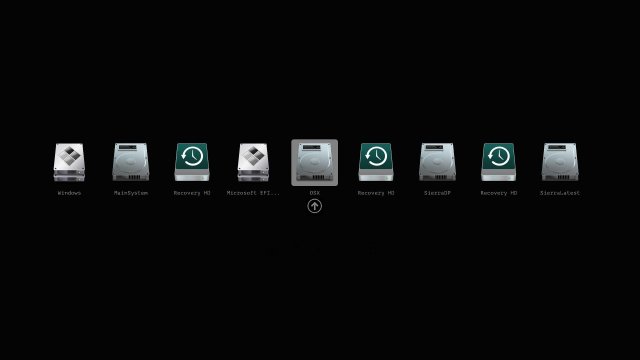
The Clover EFI Bootloader has released version 5176, a versatile tool that allows users to boot various operating systems—including OS X, Windows, and Linux—on both Mac and PC hardware, utilizing either UEFI or BIOS firmware. This bootloader is capable of operating in both UEFI and legacy modes, providing flexibility for users with different system configurations.
Key features of Clover EFI Bootloader include:
- Direct booting using UEFI firmware or emulation through CloverEFI.
- A highly customizable graphical user interface (GUI) that allows modification of themes, icons, fonts, background images, animations, and mouse pointers.
- Access to a theme database and repository for users to explore and implement new themes.
- Native screen resolution support in the GUI, with the option to adjust resolution using the Page Up or Page Down keys.
- Multilingual help available through the F1 key, and various functionalities accessible via function keys (e.g., F2 for saving logs, F4 for saving ACPI tables, F5 for DSDT testing, F10 for screenshots).
- The ability to boot previously selected entries after a default timeout and scroll through boot entries if the display resolution is limited.
- Options for creating custom boot entries and adding support for additional operating systems, as well as launching an EFI command shell directly from the GUI.
This release enhances the user experience by providing an array of tools for customization and troubleshooting, making it easier for users to manage their multi-boot environments effectively.
In conclusion, Clover EFI Bootloader version 5176 continues to be a powerful solution for users looking to boot multiple operating systems on a variety of hardware. It encourages personalization and adaptability, ensuring that users can tailor their boot experiences to their specific needs and preferences. The ongoing development and enhancements of Clover EFI highlight its importance within the community of tech enthusiasts and users seeking comprehensive boot management solutions
Key features of Clover EFI Bootloader include:
- Direct booting using UEFI firmware or emulation through CloverEFI.
- A highly customizable graphical user interface (GUI) that allows modification of themes, icons, fonts, background images, animations, and mouse pointers.
- Access to a theme database and repository for users to explore and implement new themes.
- Native screen resolution support in the GUI, with the option to adjust resolution using the Page Up or Page Down keys.
- Multilingual help available through the F1 key, and various functionalities accessible via function keys (e.g., F2 for saving logs, F4 for saving ACPI tables, F5 for DSDT testing, F10 for screenshots).
- The ability to boot previously selected entries after a default timeout and scroll through boot entries if the display resolution is limited.
- Options for creating custom boot entries and adding support for additional operating systems, as well as launching an EFI command shell directly from the GUI.
This release enhances the user experience by providing an array of tools for customization and troubleshooting, making it easier for users to manage their multi-boot environments effectively.
In conclusion, Clover EFI Bootloader version 5176 continues to be a powerful solution for users looking to boot multiple operating systems on a variety of hardware. It encourages personalization and adaptability, ensuring that users can tailor their boot experiences to their specific needs and preferences. The ongoing development and enhancements of Clover EFI highlight its importance within the community of tech enthusiasts and users seeking comprehensive boot management solutions
Clover EFI Bootloader 5176 released
Clover EFI Bootloader can boot OS X, Windows, and Linux on Mac or PC with UEFI or BIOS firmware.