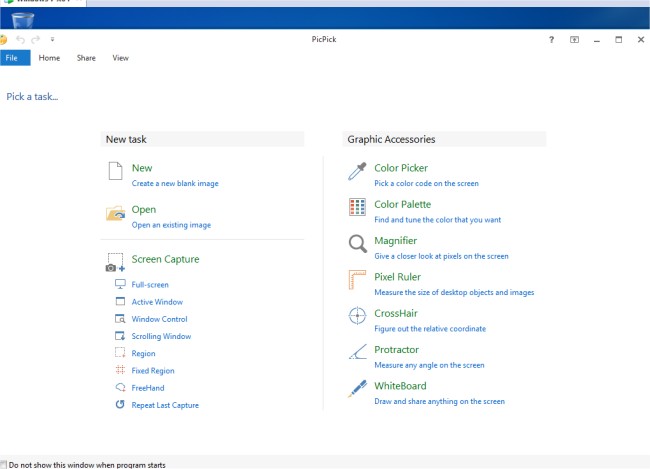
PicPick 7.6.1 has been released, enhancing its reputation as a comprehensive screen capture tool. This versatile software not only captures screenshots of your entire screen, active windows, scrolling windows, or specific desktop regions, but also boasts an intuitive image editor. Users can enhance their images using a variety of features, including a color picker, color palette, pixel ruler, protractor, crosshair, and whiteboard, among others.
The image editor allows for annotations and highlights through text, arrows, shapes, and various effects such as drop shadows, frames, watermarks, mosaics, motion blur, and brightness adjustments. PicPick's latest update introduces a user-friendly Ribbon-style menu for easier navigation and editing.
Additionally, PicPick facilitates sharing and saving images via multiple platforms, including email, FTP, Dropbox, Google Drive, SkyDrive, Box, Evernote, Facebook, and Twitter. The software is customizable, offering advanced settings for hotkeys, file naming, and image quality to tailor the experience to individual user preferences.
In summary, PicPick 7.6.1 is not just a screen capture tool; it's a complete image editing and sharing suite that caters to a wide range of user needs, making it a valuable asset for anyone needing efficient screen capture and editing capabilities. Future updates could potentially enhance collaboration features, integrate more cloud storage options, or introduce AI-assisted editing tools for a seamless user experience
The image editor allows for annotations and highlights through text, arrows, shapes, and various effects such as drop shadows, frames, watermarks, mosaics, motion blur, and brightness adjustments. PicPick's latest update introduces a user-friendly Ribbon-style menu for easier navigation and editing.
Additionally, PicPick facilitates sharing and saving images via multiple platforms, including email, FTP, Dropbox, Google Drive, SkyDrive, Box, Evernote, Facebook, and Twitter. The software is customizable, offering advanced settings for hotkeys, file naming, and image quality to tailor the experience to individual user preferences.
In summary, PicPick 7.6.1 is not just a screen capture tool; it's a complete image editing and sharing suite that caters to a wide range of user needs, making it a valuable asset for anyone needing efficient screen capture and editing capabilities. Future updates could potentially enhance collaboration features, integrate more cloud storage options, or introduce AI-assisted editing tools for a seamless user experience
PicPick 7.6.1 released
PicPick is an all-in-one screen capture tool that includes an intuitive image editor, color picker, color palette, pixel ruler, protractor, crosshair, whiteboard and more.