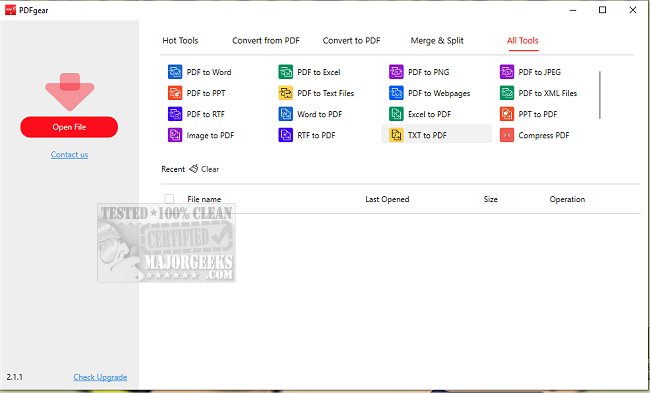
PDFgear has recently released version 2.1.20, enhancing its robust desktop PDF editing capabilities. This software offers an array of features that allow users to manage their PDF files effectively, including converting, editing, merging, splitting, organizing, signing, and annotating documents—all without any cost or sign-up requirements.
One standout feature of PDFgear is its text editing capability, which allows users to modify PDF content as easily as they would in Microsoft Word. Users can change text, swap images, or remove paragraphs seamlessly, avoiding any formatting issues. The software also supports the conversion of over 60 different image and document formats, including Word, Excel, PowerPoint, and e-books, with a user-friendly one-click process. The batch conversion feature further enhances efficiency, saving users valuable time.
Another innovative feature is PDFgear Copilot, which enables users to communicate with the software using natural language. This functionality streamlines workflows by allowing users to send text messages and receive quick responses. Additionally, PDFgear is powered by AI and integrates GPT-3.5 technology, making it one of the most sought-after PDF editing tools available. Users can summarize lengthy research documents, extract crucial information, proofread, revise, and rewrite their PDF content. The platform also allows for interactive engagement with PDF files, making the editing process more intuitive.
Moreover, PDFgear includes a powerful OCR (Optical Character Recognition) PDF converter, which is particularly useful for editing scanned documents. This feature can convert scanned PDFs into editable Microsoft Word files and extract data from these files effectively.
The most appealing aspect of PDFgear is that it is entirely free to use, making it accessible to a wide range of users seeking efficient PDF management solutions.
In conclusion, PDFgear 2.1.20 is an advanced PDF editor that combines comprehensive editing features with user-friendly functionality and AI integration, setting a high standard in the realm of PDF management tools. Its free access makes it an attractive option for individuals and businesses alike, encouraging more users to improve their PDF workflow without any financial investment
One standout feature of PDFgear is its text editing capability, which allows users to modify PDF content as easily as they would in Microsoft Word. Users can change text, swap images, or remove paragraphs seamlessly, avoiding any formatting issues. The software also supports the conversion of over 60 different image and document formats, including Word, Excel, PowerPoint, and e-books, with a user-friendly one-click process. The batch conversion feature further enhances efficiency, saving users valuable time.
Another innovative feature is PDFgear Copilot, which enables users to communicate with the software using natural language. This functionality streamlines workflows by allowing users to send text messages and receive quick responses. Additionally, PDFgear is powered by AI and integrates GPT-3.5 technology, making it one of the most sought-after PDF editing tools available. Users can summarize lengthy research documents, extract crucial information, proofread, revise, and rewrite their PDF content. The platform also allows for interactive engagement with PDF files, making the editing process more intuitive.
Moreover, PDFgear includes a powerful OCR (Optical Character Recognition) PDF converter, which is particularly useful for editing scanned documents. This feature can convert scanned PDFs into editable Microsoft Word files and extract data from these files effectively.
The most appealing aspect of PDFgear is that it is entirely free to use, making it accessible to a wide range of users seeking efficient PDF management solutions.
In conclusion, PDFgear 2.1.20 is an advanced PDF editor that combines comprehensive editing features with user-friendly functionality and AI integration, setting a high standard in the realm of PDF management tools. Its free access makes it an attractive option for individuals and businesses alike, encouraging more users to improve their PDF workflow without any financial investment
PDFgear 2.1.20 released
PDFgear provides a comprehensive desktop PDF editor that allows you to convert, edit, merge, split, organize, sign, annotate, and more.