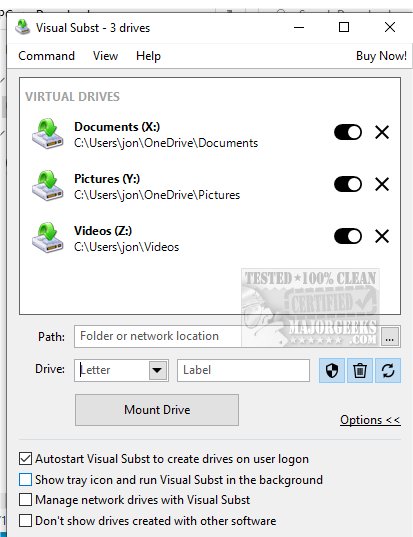
Visual Subst 6.1 has been released, offering a user-friendly interface that simplifies the management of virtual and network drives. This application addresses the limitations of traditional commands like 'SUBST' and 'NET USE' by providing four key enhancements: easy editing of drive labels, creation of UAC-compliant drives for applications needing elevated permissions, improved management of deleted items in the Recycle Bin, and automatic restoration of virtual drives after system reboots.
By allowing users to create virtual drives from folders on their computers and assign custom drive letters, Visual Subst streamlines data transfer from removable storage devices, improving file management and accessibility. Its efficient interface features an organized list of added virtual drives, facilitating easy navigation and project management. The compact toolbar is designed for quick access to all essential functions, allowing users to add, organize, modify, or remove drives with minimal effort.
When using Visual Subst, items can only be added one at a time, and users must select an available drive letter to avoid conflicts. Upon closing the application, all virtual drives are automatically dismounted, but users can enable a feature that allows these drives to be remounted at system startup, enhancing productivity by providing immediate access to files upon logging in.
In summary, Visual Subst is a powerful tool that significantly enhances the file management experience. By creating efficient shortcuts to frequently accessed folders, it transforms file handling and facilitates seamless file transfers between storage devices. This innovation not only optimizes digital organization but also improves overall workflow, making it an essential application for anyone looking to enhance their file management capabilities.
Looking ahead, Visual Subst could expand its functionality by incorporating features such as cloud integration, allowing users to create virtual drives linked to cloud storage services. Additionally, implementing a multi-item selection capability would enable users to add or modify multiple virtual drives simultaneously, further increasing efficiency. Enhanced user support, including tutorial resources and community forums, could also help new users maximize their experience with the tool. As technology evolves, Visual Subst has the potential to remain a pivotal resource for both personal and professional file management needs
By allowing users to create virtual drives from folders on their computers and assign custom drive letters, Visual Subst streamlines data transfer from removable storage devices, improving file management and accessibility. Its efficient interface features an organized list of added virtual drives, facilitating easy navigation and project management. The compact toolbar is designed for quick access to all essential functions, allowing users to add, organize, modify, or remove drives with minimal effort.
When using Visual Subst, items can only be added one at a time, and users must select an available drive letter to avoid conflicts. Upon closing the application, all virtual drives are automatically dismounted, but users can enable a feature that allows these drives to be remounted at system startup, enhancing productivity by providing immediate access to files upon logging in.
In summary, Visual Subst is a powerful tool that significantly enhances the file management experience. By creating efficient shortcuts to frequently accessed folders, it transforms file handling and facilitates seamless file transfers between storage devices. This innovation not only optimizes digital organization but also improves overall workflow, making it an essential application for anyone looking to enhance their file management capabilities.
Extended Features and Future Potential
Looking ahead, Visual Subst could expand its functionality by incorporating features such as cloud integration, allowing users to create virtual drives linked to cloud storage services. Additionally, implementing a multi-item selection capability would enable users to add or modify multiple virtual drives simultaneously, further increasing efficiency. Enhanced user support, including tutorial resources and community forums, could also help new users maximize their experience with the tool. As technology evolves, Visual Subst has the potential to remain a pivotal resource for both personal and professional file management needs
Visual Subst 6.1 released
Visual Subst offers an intuitive and straightforward user interface designed for effectively managing both virtual and network drives simultaneously.