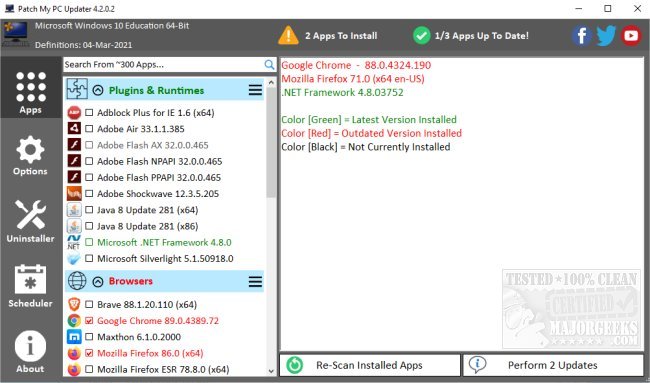
Patch My PC has recently released version 5.4.4.0, a portable application that simplifies the process of checking and updating over 300 software applications on your system. The app features a user-friendly interface that visually categorizes applications into 17 categories, displaying their update statuses as green (up to date), red (outdated), or black (not installed), making it easy for users to manage their software.
The update process is streamlined, as Patch My PC installs outdated applications silently without the need for cumbersome installation wizards. Additionally, it intelligently defaults to installing 64-bit applications on 64-bit systems while offering the option to install 32-bit versions if desired. The application also includes options to automatically close running programs before updates and uninstall multiple applications quickly.
Another advantageous feature is its ability to create a baseline of applications for new PC installations, which can significantly save time for system administrators during deployment. Patch My PC is designed to evolve continuously, adding new features and refining existing ones to enhance the user experience.
This utility serves users of all skill levels who wish to keep their PCs updated and running smoothly without unnecessary effort. For further assistance, an FAQ is available on their website.
In addition to these features, it would be beneficial for Patch My PC to incorporate a backup option that allows users to restore previous versions of applications before updates, ensuring that any compatibility issues can be easily resolved. Furthermore, an integrated reporting tool could enable users to track which applications have been updated over time, providing a clearer overview of software management. Overall, Patch My PC is an indispensable tool for efficient software maintenance
The update process is streamlined, as Patch My PC installs outdated applications silently without the need for cumbersome installation wizards. Additionally, it intelligently defaults to installing 64-bit applications on 64-bit systems while offering the option to install 32-bit versions if desired. The application also includes options to automatically close running programs before updates and uninstall multiple applications quickly.
Another advantageous feature is its ability to create a baseline of applications for new PC installations, which can significantly save time for system administrators during deployment. Patch My PC is designed to evolve continuously, adding new features and refining existing ones to enhance the user experience.
This utility serves users of all skill levels who wish to keep their PCs updated and running smoothly without unnecessary effort. For further assistance, an FAQ is available on their website.
In addition to these features, it would be beneficial for Patch My PC to incorporate a backup option that allows users to restore previous versions of applications before updates, ensuring that any compatibility issues can be easily resolved. Furthermore, an integrated reporting tool could enable users to track which applications have been updated over time, providing a clearer overview of software management. Overall, Patch My PC is an indispensable tool for efficient software maintenance
Patch My PC 5.4.4.0 released
Patch My PC is a portable app designed to check your system against the current version of over 300 apps and allow for streamlined updating. Video tutorial available.