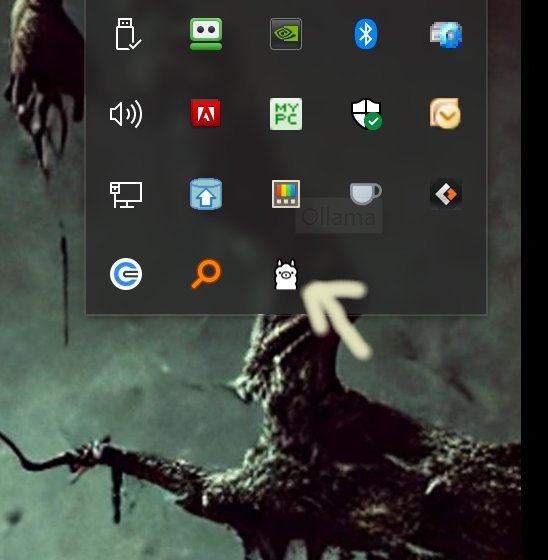
Ollama is a local-first platform designed to run large language models (LLMs) directly on your desktop, offering a privacy-centric alternative to cloud-based solutions. The latest version, 0.22.0, allows users to operate models like LLaMA 3.3, Phi-4, Mistral, and DeepSeek without the need for internet connectivity or user accounts, making it ideal for developers and privacy-conscious individuals. Installation is straightforward; users simply download and run Ollama, which is represented by a Llama icon in the system tray.
Key Features:
- Local Execution: All processes run on the user's device, ensuring rapid responses and complete data control without concerns of cloud-related logging or leaks.
- Cross-Platform Compatibility: Ollama supports Windows, macOS, and Linux, accommodating various user environments seamlessly.
- Command Line Interface (CLI): The platform is optimized for CLI, allowing users to perform tasks such as swapping models, creating custom assistants, and scripting outputs with ease.
- Modelfile Customization: Users can import and adjust models using formats like GGUF and Safetensors, tailoring behaviors and prompts to meet specific needs.
- Developer-Friendly: Ollama supports integration with Python and JavaScript, facilitating easy incorporation into applications.
Usage and Customization:
Ollama primarily functions through command-line commands, with extensive documentation available for users to learn how to effectively utilize the platform. Users can perform actions such as downloading models, initiating interactive sessions, asking one-time questions, listing installed models, and managing model installations.
Conclusion:
Ollama is a powerful tool for those comfortable with command-line interfaces, providing a fast, efficient, and entirely local experience without the downsides of cloud dependency. While it lacks a built-in graphical user interface (GUI), community-developed alternatives exist, catering to users who prefer a more visual interaction. Overall, Ollama offers accessible yet robust LLM capabilities for those willing to embrace its CLI-driven nature.
Extension of the Text:
Looking forward, Ollama has the potential to expand its features, such as integrating more user-friendly GUI options or enhancing compatibility with additional programming languages. The community could also contribute to developing plugins or extensions that simplify model management or enhance interaction capabilities. Furthermore, as LLM technology continues to evolve, Ollama could incorporate advanced features like real-time collaboration, voice commands, or even integration with IoT devices, allowing users to harness AI in innovative ways. As privacy concerns grow, Ollama is well-positioned to become a go-to solution for individuals and organizations seeking to maintain control over their AI tools
Key Features:
- Local Execution: All processes run on the user's device, ensuring rapid responses and complete data control without concerns of cloud-related logging or leaks.
- Cross-Platform Compatibility: Ollama supports Windows, macOS, and Linux, accommodating various user environments seamlessly.
- Command Line Interface (CLI): The platform is optimized for CLI, allowing users to perform tasks such as swapping models, creating custom assistants, and scripting outputs with ease.
- Modelfile Customization: Users can import and adjust models using formats like GGUF and Safetensors, tailoring behaviors and prompts to meet specific needs.
- Developer-Friendly: Ollama supports integration with Python and JavaScript, facilitating easy incorporation into applications.
Usage and Customization:
Ollama primarily functions through command-line commands, with extensive documentation available for users to learn how to effectively utilize the platform. Users can perform actions such as downloading models, initiating interactive sessions, asking one-time questions, listing installed models, and managing model installations.
Conclusion:
Ollama is a powerful tool for those comfortable with command-line interfaces, providing a fast, efficient, and entirely local experience without the downsides of cloud dependency. While it lacks a built-in graphical user interface (GUI), community-developed alternatives exist, catering to users who prefer a more visual interaction. Overall, Ollama offers accessible yet robust LLM capabilities for those willing to embrace its CLI-driven nature.
Extension of the Text:
Looking forward, Ollama has the potential to expand its features, such as integrating more user-friendly GUI options or enhancing compatibility with additional programming languages. The community could also contribute to developing plugins or extensions that simplify model management or enhance interaction capabilities. Furthermore, as LLM technology continues to evolve, Ollama could incorporate advanced features like real-time collaboration, voice commands, or even integration with IoT devices, allowing users to harness AI in innovative ways. As privacy concerns grow, Ollama is well-positioned to become a go-to solution for individuals and organizations seeking to maintain control over their AI tools
Ollama 0.22.0 released
Ollama is the local-first platform that brings large language models (LLMs) right to your desktop.