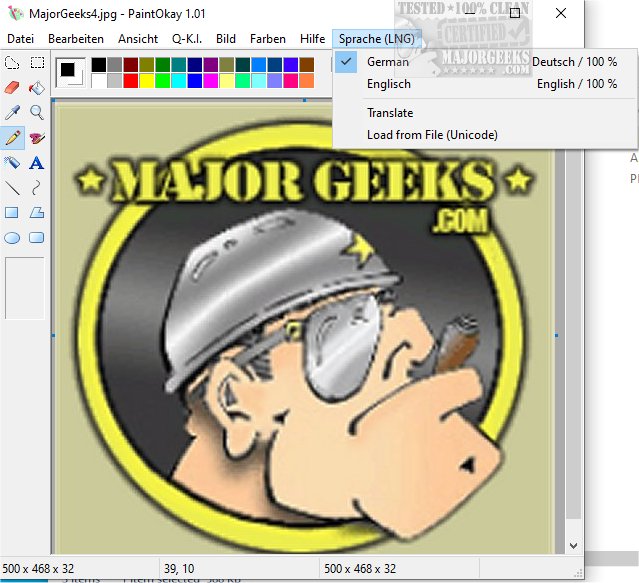
PaintOkay is a newly released software version that serves as an efficient and streamlined alternative to the traditional MS Paint XP, specifically designed for pixel editing. Its primary focus is on delivering precise image manipulation capabilities, allowing users to engage in pixel-level edits without the distractions posed by unnecessary features.
The Evolution of MS Paint
With the launch of Windows 11, MS Paint has experienced significant changes, evolving from its classic Windows XP version into a more modern application. The updated MS Paint features a sleek interface characterized by rounded corners, a vibrant color palette, and a revamped toolbar. However, as Microsoft continues to enhance the application, it incorporates features that align more with vector graphics programs, such as advanced selection tools and improved fill options. This shift towards graphic design capabilities detracts from MS Paint’s original purpose as a simple pixel editor, potentially alienating users who preferred its straightforward approach.
Why PaintOkay Stands Out
PaintOkay aims to preserve the essence of MS Paint by emphasizing traditional pixel editing functions. While MS Paint adds complexity with new features, PaintOkay maintains a focus on core editing tasks, ensuring that users can engage in pure drawing and image manipulation without the added complications.
Key Features of PaintOkay:
- Edit Palette: Offers custom colors and both modern and classic palettes to cater to different aesthetic preferences.
- Filters & Effects: Includes options like monochrome, grayscale, sepia, and inverted colors, along with brightness and contrast adjustments. It supports optimized color modes for various depths and provides filters such as Gaussian Blur and Edge Detection.
- AI Integration: Features Q-A.I. (Q-K.I.), an AI-powered image generation tool that creates mini-images in the styles of famous artists like Picasso and Gogh.
- Resource Efficiency: Designed to consume minimal system resources, ensuring smooth performance even on lower-end devices.
Conclusion: A Reliable MS Paint Alternative
As support for Windows 10 diminishes, MS Paint continues to evolve, often straying from its original simplicity. PaintOkay, however, remains dedicated to providing a swift and powerful pixel editing tool that champions efficiency and directness. By stripping away unnecessary features, it enhances the user experience, making it an appealing choice for anyone seeking a return to basic, effective image editing.
In addition to PaintOkay, users may also explore other useful tips and features related to Windows, such as restoring the Windows Photo Viewer or creating shortcuts for screen snipping in Windows 10 and 11. These resources help users optimize their experience on the platform while using PaintOkay for their artistic endeavors
The Evolution of MS Paint
With the launch of Windows 11, MS Paint has experienced significant changes, evolving from its classic Windows XP version into a more modern application. The updated MS Paint features a sleek interface characterized by rounded corners, a vibrant color palette, and a revamped toolbar. However, as Microsoft continues to enhance the application, it incorporates features that align more with vector graphics programs, such as advanced selection tools and improved fill options. This shift towards graphic design capabilities detracts from MS Paint’s original purpose as a simple pixel editor, potentially alienating users who preferred its straightforward approach.
Why PaintOkay Stands Out
PaintOkay aims to preserve the essence of MS Paint by emphasizing traditional pixel editing functions. While MS Paint adds complexity with new features, PaintOkay maintains a focus on core editing tasks, ensuring that users can engage in pure drawing and image manipulation without the added complications.
Key Features of PaintOkay:
- Edit Palette: Offers custom colors and both modern and classic palettes to cater to different aesthetic preferences.
- Filters & Effects: Includes options like monochrome, grayscale, sepia, and inverted colors, along with brightness and contrast adjustments. It supports optimized color modes for various depths and provides filters such as Gaussian Blur and Edge Detection.
- AI Integration: Features Q-A.I. (Q-K.I.), an AI-powered image generation tool that creates mini-images in the styles of famous artists like Picasso and Gogh.
- Resource Efficiency: Designed to consume minimal system resources, ensuring smooth performance even on lower-end devices.
Conclusion: A Reliable MS Paint Alternative
As support for Windows 10 diminishes, MS Paint continues to evolve, often straying from its original simplicity. PaintOkay, however, remains dedicated to providing a swift and powerful pixel editing tool that champions efficiency and directness. By stripping away unnecessary features, it enhances the user experience, making it an appealing choice for anyone seeking a return to basic, effective image editing.
In addition to PaintOkay, users may also explore other useful tips and features related to Windows, such as restoring the Windows Photo Viewer or creating shortcuts for screen snipping in Windows 10 and 11. These resources help users optimize their experience on the platform while using PaintOkay for their artistic endeavors
PaintOkay 1.11 released
PaintOkay is a streamlined and efficient alternative to the traditional MS Paint XP. It prioritizes pixel-editing functionality, allowing you to focus on precise image manipulation without the distraction of nonessential features.