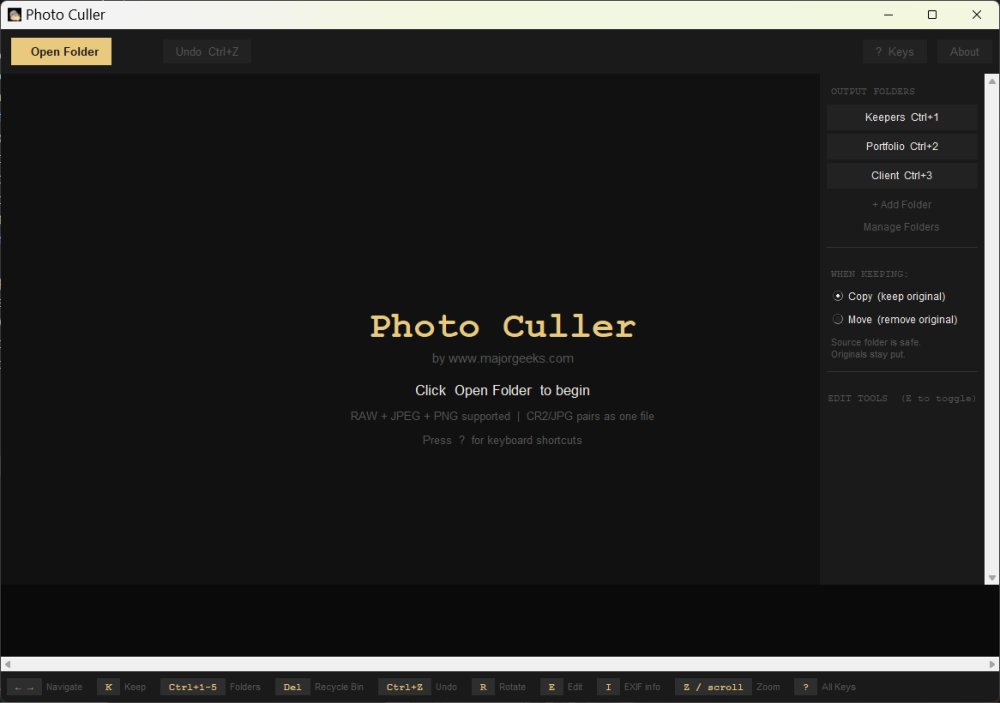
Photo Culler is a newly released, fast, and free photo culling application specifically designed for Windows. It caters to anyone who needs to efficiently sort through large batches of images, whether they are DSLR photos, RAW files, JPEGs, or even memes and personal snapshots. This portable tool allows users to quickly sift through their image folders without the need for importing them into more complex programs like Lightroom, making the process of culling much more manageable.
Key Features of Photo Culler
The primary function of Photo Culler is to open a folder of images for fast review. Users can navigate through photos using their keyboard and mouse, with a filmstrip of thumbnails displayed at the bottom of the interface. Key commands allow users to easily move images to an output folder or send unwanted images to the Windows Recycle Bin. The tool also includes basic editing features, enabling users to crop, resize, rotate, and adjust exposure, contrast, and saturation on the fly. This functionality is especially beneficial when determining if a photo is worth keeping, as slight adjustments can reveal the true potential of an image.
Photo Culler supports a wide range of image formats, including common ones like JPEG, PNG, and TIFF, as well as several major RAW formats such as CR2, CR3, NEF, ARW, DNG, ORF, and RW2. Importantly, it can handle RAW+JPEG pairs, allowing photographers who shoot in both formats to manage their images more efficiently.
Why Use Photo Culler?
For those dealing with large quantities of images, such as content creators, photographers, or anyone with a substantial number of pictures on their devices, Photo Culler addresses a significant pain point. Traditional file management methods can be cumbersome and inefficient, particularly when trying to evaluate the quality of images that seem acceptable as thumbnails but may have issues upon closer inspection. Photo Culler was developed in response to these challenges faced by users, streamlining the culling process to save time and improve workflow.
Notable Features to Enhance User Experience
- Fast Folder Loading: Open and begin reviewing images immediately without the need for an import step.
- Multiple Output Folders: Organize images into various categories like Keepers, Portfolio, or Maybe, facilitating a more streamlined sorting process.
- Zoom and Pan Functionality: Easily zoom in up to 16x to check focus and detail, crucial for assessing images taken in challenging conditions.
- Quick Editing Tools: Make swift adjustments to images to aid in decision-making without getting bogged down in extensive editing.
- Undo Support: Up to 60 levels of undo to correct any accidental actions.
Limitations of Photo Culler
While Photo Culler offers several valuable features, it is not intended to serve as a comprehensive photo management system. It lacks the advanced organizational capabilities of dedicated Digital Asset Management (DAM) systems and is not meant to replace professional editing software like Lightroom or Photoshop. The editing features are designed for quick adjustments rather than in-depth editing.
System Requirements and Availability
Photo Culler runs on Windows 10 and 11 and does not require installation, making it a convenient option for users. It can be downloaded from MajorGeeks, and users are encouraged to support the developers if they find the tool beneficial.
Conclusion
In essence, Photo Culler is a practical and efficient solution for anyone looking to streamline their photo sorting process. It allows users to quickly identify and save their best images without getting caught up in extensive editing workflows. The ability to sort images into multiple output folders adds to its utility, making it an essential tool for photographers and image enthusiasts alike. With its user-friendly design and effective functionality, Photo Culler is poised to become a go-to tool for anyone dealing with large volumes of images
Key Features of Photo Culler
The primary function of Photo Culler is to open a folder of images for fast review. Users can navigate through photos using their keyboard and mouse, with a filmstrip of thumbnails displayed at the bottom of the interface. Key commands allow users to easily move images to an output folder or send unwanted images to the Windows Recycle Bin. The tool also includes basic editing features, enabling users to crop, resize, rotate, and adjust exposure, contrast, and saturation on the fly. This functionality is especially beneficial when determining if a photo is worth keeping, as slight adjustments can reveal the true potential of an image.
Photo Culler supports a wide range of image formats, including common ones like JPEG, PNG, and TIFF, as well as several major RAW formats such as CR2, CR3, NEF, ARW, DNG, ORF, and RW2. Importantly, it can handle RAW+JPEG pairs, allowing photographers who shoot in both formats to manage their images more efficiently.
Why Use Photo Culler?
For those dealing with large quantities of images, such as content creators, photographers, or anyone with a substantial number of pictures on their devices, Photo Culler addresses a significant pain point. Traditional file management methods can be cumbersome and inefficient, particularly when trying to evaluate the quality of images that seem acceptable as thumbnails but may have issues upon closer inspection. Photo Culler was developed in response to these challenges faced by users, streamlining the culling process to save time and improve workflow.
Notable Features to Enhance User Experience
- Fast Folder Loading: Open and begin reviewing images immediately without the need for an import step.
- Multiple Output Folders: Organize images into various categories like Keepers, Portfolio, or Maybe, facilitating a more streamlined sorting process.
- Zoom and Pan Functionality: Easily zoom in up to 16x to check focus and detail, crucial for assessing images taken in challenging conditions.
- Quick Editing Tools: Make swift adjustments to images to aid in decision-making without getting bogged down in extensive editing.
- Undo Support: Up to 60 levels of undo to correct any accidental actions.
Limitations of Photo Culler
While Photo Culler offers several valuable features, it is not intended to serve as a comprehensive photo management system. It lacks the advanced organizational capabilities of dedicated Digital Asset Management (DAM) systems and is not meant to replace professional editing software like Lightroom or Photoshop. The editing features are designed for quick adjustments rather than in-depth editing.
System Requirements and Availability
Photo Culler runs on Windows 10 and 11 and does not require installation, making it a convenient option for users. It can be downloaded from MajorGeeks, and users are encouraged to support the developers if they find the tool beneficial.
Conclusion
In essence, Photo Culler is a practical and efficient solution for anyone looking to streamline their photo sorting process. It allows users to quickly identify and save their best images without getting caught up in extensive editing workflows. The ability to sort images into multiple output folders adds to its utility, making it an essential tool for photographers and image enthusiasts alike. With its user-friendly design and effective functionality, Photo Culler is poised to become a go-to tool for anyone dealing with large volumes of images
Photo Culler 1.0 released
Photo Culler is a fast, free photo culling tool for Windows. Built for anyone who needs to burn through a pile of photos quickly.