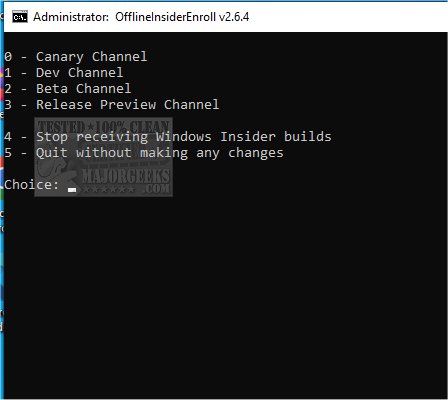
The release of OfflineInsiderEnroll version 2.6.6 introduces a command-line script that allows users to join the Windows Insider program without needing to log into a Microsoft account. This program is intended for advanced users keen on testing upcoming Windows features, and it is advised not to use it on primary computers. Instead, utilizing a virtual machine such as VMware Player is recommended for safety.
To use OfflineInsiderEnroll, users should extract the files from a portable ZIP archive, then right-click on the `OfflineInsiderEnroll.cmd` file and select "Run as administrator." Users can then choose from various options by pressing Enter, including enrolling in different channels (Canary, Dev, Beta, or Release Preview, which is the safest option) or stopping Insider builds altogether.
The script relies on an undocumented TestFlags registry value, which raises the possibility that it may become non-functional if Microsoft decides to close this loophole in the future. For those seeking further assistance, a video tutorial is available that guides users through the process.
Extensions to this information could include a detailed explanation of the differences between the Insider channels, tips on using virtual machines effectively for testing, and a discussion on the implications of participating in the Insider program, including potential risks and benefits. Additionally, users could be informed about the importance of backing up their data before testing pre-release software and other best practices for engaging with beta software safely
To use OfflineInsiderEnroll, users should extract the files from a portable ZIP archive, then right-click on the `OfflineInsiderEnroll.cmd` file and select "Run as administrator." Users can then choose from various options by pressing Enter, including enrolling in different channels (Canary, Dev, Beta, or Release Preview, which is the safest option) or stopping Insider builds altogether.
The script relies on an undocumented TestFlags registry value, which raises the possibility that it may become non-functional if Microsoft decides to close this loophole in the future. For those seeking further assistance, a video tutorial is available that guides users through the process.
Extensions to this information could include a detailed explanation of the differences between the Insider channels, tips on using virtual machines effectively for testing, and a discussion on the implications of participating in the Insider program, including potential risks and benefits. Additionally, users could be informed about the importance of backing up their data before testing pre-release software and other best practices for engaging with beta software safely
OfflineInsiderEnroll 2.6.6 released
OfflineInsiderEnroll is a (CMD) script to join the Windows Insider program without signing into your Microsoft account.