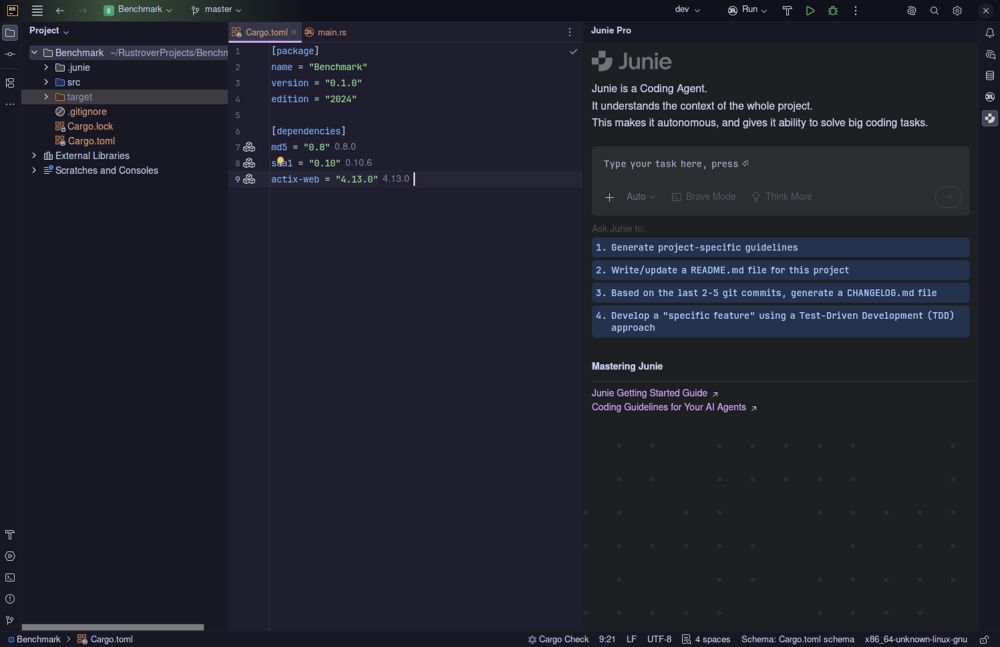
JetBrains has launched RustRover 2026.2, an integrated development environment (IDE) designed specifically for Rust programming. This new IDE aims to eliminate the tedious process of searching for plugins and configuring settings, as it comes fully equipped with all the necessary tools for writing, testing, and debugging Rust code right from the start. In this overview, we will delve into the features that set RustRover apart, its performance, and its implications for developers, especially those using it under a free non-commercial license.
Traditionally, developers often struggle with lightweight editors, spending significant time installing plugins for various functionalities such as linting, formatting, and version control integration. RustRover addresses these frustrations by providing comprehensive support for Cargo, TOML editing, remote development, and Docker management in its base installation. Users simply need to point the IDE at their Cargo.toml file, and the environment is ready to use, reducing setup time and enhancing productivity.
However, this convenience comes with potential trade-offs in terms of system performance. As JetBrains tools are typically feature-rich, they can consume a considerable amount of RAM, which may slow down older machines, particularly when indexing large projects. On more modern systems, RustRover performs smoothly, maintaining a responsive interface even during extensive refactoring.
RustRover incorporates advanced AI features that are both practical and intuitive. Developers can utilize various AI models such as Claude, GPT-4, and more, while maintaining transparency regarding costs and avoiding mandatory subscriptions. The IDE’s code completion is fast and contextually aware, making it a valuable tool for coding. For instance, it effectively inferred error handling patterns in a complex asynchronous networking crate, demonstrating a deep understanding of the code.
When it comes to integrating AI into the workflow, RustRover allows for in-editor suggestions and prompts, minimizing the need for context switching. This feature is particularly beneficial for tasks such as generating tests or explaining intricate macro expansions, where specialized models can be deployed for efficiency.
One of the standout features of RustRover is its real-time collaboration capabilities, making it easier for teams to work together across different time zones. The IDE allows for the sharing of project configurations, thereby simplifying collaboration on coding style and formatting preferences. Git integration is seamless, covering all aspects of version control without requiring additional extensions.
Moreover, RustRover enhances productivity through built-in database tools sourced from DataGrip. This integration simplifies schema exploration and query editing, allowing developers to manage Docker containers and troubleshoot database connections without the need to switch between multiple applications.
JetBrains offers RustRover for free for non-commercial use, which is advantageous for hobbyists, learners, and open-source contributors. However, any work related to paid employment or commercial development requires a paid license. This licensing structure opens up professional-grade Rust tooling for individuals and small teams who might otherwise be deterred by the costs of commercial software.
Pros:
- Zero configuration required for full Cargo, TOML, and debugging support.
- Native AI integration that comprehensively understands Rust-specific constructs.
- Built-in database client and Docker management reduce the need for multiple windows.
- Free license options for hobbyists and educational purposes.
Cons:
- High memory usage can hinder performance on older systems.
- Commercial use necessitates a separate paid license, which may impact budget-conscious teams.
- User interface may feel cluttered for those who prefer a minimalist setup.
- Limited plugin ecosystem compared to competitors like VS Code.
For developers seeking a polished and efficient Rust development experience, RustRover 2026.2 presents a compelling option. By minimizing setup friction and integrating useful features, it allows users to focus on code rather than configuration. Although there are some drawbacks, particularly concerning resource consumption and licensing for commercial work, the benefits of a streamlined workflow and advanced tools make RustRover a strong candidate for everyday Rust development. If you encounter any issues, user forums such as MajorGeeks can provide valuable support.
In summary, RustRover is positioned to empower Rust developers, enabling them to write code more effectively without the usual hurdles associated with setting up a new environment
Streamlined Setup and Functionality
Traditionally, developers often struggle with lightweight editors, spending significant time installing plugins for various functionalities such as linting, formatting, and version control integration. RustRover addresses these frustrations by providing comprehensive support for Cargo, TOML editing, remote development, and Docker management in its base installation. Users simply need to point the IDE at their Cargo.toml file, and the environment is ready to use, reducing setup time and enhancing productivity.
However, this convenience comes with potential trade-offs in terms of system performance. As JetBrains tools are typically feature-rich, they can consume a considerable amount of RAM, which may slow down older machines, particularly when indexing large projects. On more modern systems, RustRover performs smoothly, maintaining a responsive interface even during extensive refactoring.
AI Capabilities
RustRover incorporates advanced AI features that are both practical and intuitive. Developers can utilize various AI models such as Claude, GPT-4, and more, while maintaining transparency regarding costs and avoiding mandatory subscriptions. The IDE’s code completion is fast and contextually aware, making it a valuable tool for coding. For instance, it effectively inferred error handling patterns in a complex asynchronous networking crate, demonstrating a deep understanding of the code.
When it comes to integrating AI into the workflow, RustRover allows for in-editor suggestions and prompts, minimizing the need for context switching. This feature is particularly beneficial for tasks such as generating tests or explaining intricate macro expansions, where specialized models can be deployed for efficiency.
Collaborative Features and Database Management
One of the standout features of RustRover is its real-time collaboration capabilities, making it easier for teams to work together across different time zones. The IDE allows for the sharing of project configurations, thereby simplifying collaboration on coding style and formatting preferences. Git integration is seamless, covering all aspects of version control without requiring additional extensions.
Moreover, RustRover enhances productivity through built-in database tools sourced from DataGrip. This integration simplifies schema exploration and query editing, allowing developers to manage Docker containers and troubleshoot database connections without the need to switch between multiple applications.
Licensing and Cost Considerations
JetBrains offers RustRover for free for non-commercial use, which is advantageous for hobbyists, learners, and open-source contributors. However, any work related to paid employment or commercial development requires a paid license. This licensing structure opens up professional-grade Rust tooling for individuals and small teams who might otherwise be deterred by the costs of commercial software.
Quick Pros and Cons
Pros:
- Zero configuration required for full Cargo, TOML, and debugging support.
- Native AI integration that comprehensively understands Rust-specific constructs.
- Built-in database client and Docker management reduce the need for multiple windows.
- Free license options for hobbyists and educational purposes.
Cons:
- High memory usage can hinder performance on older systems.
- Commercial use necessitates a separate paid license, which may impact budget-conscious teams.
- User interface may feel cluttered for those who prefer a minimalist setup.
- Limited plugin ecosystem compared to competitors like VS Code.
Conclusion
For developers seeking a polished and efficient Rust development experience, RustRover 2026.2 presents a compelling option. By minimizing setup friction and integrating useful features, it allows users to focus on code rather than configuration. Although there are some drawbacks, particularly concerning resource consumption and licensing for commercial work, the benefits of a streamlined workflow and advanced tools make RustRover a strong candidate for everyday Rust development. If you encounter any issues, user forums such as MajorGeeks can provide valuable support.
In summary, RustRover is positioned to empower Rust developers, enabling them to write code more effectively without the usual hurdles associated with setting up a new environment
RustRover 2026.2 released
RustRover drops the plugin hunting and config headaches by shipping with everything needed to write, test, and debug Rust code right out of the box.