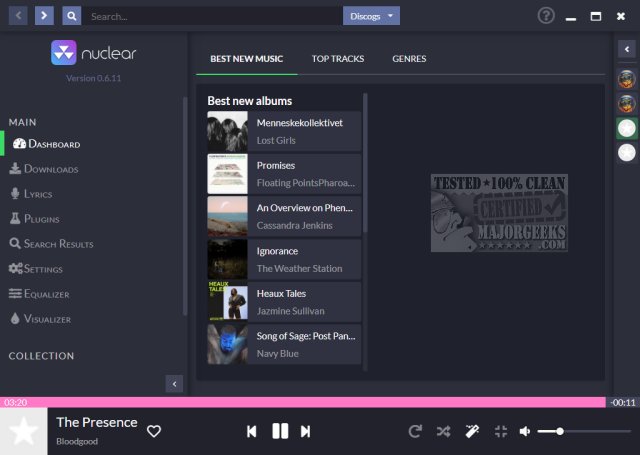
The recently released version 1.40.1 of Nuclear Music Player provides users with a powerful, open-source platform for streaming, downloading, and discovering music across Windows and Linux operating systems. This application stands out for its ad-free experience and lack of subscription fees, making it an appealing alternative to mainstream services like Spotify, iTunes, and YouTube Music.
Key Features and Functionality
Nuclear Music Player offers a streamlined interface that allows users to connect to various public music sources such as YouTube, SoundCloud, and Jamendo. Users can easily navigate curated playlists, explore genres, and utilize a central search bar to find specific songs, albums, or artists. A notable feature is its ability to suggest similar tracks, enhancing the music discovery experience reminiscent of old-school platforms like Napster. However, it's important to note that the addition of similar tracks to the queue is done one at a time, which may not suit everyone's playlist preferences.
Downloading Music
Users can download tracks in WEBM format with a simple right-click, enabling offline listening. While the app operates within legal boundaries—being open-source and not hosting music itself—caution is advised when downloading copyrighted material, as it may violate local copyright laws or platform terms. The recommendation is to stick to streaming or download royalty-free music from platforms like Jamendo.
Pros and Cons
Pros:
- Completely free and open-source, with no ads or tracking
- Facilitates music discovery through auto-suggestions
- Supports offline downloads (WEBM format)
- Available on multiple platforms: Windows, Mac, and Linux
- User-friendly, minimalist design
Cons:
- Only allows WEBM downloads, necessitating conversion for other formats like MP3
- Lack of individual management for similar tracks in the queue
- Dependency on third-party sources, which may affect availability
- Potential legal issues with downloading from certain platforms
Conclusion
Overall, Nuclear Music Player is an excellent choice for users who prioritize privacy and seek a straightforward music streaming experience devoid of intrusive ads. It efficiently combines essential features with a clean interface, making it easy for users to enjoy their favorite music while discovering new tracks. As a versatile addition to any music toolkit, it serves as a compelling option for those looking to explore music from public sources. However, users should remain vigilant about the legalities surrounding music downloads to avoid potential complications.
Looking Ahead
Future updates could enhance Nuclear Music Player's appeal by introducing options for managing similar tracks, broader file format support for downloads, and improved integration with additional music platforms. With the growing demand for privacy-focused applications, Nuclear is well-positioned to attract a dedicated user base
Key Features and Functionality
Nuclear Music Player offers a streamlined interface that allows users to connect to various public music sources such as YouTube, SoundCloud, and Jamendo. Users can easily navigate curated playlists, explore genres, and utilize a central search bar to find specific songs, albums, or artists. A notable feature is its ability to suggest similar tracks, enhancing the music discovery experience reminiscent of old-school platforms like Napster. However, it's important to note that the addition of similar tracks to the queue is done one at a time, which may not suit everyone's playlist preferences.
Downloading Music
Users can download tracks in WEBM format with a simple right-click, enabling offline listening. While the app operates within legal boundaries—being open-source and not hosting music itself—caution is advised when downloading copyrighted material, as it may violate local copyright laws or platform terms. The recommendation is to stick to streaming or download royalty-free music from platforms like Jamendo.
Pros and Cons
Pros:
- Completely free and open-source, with no ads or tracking
- Facilitates music discovery through auto-suggestions
- Supports offline downloads (WEBM format)
- Available on multiple platforms: Windows, Mac, and Linux
- User-friendly, minimalist design
Cons:
- Only allows WEBM downloads, necessitating conversion for other formats like MP3
- Lack of individual management for similar tracks in the queue
- Dependency on third-party sources, which may affect availability
- Potential legal issues with downloading from certain platforms
Conclusion
Overall, Nuclear Music Player is an excellent choice for users who prioritize privacy and seek a straightforward music streaming experience devoid of intrusive ads. It efficiently combines essential features with a clean interface, making it easy for users to enjoy their favorite music while discovering new tracks. As a versatile addition to any music toolkit, it serves as a compelling option for those looking to explore music from public sources. However, users should remain vigilant about the legalities surrounding music downloads to avoid potential complications.
Looking Ahead
Future updates could enhance Nuclear Music Player's appeal by introducing options for managing similar tracks, broader file format support for downloads, and improved integration with additional music platforms. With the growing demand for privacy-focused applications, Nuclear is well-positioned to attract a dedicated user base
Nuclear Music Player 1.40.1 released
Nuclear Music Player can find, download, and play your favorite music from one intuitive app in Windows or Linux.