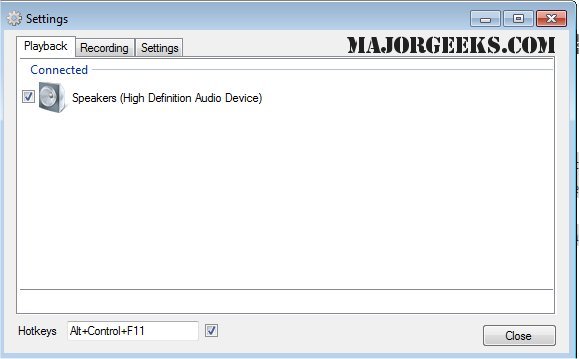
SoundSwitch is a utility that simplifies the process of switching between various audio playback devices connected to your Windows machine using customizable hotkeys. This tool addresses a common frustration for users with multiple audio outputs—such as speakers, headphones, and USB DACs—by allowing quick toggling without the need to navigate through cumbersome menus.
Upon installation, SoundSwitch places a small icon in the system tray. Users can configure their preferences by right-clicking the icon, where they can select a hotkey (default is Ctrl+Alt+F11) and choose which playback devices to include in the switching rotation. This ensures that only selected devices are cycled through, preventing accidental switches to undesired outputs, like a computer monitor's inferior speakers.
Once set up, SoundSwitch operates quietly in the background, enabling users to switch audio devices instantly with a simple hotkey press. A notification appears to confirm the active device, streamlining the process for various scenarios:
- Headphones vs. Speakers: Switching between these without accessing the volume mixer.
- Streaming or Gaming: Easily toggling to a capture card or audio interface.
- Remote Work: Adjusting between headset and speakers based on meeting requirements or music listening.
- Bluetooth Audio: Quickly resolving issues when Bluetooth devices revert to "hands-free mode."
Pros and Cons
Pros:
- Free and open-source (GPL 3.0)
- Hotkey-based switching reduces repetitive clicks
- Lightweight and unobtrusive
- Simple to set up and use
Cons:
- Lacks built-in audio profiles or per-application routing
- Windows-only compatibility (no support for macOS or Linux)
- Limited to playback and recording switches, lacking full audio management features
Geek Verdict
SoundSwitch is a practical tool that fills a gap in Windows' native functionality, offering a straightforward solution for users managing multiple audio outputs. Whether you're frequently switching between different devices during gaming, streaming, or remote work, SoundSwitch enhances your audio experience without consuming system resources or complicating your workflow.
Potential Extensions
In addition to its current functionality, future updates could consider adding features such as audio profiles tailored for different scenarios (e.g., gaming, meetings, music). This would allow users to save their preferred settings, enhancing the overall user experience. Furthermore, expanding compatibility to macOS and Linux could broaden its user base significantly. Integrating advanced features like per-application audio routing would also cater to power users looking for more control over their audio environments. Overall, SoundSwitch is a valuable tool for anyone looking to streamline audio management on Windows, and with thoughtful enhancements, it could become an even more indispensable utility
Upon installation, SoundSwitch places a small icon in the system tray. Users can configure their preferences by right-clicking the icon, where they can select a hotkey (default is Ctrl+Alt+F11) and choose which playback devices to include in the switching rotation. This ensures that only selected devices are cycled through, preventing accidental switches to undesired outputs, like a computer monitor's inferior speakers.
Once set up, SoundSwitch operates quietly in the background, enabling users to switch audio devices instantly with a simple hotkey press. A notification appears to confirm the active device, streamlining the process for various scenarios:
- Headphones vs. Speakers: Switching between these without accessing the volume mixer.
- Streaming or Gaming: Easily toggling to a capture card or audio interface.
- Remote Work: Adjusting between headset and speakers based on meeting requirements or music listening.
- Bluetooth Audio: Quickly resolving issues when Bluetooth devices revert to "hands-free mode."
Pros and Cons
Pros:
- Free and open-source (GPL 3.0)
- Hotkey-based switching reduces repetitive clicks
- Lightweight and unobtrusive
- Simple to set up and use
Cons:
- Lacks built-in audio profiles or per-application routing
- Windows-only compatibility (no support for macOS or Linux)
- Limited to playback and recording switches, lacking full audio management features
Geek Verdict
SoundSwitch is a practical tool that fills a gap in Windows' native functionality, offering a straightforward solution for users managing multiple audio outputs. Whether you're frequently switching between different devices during gaming, streaming, or remote work, SoundSwitch enhances your audio experience without consuming system resources or complicating your workflow.
Potential Extensions
In addition to its current functionality, future updates could consider adding features such as audio profiles tailored for different scenarios (e.g., gaming, meetings, music). This would allow users to save their preferred settings, enhancing the overall user experience. Furthermore, expanding compatibility to macOS and Linux could broaden its user base significantly. Integrating advanced features like per-application audio routing would also cater to power users looking for more control over their audio environments. Overall, SoundSwitch is a valuable tool for anyone looking to streamline audio management on Windows, and with thoughtful enhancements, it could become an even more indispensable utility
SoundSwitch 7.1.1 Beta 1 / 7.1.0 released
SoundSwitch allows you to easily switch between the different playback devices currently connected to your machine via hotkeys.