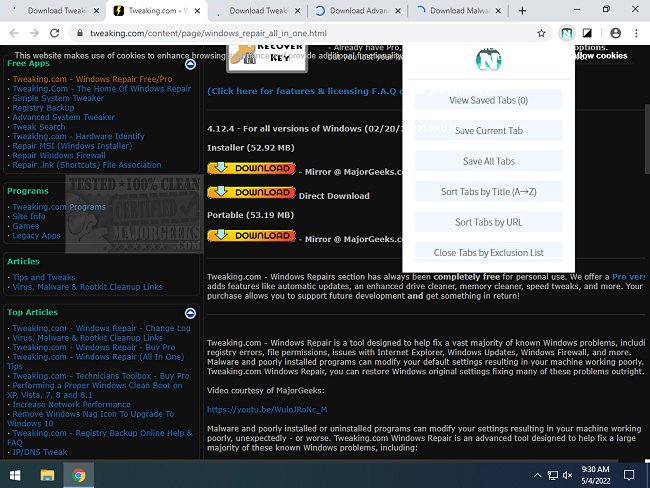
NimoTab for Chrome has released its version 2.17.3, enhancing the user experience in organizing and managing browser tabs to maintain a clean browsing session. As users often find themselves overwhelmed with multiple open tabs, NimoTab is designed to streamline this process by allowing users to save their open tabs to a user-friendly landing page. This page provides essential details about each tab, enabling users to easily recover, save, or delete tabs while also displaying the date each tab was saved.
Key features of NimoTab include the ability to sort and organize tabs, search through saved tabs, filter them by date or domain, and group similar tabs together. Users can also manage their tabs effectively with sorting options based on session, time, or count. Additionally, NimoTab includes an exclusion list for screening out certain tabs, a window manager for switching between tabs, and backup/restore functionalities for saved tabs. For those who prefer a darker interface, a dark mode theme is also available.
Overall, NimoTab aims to provide a clutter-free browsing experience for users of all skill levels, making tab management efficient and less time-consuming.
In future developments, NimoTab could consider integrating features such as cloud storage options for saved tabs, allowing users to access their saved sessions across multiple devices. Additionally, incorporating collaborative features for sharing tab collections with others or adding reminders for tab recovery could further enhance its utility. These improvements would not only cater to individual users but also to teams and collaborative work environments, making NimoTab an indispensable tool for both personal and professional browsing
Key features of NimoTab include the ability to sort and organize tabs, search through saved tabs, filter them by date or domain, and group similar tabs together. Users can also manage their tabs effectively with sorting options based on session, time, or count. Additionally, NimoTab includes an exclusion list for screening out certain tabs, a window manager for switching between tabs, and backup/restore functionalities for saved tabs. For those who prefer a darker interface, a dark mode theme is also available.
Overall, NimoTab aims to provide a clutter-free browsing experience for users of all skill levels, making tab management efficient and less time-consuming.
In future developments, NimoTab could consider integrating features such as cloud storage options for saved tabs, allowing users to access their saved sessions across multiple devices. Additionally, incorporating collaborative features for sharing tab collections with others or adding reminders for tab recovery could further enhance its utility. These improvements would not only cater to individual users but also to teams and collaborative work environments, making NimoTab an indispensable tool for both personal and professional browsing
NimoTab For Chrome 2.17.3 released
NimoTab for Chrome helps to organize and manage your tabs keeping your browsing session clean.