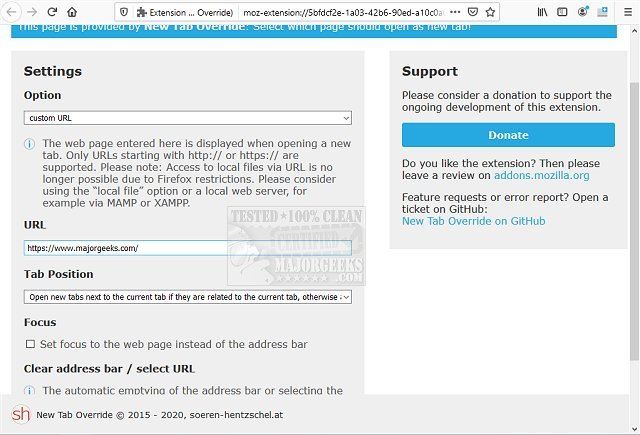
The New Tab Override add-on for Firefox version 18.0.0 has been released, providing users with the ability to set a specific page for every new tab that opens. This tool was developed in response to Mozilla's decision to remove the option for users to customize their new tab page starting with Firefox version 41.x, making it a valuable resource for those who prefer to maintain control over their browsing experience.
With New Tab Override, users can choose any website as their new tab page and even use their current homepage if desired. The add-on also offers customization options, such as the ability to change the background color of the new tab page. Additionally, it can store a local HTML file that can be displayed when a new tab is opened. Importantly, the add-on ensures that URLs entered are properly formatted by automatically adding "http://" if it is missing.
The configuration of New Tab Override is user-friendly, and it is part of an actively maintained project, meaning that users can expect regular updates and new features to enhance their browsing experience.
In summary, New Tab Override is a versatile tool for Firefox users looking to regain the ability to personalize their new tab pages, making it a significant addition to the browser's functionality. As web browsing continues to evolve, such extensions will likely play a crucial role in enhancing user experience by providing greater customization options. Future developments may include even more features, such as integration with bookmarks or improved synchronization across devices, further empowering users to tailor their online experience
With New Tab Override, users can choose any website as their new tab page and even use their current homepage if desired. The add-on also offers customization options, such as the ability to change the background color of the new tab page. Additionally, it can store a local HTML file that can be displayed when a new tab is opened. Importantly, the add-on ensures that URLs entered are properly formatted by automatically adding "http://" if it is missing.
The configuration of New Tab Override is user-friendly, and it is part of an actively maintained project, meaning that users can expect regular updates and new features to enhance their browsing experience.
In summary, New Tab Override is a versatile tool for Firefox users looking to regain the ability to personalize their new tab pages, making it a significant addition to the browser's functionality. As web browsing continues to evolve, such extensions will likely play a crucial role in enhancing user experience by providing greater customization options. Future developments may include even more features, such as integration with bookmarks or improved synchronization across devices, further empowering users to tailor their online experience
New Tab Override for Firefox 18.0.0 released
New Tab Override for Firefox is a tab add-on designed to permit you to set a specific page for every new tab opened.