Intel has released version 26.2.0.7 of its Intel Driver & Support Assistant (Intel DSA), a tool designed to simplify the process of keeping your Intel hardware drivers up-to-date. This application quickly scans your system for the latest drivers, ensuring optimal performance and stability for your devices, whether you're using an Intel NUC, a traditional PC, or other Intel-powered hardware.
1. Effortless Driver Identification: The enhanced detection engine scans your system to identify all relevant drivers, including graphics, audio, and networking, with speed and accuracy.
2. Web-Based Interface: Intel DSA operates directly from Intel’s support website, offering a streamlined experience for scanning, updating, and accessing additional support resources.
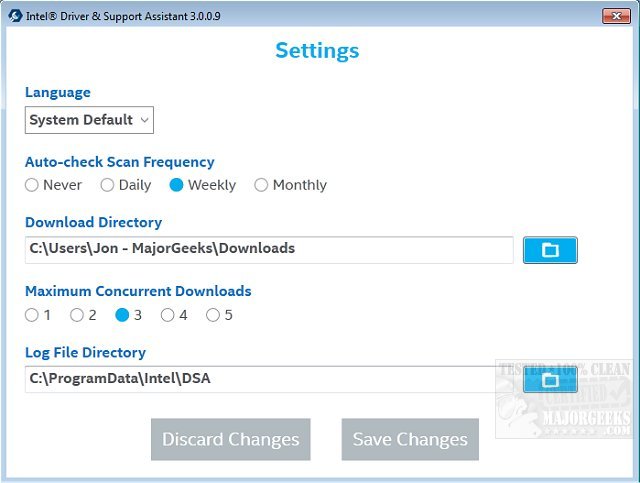
3. Customizable Scanning Options: Users can choose between automatic scans at set intervals or manual scans whenever needed, keeping their systems up-to-date without hassle.
4. Broad Hardware Support: The tool supports various Intel products, including graphics drivers, networking, NUCs, and chipsets, making it a versatile solution for multiple Intel devices.
The Intel DSA transforms the often tedious task of driver updates into a simple, automated process, effectively addressing common issues like system crashes or connectivity problems by ensuring that drivers are current. It saves users time and effort, allowing them to focus on other tasks such as gaming or working without the interruption of driver-related problems.
To start using Intel DSA, simply download and install it from Intel's website. After installation, launch the application to conduct a thorough scan of your system, review available updates, and install them with ease. This intuitive process allows users to optimize their PCs effortlessly.
While Intel DSA is excellent for systems with Intel hardware, it is not designed to update drivers for non-Intel components, which may require additional management tools. It also necessitates an internet connection and may occasionally suggest updates that are not directly compatible with your specific PC model, so checking with the manufacturer's recommendations is advised.
The Intel Driver & Support Assistant is an essential tool for anyone using Intel hardware, offering a no-fuss solution to driver management. Its user-friendly interface and comprehensive features make it an indispensable companion for tech enthusiasts and casual users alike. With the added benefit of being free, it’s a smart choice for optimizing your Intel-powered system.
As technology evolves, the importance of keeping drivers updated cannot be overstated. This ensures not only enhanced performance but also security against vulnerabilities that outdated drivers may present. Intel DSA stands out in a crowded utility market by providing a focused solution for Intel products. As more users integrate smart devices and IoT into their daily lives, tools like Intel DSA will play a critical role in maintaining the integrity and efficiency of their tech ecosystem. Additionally, as Intel continues to innovate and expand its product offerings, future updates to DSA may include even broader support and enhanced functionalities, making it an essential tool for both current and future Intel users
Key Features of Intel DSA:
1. Effortless Driver Identification: The enhanced detection engine scans your system to identify all relevant drivers, including graphics, audio, and networking, with speed and accuracy.
2. Web-Based Interface: Intel DSA operates directly from Intel’s support website, offering a streamlined experience for scanning, updating, and accessing additional support resources.
3. Customizable Scanning Options: Users can choose between automatic scans at set intervals or manual scans whenever needed, keeping their systems up-to-date without hassle.
4. Broad Hardware Support: The tool supports various Intel products, including graphics drivers, networking, NUCs, and chipsets, making it a versatile solution for multiple Intel devices.
Benefits of Using Intel DSA:
The Intel DSA transforms the often tedious task of driver updates into a simple, automated process, effectively addressing common issues like system crashes or connectivity problems by ensuring that drivers are current. It saves users time and effort, allowing them to focus on other tasks such as gaming or working without the interruption of driver-related problems.
Getting Started:
To start using Intel DSA, simply download and install it from Intel's website. After installation, launch the application to conduct a thorough scan of your system, review available updates, and install them with ease. This intuitive process allows users to optimize their PCs effortlessly.
Considerations:
While Intel DSA is excellent for systems with Intel hardware, it is not designed to update drivers for non-Intel components, which may require additional management tools. It also necessitates an internet connection and may occasionally suggest updates that are not directly compatible with your specific PC model, so checking with the manufacturer's recommendations is advised.
Conclusion:
The Intel Driver & Support Assistant is an essential tool for anyone using Intel hardware, offering a no-fuss solution to driver management. Its user-friendly interface and comprehensive features make it an indispensable companion for tech enthusiasts and casual users alike. With the added benefit of being free, it’s a smart choice for optimizing your Intel-powered system.
Extended Thoughts:
As technology evolves, the importance of keeping drivers updated cannot be overstated. This ensures not only enhanced performance but also security against vulnerabilities that outdated drivers may present. Intel DSA stands out in a crowded utility market by providing a focused solution for Intel products. As more users integrate smart devices and IoT into their daily lives, tools like Intel DSA will play a critical role in maintaining the integrity and efficiency of their tech ecosystem. Additionally, as Intel continues to innovate and expand its product offerings, future updates to DSA may include even broader support and enhanced functionalities, making it an essential tool for both current and future Intel users
Intel Driver and Support Assistant 26.2.0.7 released
Intel Driver & Support Assistant quickly scans your machine for the latest up-to-date drivers currently available from Intel.
Intel Driver and Support Assistant 26.2.0.7 released @ MajorGeeks