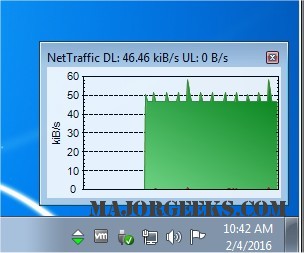
NetTraffic version 1.71.1 has been released, offering a user-friendly and efficient solution for monitoring real-time network traffic through TCP/IP network adapters. This lightweight application provides users with a comprehensive overview of data being sent and received, showcasing this information through easy-to-read graphs and statistical data.
NetTraffic actively tracks bandwidth usage on selected interfaces and presents the data in both graphical and numeric formats. It includes features such as a taskbar icon that indicates activity, a statistical module, and tracking of computer work time. Additionally, it offers predictive insights based on historical data and allows users to review archived traffic data.
Designed for simplicity, NetTraffic caters to users of all skill levels, enabling anyone to monitor their network traffic effortlessly. However, it also includes advanced options that appeal to network administrators and IT professionals, making it a versatile tool for a wide range of users.
In the context of similar tools and resources, users may find interest in related topics such as managing internet upload and download indicators on the taskbar, assessing network adapter speeds in Windows 10 and 11, utilizing the Ping command, understanding Windows Auto-Tuning features, resetting network settings, and adjusting the preferred band for wireless network adapters.
Overall, NetTraffic stands out as a practical application for both casual users and IT experts, facilitating effective network management and analysis. Future updates could enhance its functionality by integrating features such as customizable alerts for unusual traffic patterns or expanded compatibility with additional operating systems and devices
NetTraffic actively tracks bandwidth usage on selected interfaces and presents the data in both graphical and numeric formats. It includes features such as a taskbar icon that indicates activity, a statistical module, and tracking of computer work time. Additionally, it offers predictive insights based on historical data and allows users to review archived traffic data.
Designed for simplicity, NetTraffic caters to users of all skill levels, enabling anyone to monitor their network traffic effortlessly. However, it also includes advanced options that appeal to network administrators and IT professionals, making it a versatile tool for a wide range of users.
In the context of similar tools and resources, users may find interest in related topics such as managing internet upload and download indicators on the taskbar, assessing network adapter speeds in Windows 10 and 11, utilizing the Ping command, understanding Windows Auto-Tuning features, resetting network settings, and adjusting the preferred band for wireless network adapters.
Overall, NetTraffic stands out as a practical application for both casual users and IT experts, facilitating effective network management and analysis. Future updates could enhance its functionality by integrating features such as customizable alerts for unusual traffic patterns or expanded compatibility with additional operating systems and devices
NetTraffic 1.71.1 released
NetTraffic is a lightweight program for plotting all real-time data sent and received via your TCP/IP Network adaptors.