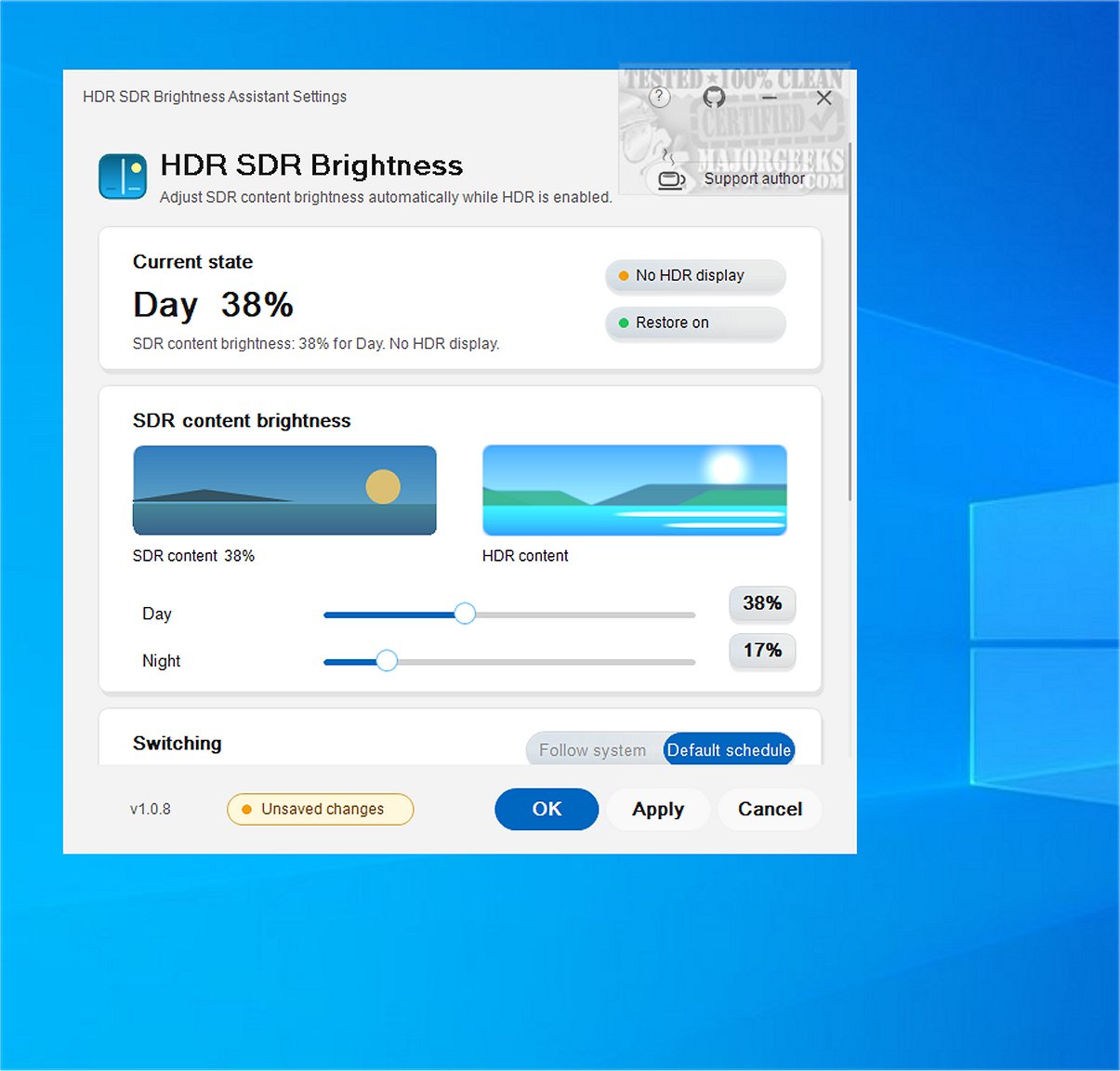
The latest version of HDR SDR Brightness, a compact utility for Windows, has been released. This tool is specifically designed to help users maintain consistent brightness for Standard Dynamic Range (SDR) content when High Dynamic Range (HDR) is activated in Windows. By managing brightness adjustments effectively, it enhances the overall viewing experience, particularly for users with OLED, QD-OLED, MiniLED displays, and HDR-capable monitors, TVs, and laptops.
Key Features:
1. Brightness Management for SDR Content: HDR SDR Brightness addresses the common issue where SDR applications may appear overly bright, too dim, or lack color vibrancy when HDR is enabled. This tool ensures that users can enjoy a more predictable and visually satisfying experience.
2. Windows Night Light Synchronization: The application allows users to set different brightness levels for SDR content during the day and night, with the added feature of syncing with Windows Night Light settings. This means that when users manually adjust their Night Light settings, the tool will automatically adapt the SDR brightness to match their preferences.
3. System Tray Functionality: HDR SDR Brightness runs discreetly from the Windows system tray, allowing for easy access and management without cluttering the desktop. It also adapts its interface to match the light or dark theme of Windows, providing a seamless user experience. Additionally, users can preview SDR and HDR settings in real-time within the application for quick adjustments.
4. Availability and Pricing: The HDR SDR Brightness Assistant is available as a paid application in the Microsoft Store, which includes a limited-time free trial. The app is user-friendly with no in-app purchases, donations, subscriptions, or unlock codes required. It does not install any additional drivers or software, and all settings are stored locally for the current user, eliminating the need for account creation.
Conclusion:
Overall, HDR SDR Brightness is a valuable tool for Windows users looking to enhance their viewing experience when switching between SDR and HDR content. By maintaining consistent brightness levels and providing synchronization with Windows settings, this lightweight application ensures a balanced and enjoyable viewing experience. With the release of version 1.0.9, users can expect improved functionality and a user-friendly interface to manage their display settings efficiently
Key Features:
1. Brightness Management for SDR Content: HDR SDR Brightness addresses the common issue where SDR applications may appear overly bright, too dim, or lack color vibrancy when HDR is enabled. This tool ensures that users can enjoy a more predictable and visually satisfying experience.
2. Windows Night Light Synchronization: The application allows users to set different brightness levels for SDR content during the day and night, with the added feature of syncing with Windows Night Light settings. This means that when users manually adjust their Night Light settings, the tool will automatically adapt the SDR brightness to match their preferences.
3. System Tray Functionality: HDR SDR Brightness runs discreetly from the Windows system tray, allowing for easy access and management without cluttering the desktop. It also adapts its interface to match the light or dark theme of Windows, providing a seamless user experience. Additionally, users can preview SDR and HDR settings in real-time within the application for quick adjustments.
4. Availability and Pricing: The HDR SDR Brightness Assistant is available as a paid application in the Microsoft Store, which includes a limited-time free trial. The app is user-friendly with no in-app purchases, donations, subscriptions, or unlock codes required. It does not install any additional drivers or software, and all settings are stored locally for the current user, eliminating the need for account creation.
Conclusion:
Overall, HDR SDR Brightness is a valuable tool for Windows users looking to enhance their viewing experience when switching between SDR and HDR content. By maintaining consistent brightness levels and providing synchronization with Windows settings, this lightweight application ensures a balanced and enjoyable viewing experience. With the release of version 1.0.9, users can expect improved functionality and a user-friendly interface to manage their display settings efficiently
HDR SDR Brightness 1.0.9 released
HDR SDR Brightness is a lightweight tool that resides in the Windows system tray. It is designed to help you maintain consistent brightness levels for SDR (Standard Dynamic Range) content when HDR (High Dynamic Range) is enabled in Windows. This tool ensures a more predictable viewing experience by effectively managing brightness adjustments.