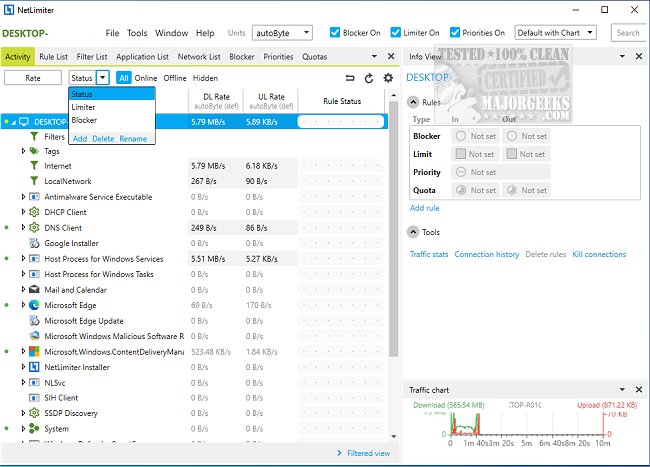
NetLimiter has released version 5.3.28.0, an advanced internet traffic control and monitoring software. This tool allows users to effectively manage their internet bandwidth by setting specific download and upload limits for individual applications, connections, or groups. This enables efficient distribution of bandwidth across all applications running on a PC.
NetLimiter is available in three variants: Pro, Lite, and Freeware Monitor. Key features include:
- Network Monitor: Displays a comprehensive list of applications connected to the network, along with details about connections and transfer rates.
- Bandwidth Limiter/ Shaper: Users can impose download and upload limits to control bandwidth usage effectively.
- Statistical Tool: Tracks internet traffic history since the software installation, providing insights into usage patterns.
- Additional Network Information: Offers WHOIS lookups, traceroute details, and more for enhanced network management.
- Advanced Features: Includes a Rule Scheduler, Remote Administration, Connection Blocker, user rights management, charting, an advanced rule editor, and zone-based traffic management.
In addition to these features, users may find similar guides and articles helpful, such as how to display internet usage statistics on the taskbar or how to check network adapter speeds in Windows 10 and 11.
As the demand for efficient internet management continues to grow, tools like NetLimiter offer essential functionalities for both personal and professional users. The ability to monitor, control, and analyze internet traffic not only enhances user experience but also aids in optimizing network performance, ensuring that critical applications receive the necessary bandwidth while preventing congestion. This makes NetLimiter a valuable asset for anyone looking to take control of their internet usage
NetLimiter is available in three variants: Pro, Lite, and Freeware Monitor. Key features include:
- Network Monitor: Displays a comprehensive list of applications connected to the network, along with details about connections and transfer rates.
- Bandwidth Limiter/ Shaper: Users can impose download and upload limits to control bandwidth usage effectively.
- Statistical Tool: Tracks internet traffic history since the software installation, providing insights into usage patterns.
- Additional Network Information: Offers WHOIS lookups, traceroute details, and more for enhanced network management.
- Advanced Features: Includes a Rule Scheduler, Remote Administration, Connection Blocker, user rights management, charting, an advanced rule editor, and zone-based traffic management.
In addition to these features, users may find similar guides and articles helpful, such as how to display internet usage statistics on the taskbar or how to check network adapter speeds in Windows 10 and 11.
As the demand for efficient internet management continues to grow, tools like NetLimiter offer essential functionalities for both personal and professional users. The ability to monitor, control, and analyze internet traffic not only enhances user experience but also aids in optimizing network performance, ensuring that critical applications receive the necessary bandwidth while preventing congestion. This makes NetLimiter a valuable asset for anyone looking to take control of their internet usage
NetLimiter 5.3.28.0 released
NetLimiter is an internet traffic control and monitoring tool.